Once you take Compose beyond Android, navigation stops being a solved problem. Here's a practical look at your options.
The problem
If you're an Android developer exploring Compose Multiplatform, navigation is one of the first things that stops feeling familiar.
On Android, you probably use Jetpack Navigation Compose. You define a NavHost, pass in a NavController, declare your routes, and move on. It's not perfect, but it's well-documented, widely adopted, and it handles the lifecycle and back stack complexities that Android throws at you. You don't think about it much.
Then you start a Compose Multiplatform project targeting iOS and desktop alongside Android, and the question surfaces immediately: does my navigation library even work here?
The answer depends on which library you're using, but the deeper issue is that "works here" means something different on each platform. Android has its system back button, activity recreation, and process death. iOS has swipe-to-go-back gestures and its own navigation controller expectations. Desktop has keyboard shortcuts and window management. Web has browser history and URL routing. A navigation library for Compose Multiplatform has to handle all of this, or at least not fight against it.
This creates a genuinely interesting design space. Some libraries wrap the official Android solution and extend it to other platforms. Some throw out Android's assumptions entirely and build from scratch. Some treat navigation as a thin routing layer. Others treat it as the backbone of your entire architecture.
This post walks through four libraries that represent those different philosophies: the official Compose Navigation (now multiplatform), Decompose, Voyager, and Circuit. For each, we'll look at how you define screens, how you navigate between them, and what trade-offs you're signing up for. The goal isn't to crown a winner but to give you enough context to make an informed choice for your project.
The options
Here's where things stand as of early 2026:
| Library | Latest version | Approach | Maintained by |
|---|
| Compose Navigation | 2.9.x (stable) | NavHost + NavController | Google / JetBrains |
| Decompose | 3.x (stable) | Component-based, lifecycle-aware | Arkadii Ivanov |
| Voyager | 1.1.0-beta03 | Screen-based, Compose-first | Adriel Cafe |
| Circuit | 0.x (pre-1.0) | Presenter/UI pattern | Slack |
Each makes fundamentally different assumptions about what navigation should be responsible for.
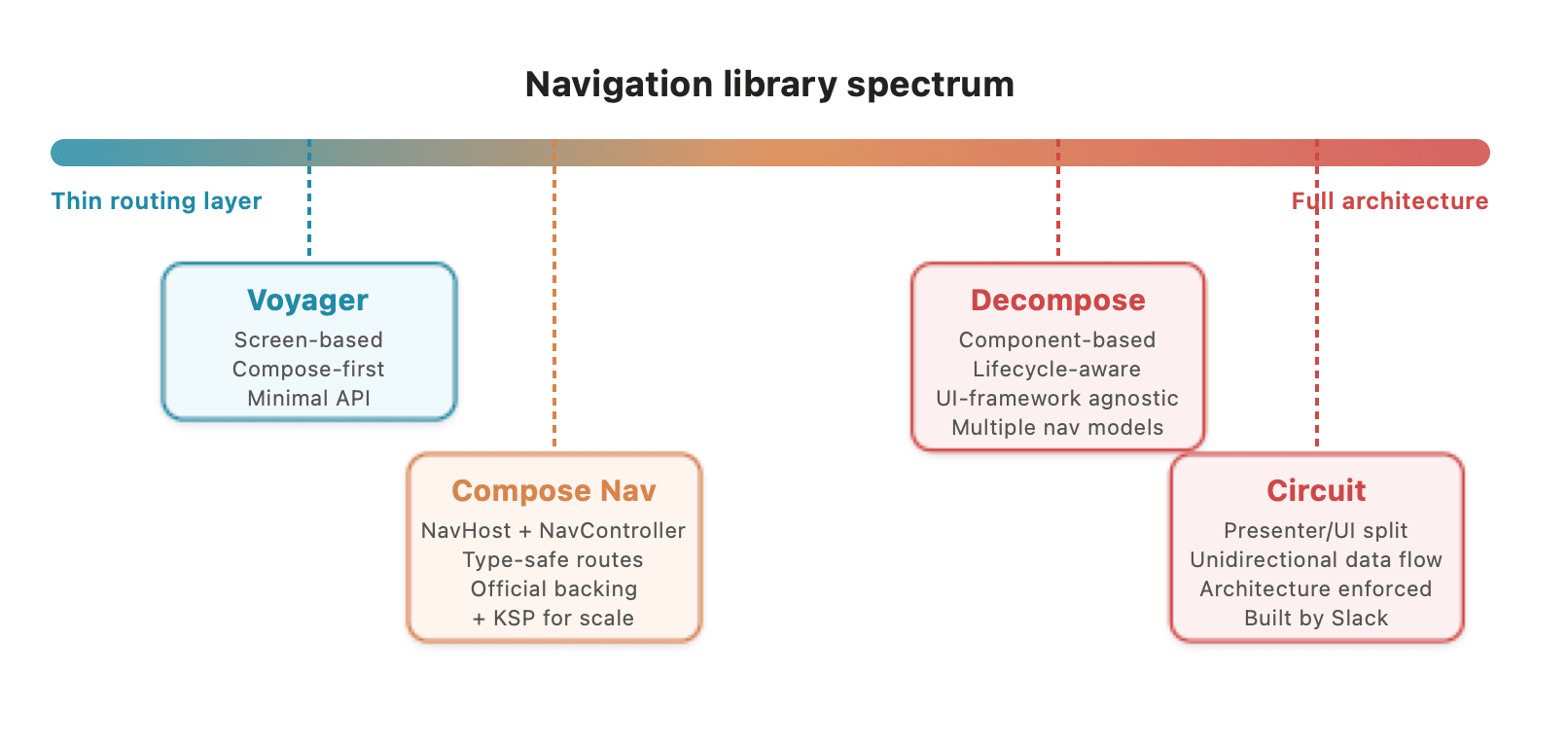
Navigation libraries in Compose Multiplatform range from thin routing layers to full architecture frameworks.
Official Compose Navigation
The familiar choice
If you've written Jetpack Navigation Compose on Android, this is the path of least resistance. JetBrains maintains multiplatform support for the AndroidX Navigation library, so the API you already know works across Android, iOS, desktop, and web. On Android your app pulls in the original AndroidX artifact; on other platforms it uses JetBrains-built equivalents under the same package.
The multiplatform artifact lives at org.jetbrains.androidx.navigation:navigation-compose.
Defining destinations
Routes are Kotlin classes annotated with @Serializable. If you've been using the older string-based route API on Android, this is a significant improvement: routes are now type-safe, and the arguments are just constructor parameters.
@Serializable
object Home

@Serializable
data class Profile(val userId: String)

@Serializable
data class Settings(val section: String? = null)
Setting up navigation
The setup looks almost identical to what you'd write on Android:
@Composable
fun App() {
    val navController = rememberNavController()

    NavHost(navController = navController, startDestination = Home) {
        composable<Home> {
            HomeScreen(
                onProfileClick = { userId ->
                    navController.navigate(Profile(userId))
                }
            )
        }
        composable<Profile> { backStackEntry ->
            val profile: Profile = backStackEntry.toRoute()
            ProfileScreen(
                userId = profile.userId,
                onSettingsClick = {
                    navController.navigate(Settings(section = "notifications"))
                }
            )
        }
        composable<Settings> { backStackEntry ->
            val settings: Settings = backStackEntry.toRoute()
            SettingsScreen(section = settings.section)
        }
    }
}
The NavController manages the back stack. You navigate forward with navigate(), go back with popBackStack(), and control stack behavior with popUpTo and launchSingleTop the same way you would on Android.
What you get for free
The multiplatform version handles platform-specific back gestures automatically. iOS swipe-to-go-back works out of the box. Desktop respects the Escape key. Android's system back button behaves as expected. State saving across navigation events is automatic, and deep linking is supported through the same URI association API.
Custom transition animations work across platforms:
composable<Profile>(
enterTransition = { slideInHorizontally(initialOffsetX = { it }) },
exitTransition = { slideOutHorizontally(targetOffsetX = { -it }) }
) { backStackEntry ->
}
What to watch for
The biggest adjustment for Android developers is recognizing that this library was designed Android-first. Concepts like SavedStateHandle and the deep linking model map directly to Android's Intent system. On iOS and desktop these work, but they're emulated rather than native. If your app needs deep integration with platform-specific navigation patterns (like iOS's UINavigationController or split-view on iPad), you'll be working around the abstraction rather than with it.
There's also Navigation 3, a ground-up redesign that reached stable (1.0.0) in November 2025 and is now at 1.0.1, with 1.1.0-rc01 already in progress. It flips the ownership model: instead of the library managing the back stack, you own a SnapshotStateList directly and the library renders it. Nav3 is fully multiplatform, covering Android, iOS, desktop, and web. If you're starting a new project today, it's worth evaluating alongside the current Compose Navigation - it's production-ready and under active development.
Trade-offs
Strengths: familiar API for Android developers, official backing from Google and JetBrains, type-safe routes, automatic platform back gesture handling, active development.
Weaknesses: Android-centric design assumptions that don't always map cleanly to other platforms; deep linking on non-Android targets is less mature; relatively shallow lifecycle management compared to libraries like Decompose.
Scaling it: a thin abstraction layer
When the official library needs help
If you picked the official Compose Navigation (good choice), you'll notice something around the time your app hits 30+ screens: the NavHost block becomes a sprawling list of composable<> calls, every screen needs the same transition copy-pasted, and adding a new screen means touching a central file that every other feature also touches.
None of these are bugs in the library. They're scaling problems. The official API gives you all the primitives you need, it just doesn't have opinions about how to organize them. That's where a thin abstraction layer can help without replacing anything underneath.
This section walks through an approach we built for a Compose Multiplatform app with 80+ screens. It keeps the official NavHost, NavController, and type-safe routes exactly as they are, but uses KSP code generation to eliminate the registration boilerplate. You annotate a screen class, and it appears in the navigation graph automatically.
The core idea
Instead of manually registering every screen in a NavHost builder, you define a screen by implementing a simple interface and adding an annotation:
@Serializable
data class ProfileRoute(val userId: Long)
@AppRoute
class ProfileScreen : UiScreen<ProfileRoute> {
@Composable
override fun Content(route: ProfileRoute) {
}
}
That's the entire registration. No NavHost block to edit. No transition code to copy.
The building blocks
The abstraction has three pieces:
1. A screen interface. Every screen implements UiScreen<T> where T is its @Serializable route:
interface UiScreen<T : Any> {
    @Composable
    fun Content(route: T)
}
The route carries the arguments (just like the official API), and the screen renders them. No lifecycle hooks, no abstract ViewModel bindings, nothing that fights Compose's own patterns.
2. A route annotation. An annotation marks which screens belong in the navigation graph:
@Target(AnnotationTarget.CLASS)
@Retention(AnnotationRetention.SOURCE)
annotation class AppRoute
If your app has multiple navigation graphs (e.g., onboarding and main app), you create one annotation per graph. For a single graph, one annotation is all you need.
3. A KSP processor. At compile time, a Kotlin Symbol Processor finds every annotated class, extracts its route type from the UiScreen<T> generic parameter, and generates a NavHost with all the composable<> calls wired in:
@Composable
fun GeneratedNavigationGraph(
startRoute: Any,
navController: NavHostController = rememberNavController()
) {
NavHost(
navController = navController,
startDestination = startRoute,
) {
composable<HomeRoute>(
enterTransition = { },
exitTransition = { }
) {
val route = it.toRoute<HomeRoute>()
HomeScreen().Content(route)
}
composable<ProfileRoute>(
enterTransition = { },
exitTransition = { }
) {
val route = it.toRoute<ProfileRoute>()
ProfileScreen().Content(route)
}
}
}
The processor reads the annotation, resolves the route type from the Content function's parameter, and generates a standard composable<> registration. You can extend the generated block to include whatever you need - analytics tracking, shared transitions, logging - applied uniformly to every screen.
How navigation works
Navigation still uses the official NavController. Nothing changes:
val navController = LocalNavController.current
navController.navigate(ProfileRoute(userId = 42))
No wrapper APIs, no custom navigation commands. It's the same NavController.navigate() you'd write without the abstraction.
What you get from this
Zero-touch screen registration. Add @AppRoute and UiScreen<T> to a new class, and it appears in the nav graph at next compile. No central file to merge conflict on.
Consistent behavior everywhere. The generated code applies the same transitions to every screen. Want to change something app-wide? Change one line in the processor.
No lock-in. The generated code is standard NavHost + composable<> calls. If you ever want to stop using the abstraction, take the generated file, check it into your repo, and delete the processor. You're left with vanilla Compose Navigation code.
What this doesn't do
This is deliberately not a framework. It doesn't replace NavController with a custom API, manage ViewModel lifecycles, or introduce any runtime dependencies. It's a build-time convenience layer. At runtime, it's indistinguishable from hand-written Compose Navigation code - because that's exactly what it generates.
When this makes sense
This pattern pays off when your app has enough screens that the manual boilerplate becomes a maintenance burden. If you have 5 screens, just write the NavHost by hand. If you have 50, the abstraction saves real time and prevents real bugs (inconsistent transitions, merge conflicts in a central navigation file).
It also works well for teams. New developers don't need to understand the navigation wiring to add a screen. They implement UiScreen, add an annotation, and write their composable.
Decompose
The architecture-first approach
Decompose takes a fundamentally different position on what a navigation library should do. Where Compose Navigation is a routing layer that sits inside your Compose UI, Decompose is a component architecture where navigation is one capability among several. Components are plain Kotlin classes that own their business logic, lifecycle, state saving, and child management. The UI is pluggable: Compose, SwiftUI, React, even Android Views.
This means Decompose isn't just a navigation library, it's an application architecture. That's either exactly what you want or a significant over-commitment depending on your project.
The dependency is com.arkivanov.decompose:decompose plus extensions-compose for Compose integration.
Defining destinations
Destinations are called "configurations" and, like the other libraries, use @Serializable classes:
@Serializable
sealed class Config {
    @Serializable
    data object List : Config()

    @Serializable
    data class Details(val itemId: Long) : Config()
}
Creating components
Each destination maps to a component. Components receive a ComponentContext that provides lifecycle management, state saving, instance retention (similar to Android's ViewModel retention), and back button handling:
class RootComponent(
    componentContext: ComponentContext
) : ComponentContext by componentContext {

    private val navigation = StackNavigation<Config>()

    val stack: Value<ChildStack<Config, Child>> =
        childStack(
            source = navigation,
            serializer = Config.serializer(),
            initialConfiguration = Config.List,
            childFactory = ::createChild,
        )

    private fun createChild(config: Config, context: ComponentContext): Child =
        when (config) {
            is Config.List -> Child.ListChild(ListComponent(context))
            is Config.Details -> Child.DetailsChild(
                DetailsComponent(context, config.itemId)
            )
        }

    sealed class Child {
        data class ListChild(val component: ListComponent) : Child()
        data class DetailsChild(val component: DetailsComponent) : Child()
    }

    fun onItemClicked(itemId: Long) {
        navigation.push(Config.Details(itemId = itemId))
    }

    fun onBackPressed() {
        navigation.pop()
    }
}
Rendering in Compose
The Compose integration observes the component's child stack and renders the appropriate UI:
@Composable
fun RootContent(component: RootComponent) {
    Children(stack = component.stack) { child ->
        when (val instance = child.instance) {
            is Child.ListChild -> ListContent(instance.component)
            is Child.DetailsChild -> DetailsContent(instance.component)
        }
    }
}
Multiple navigation models
This is where Decompose distinguishes itself. It doesn't just offer a stack. It provides several navigation models out of the box:
- Child Stack - standard push/pop navigation, what you'd use for most screen-to-screen transitions.
- Child Slot - a single optional child, useful for dialogs or detail panes that may or may not be visible.
- Child Pages - a pager model for swipeable pages.
- Child Panels - multi-pane layouts where multiple children are visible simultaneously (list-detail on tablets).
You can compose these in a single component. A root component might use a Child Stack for top-level navigation and a Child Panels inside one of those screens for a list-detail layout.
What makes it different
The key insight in Decompose is that components exist independently of any UI framework. A ListComponent is just a Kotlin class with a ComponentContext. You can test it without any Compose dependencies. You can render it with SwiftUI on iOS if you want native UI on that platform. You can retain instances across configuration changes (on Android) or platform-specific reconfigurations without any special ViewModel mechanism, because instance retention is built into the ComponentContext.
State preservation across process death is handled by serializing configurations. When the process is restored, the component tree is rebuilt from the serialized stack, and each component receives its saved state through its context.
What to watch for
The learning curve is real. If you're coming from Android and just want to navigate between screens, Decompose requires you to commit to its component model first. Every screen becomes a component class, every component needs a ComponentContext, and the wiring between parent and child components is explicit. For a simple app with five screens and straightforward navigation, this can feel like significant overhead.
The library is maintained by a single developer, Arkadii Ivanov, who is notably active and responsive. But single-maintainer risk is worth considering for a library that sits at the architectural foundation of your app.
Trade-offs
Strengths: the most comprehensive lifecycle and state management of any option here; UI-framework agnostic (use SwiftUI on iOS if you want); excellent testability since components are plain Kotlin; broadest platform support (including macOS, tvOS, watchOS); multiple built-in navigation models beyond just stacks.
Weaknesses: steep learning curve; more boilerplate than simpler alternatives; it's an architecture commitment, not just a navigation choice; single maintainer.
Voyager
The simple choice
Voyager takes the opposite stance from Decompose. It's designed to feel like the simplest possible navigation layer for Compose. Screens implement an interface, you push and pop them, and that's mostly it.
The dependency is cafe.adriel.voyager:voyager-navigator.
Defining screens
A screen is a class that implements Screen and provides a Content composable:
class HomeScreen : Screen {

    @Composable
    override fun Content() {
        val screenModel = rememberScreenModel { HomeScreenModel() }
        val items by screenModel.items.collectAsState()

        LazyColumn {
            items(items) { item ->
                ItemRow(
                    item = item,
                    onClick = {
                        val navigator = LocalNavigator.currentOrThrow
                        navigator.push(DetailScreen(item.id))
                    }
                )
            }
        }
    }
}
Navigation
Navigation uses a Navigator composable at the root and a LocalNavigator composition local to access it from anywhere in the tree:
@Composable
fun App() {
    Navigator(HomeScreen()) { navigator ->
        SlideTransition(navigator)
    }
}
From any composable inside the Navigator scope:
val navigator = LocalNavigator.currentOrThrow
navigator.push(DetailScreen(itemId))
navigator.pop()
navigator.replace(NewScreen())
navigator.replaceAll(RootScreen())
That's it. No NavHost builder, no route serialization, no component context. You create screen instances and push them.
ScreenModel
Voyager provides ScreenModel as its multiplatform ViewModel equivalent. It integrates with dependency injection frameworks (Koin, Kodein, Hilt) and is scoped to the screen's lifecycle:
class DetailScreenModel(
    private val itemId: String,
    private val repository: ItemRepository
) : ScreenModel {

    val item = repository.getItem(itemId)
        .stateIn(screenModelScope, SharingStarted.WhileSubscribed(5000), null)
}
class DetailScreen(private val itemId: String) : Screen {
@Composable
override fun Content() {
val screenModel = rememberScreenModel { DetailScreenModel(itemId, getKoin().get()) }
val item by screenModel.item.collectAsState()
}
}
Navigation patterns
Beyond basic stack navigation, Voyager supports tabs and bottom sheets:
TabNavigator(HomeTab) {
Scaffold(
bottomBar = {
NavigationBar {
TabNavigationItem(HomeTab)
TabNavigationItem(SearchTab)
TabNavigationItem(ProfileTab)
}
}
) {
CurrentTab()
}
}
Nested navigation works by accessing different levels of the navigator hierarchy through LocalNavigator.current?.parent.
The maintenance question
This is the elephant in the room. Voyager's last release (1.1.0-beta03) shipped in October 2024. The library isn't deprecated, and the GitHub repository is still up, but with no releases in over 17 months, it's fair to question whether it will keep pace with Compose Multiplatform's evolution.
For a new project in 2026, this matters. Compose Multiplatform 1.10 shipped in January with significant changes, Kotlin 2.1 brought new compiler behaviors, and the ecosystem continues to move quickly. A navigation library that isn't actively tracking these changes risks becoming a source of compatibility friction.
If you have an existing project already using Voyager and it works well, there's no urgent reason to migrate. But for a greenfield project, the maintenance trajectory is worth weighing against the simplicity benefits.
Trade-offs
Strengths: the simplest API of any option; extremely low learning curve; pragmatic and Compose-native; good DI integration through ScreenModel.
Weaknesses: maintenance has slowed significantly; less sophisticated lifecycle management than Decompose or Circuit; no clear roadmap for keeping up with Compose Multiplatform and Kotlin version updates; simpler state restoration story than alternatives.
Circuit
The opinionated choice
Circuit, built by Slack's engineering team, is the newest entrant and the most opinionated. It isn't just a navigation library. It's a full application architecture that enforces strict unidirectional data flow by separating every screen into a Presenter (business logic) and a UI (rendering). Navigation is built into this pattern rather than being a separate concern.
The dependency is com.slack.circuit:circuit-foundation.
Defining screens
Every destination is a Screen object or data class. Each screen defines its own State and Event types:
data object InboxScreen : Screen {
    data class State(
        val emails: List<Email>,
        val eventSink: (Event) -> Unit
    ) : CircuitUiState

    sealed class Event : CircuitUiEvent {
        data class EmailClicked(val emailId: String) : Event()
        data object RefreshClicked : Event()
    }
}

data class DetailScreen(val emailId: String) : Screen {
    data class State(
        val email: Email?,
        val eventSink: (Event) -> Unit
    ) : CircuitUiState

    sealed class Event : CircuitUiEvent {
        data object BackClicked : Event()
    }
}
Creating a Presenter
The Presenter is a class whose present() function is a @Composable that returns the screen's state. It can use all of Compose's state management (remember, LaunchedEffect, produceState) but has no access to UI:
class InboxPresenter(
private val navigator: Navigator,
private val emailRepository: EmailRepository
) : Presenter<InboxScreen.State> {
@Composable
override fun present(): InboxScreen.State {
var emails by remember { mutableStateOf(emptyList<Email>()) }
LaunchedEffect(Unit) {
emails = emailRepository.getEmails()
}
return InboxScreen.State(emails = emails) { event ->
when (event) {
is InboxScreen.Event.EmailClicked ->
navigator.goTo(DetailScreen(event.emailId))
is InboxScreen.Event.RefreshClicked ->
}
}
}
}
Creating UI
The UI is a composable function that receives state and nothing else. It communicates back to the Presenter exclusively through the eventSink:
@CircuitInject(InboxScreen::class, AppScope::class)
@Composable
fun InboxUi(state: InboxScreen.State, modifier: Modifier = Modifier) {
    LazyColumn(modifier = modifier) {
        items(state.emails) { email ->
            EmailRow(
                email = email,
                onClick = { state.eventSink(InboxScreen.Event.EmailClicked(email.id)) }
            )
        }
    }
}
Notice that the UI function has no reference to the Presenter, the Navigator, or any repository. It receives data and emits events. This is the core architectural constraint that Circuit enforces.
Navigation setup
Wiring it together at the root:
@Composable
fun App() {
    val backStack = rememberSaveableBackStack(root = InboxScreen)
    val navigator = rememberCircuitNavigator(backStack)

    CircuitCompositionLocals(circuit) {
        NavigableCircuitContent(navigator = navigator, backStack = backStack)
    }
}
Navigation operations are minimal:
navigator.goTo(DetailScreen(emailId))
navigator.pop()
navigator.resetRoot(InboxScreen)
Why the separation matters
The Presenter/UI split isn't just an organizational preference. It has concrete benefits:
Testing. Presenters are composable functions that return state objects. You can test them without any UI framework:
@Test
fun `emails are loaded on launch`() = runTest {
    val presenter = InboxPresenter(
        navigator = FakeNavigator(),
        emailRepository = FakeEmailRepository(testEmails)
    )
    val state = presenter.test {
        val initial = awaitItem()
        assertEquals(testEmails, initial.emails)
    }
}
Preview. UI functions take state as a parameter, so Compose previews are trivial:
@Preview
@Composable
fun InboxPreview() {
    InboxUi(
        state = InboxScreen.State(
            emails = sampleEmails,
            eventSink = {}
        )
    )
}
Reuse. The same Presenter works with different UI implementations. You could render a desktop-optimized layout and a mobile layout from the same Presenter without changing any business logic.
What to watch for
Circuit is pre-1.0 (0.33.x as of early 2026). The API is marked as unstable and breaking changes between versions are expected. Slack uses it in production, which is a strong signal, but your upgrade path may require periodic migration work.
The bigger question is whether you want your navigation library to dictate your architecture. If you're building a new app and the Presenter/UI pattern appeals to you, Circuit gives you navigation, architecture, and testing patterns in one package. If you have an existing app with its own architecture, adopting Circuit means restructuring every screen, which is a significant migration.
The boilerplate per screen is also higher than alternatives. Each destination requires a Screen definition, State class, Event sealed class, Presenter, and UI function. For a screen with simple logic this can feel ceremonial.
Trade-offs
Strengths: enforced clean architecture; excellent testability; production-proven at Slack; active development with frequent releases; the Presenter pattern makes business logic highly portable across platforms.
Weaknesses: pre-1.0 with unstable API; more boilerplate per screen than any other option; it's an architecture commitment, not just navigation; steeper adoption curve for existing apps.
How to choose
There's no universally correct answer, but the decision tree is shorter than you might expect.
If you want the smallest leap from Android development: use the official Compose Navigation. The API is nearly identical to what you already know, it's backed by Google and JetBrains, and it handles the multiplatform concerns (back gestures, state saving) without requiring you to learn new concepts. For most apps, this is the pragmatic default. When your app grows past ~20 screens, consider adding a thin KSP layer on top (as described earlier) to eliminate the registration boilerplate without switching libraries.
If you need sophisticated lifecycle management or want to use native UI on some platforms: look at Decompose. It's the only option here that truly decouples navigation and business logic from the UI framework. If you're building an app where some screens are Compose and others are SwiftUI, or where you need fine-grained control over component lifecycles, Decompose is built for that. Accept the learning curve as the cost of that flexibility.
If you want the simplest possible navigation and your app is straightforward: Voyager gets you moving fastest. But weigh the maintenance trajectory. For a prototype or a small app where you can swap libraries later if needed, the simplicity is genuinely valuable. For a long-lived production app, the uncertain future is a risk.
If you're starting a new app and want architecture guardrails: Circuit gives you the most structure. The Presenter/UI pattern produces code that's easy to test and reason about, and Slack's investment in the library gives it credibility. If the boilerplate doesn't bother you and you're comfortable with a pre-1.0 dependency, it's worth serious consideration.
A quick comparison
| Compose Navigation | + KSP Abstraction | Decompose | Voyager | Circuit |
|---|
| Learning curve | Low | Low | High | Very low | Medium-High |
| Boilerplate | Low | Very low | Medium-High | Very low | High |
| Lifecycle management | Basic | Basic | Comprehensive | Basic | Compose-based |
| Testability | Standard | Standard | Excellent | Standard | Excellent |
| UI framework lock-in | Compose only | Compose only | None | Compose only | Compose only |
| Maintenance confidence | High | High (you own it) | Medium (single maintainer) | Low (stalled) | Medium (pre-1.0) |
| Architecture opinion | Weak | Moderate | Strong | Weak | Very strong |
| Best at scale (50+ screens) | Gets unwieldy | Built for it | Handles it | Gets unwieldy | Handles it |
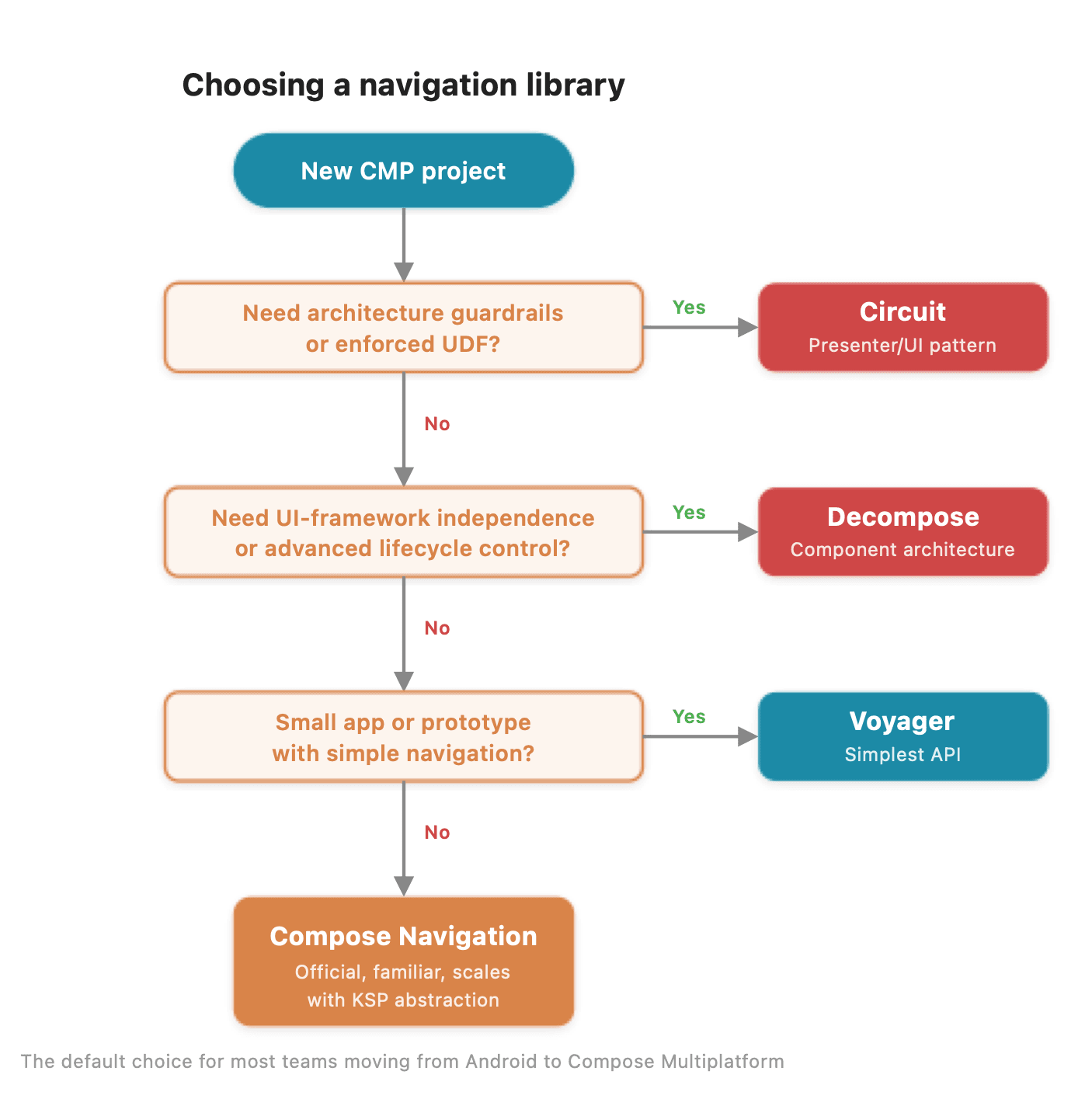
A quick decision flowchart based on your project's priorities.
What we'd recommend for most teams
If you're an Android team moving to Compose Multiplatform and you don't have strong opinions about application architecture yet, start with the official Compose Navigation. It'll feel familiar, it won't force architectural decisions on you, and it's the safest long-term bet in terms of maintenance and ecosystem support. You can always migrate to something more opinionated later if your app's complexity demands it.
If you've already outgrown simple stack navigation, if you need multi-pane layouts, nested navigation graphs with independent lifecycles, or platform-specific UI rendering, evaluate Decompose and Circuit based on whether you want the flexibility of UI-framework independence (Decompose) or the structure of enforced unidirectional data flow (Circuit).
Takeaway
Navigation in Compose Multiplatform isn't a solved problem with a single answer, but it's a solved problem with good options. The official library covers the common case well, and a thin abstraction layer can scale it to large apps without abandoning its foundation. The community libraries push into territory the official solution doesn't address.
The right choice depends less on which library is "best" and more on what your app needs and how much architecture you want your navigation layer to bring with it. Start with the simplest option that fits your requirements - you can always move to something more opinionated as your app grows.