Dragging a divider in a canvas editor looks like a small interaction. In a product configurator, that divider is also a validation boundary: one row grows, its neighbour shrinks, neither may become too small, and every label still has to remain clipped and aligned. This is how we approached that problem in the MDT Labeling Tool, and how extracting the geometry from the rendering layer makes the solution easier to reason about and test.
When a canvas has rules
The MDT Labeling Tool lets installers customise labels for switches and controllers before using them in a project. The product story and the wider workflow are covered in our MDT Labeling Tool case study. This article stays with one frontend problem hidden behind that interface: splitting a physical inscription area into resizable rows.
Each product defines one or more editable areas. Depending on the product, an area can support text, symbols, images, alignment, rotation, and a limited choice of row counts. Once an area is split, every row gets its own content and controls.
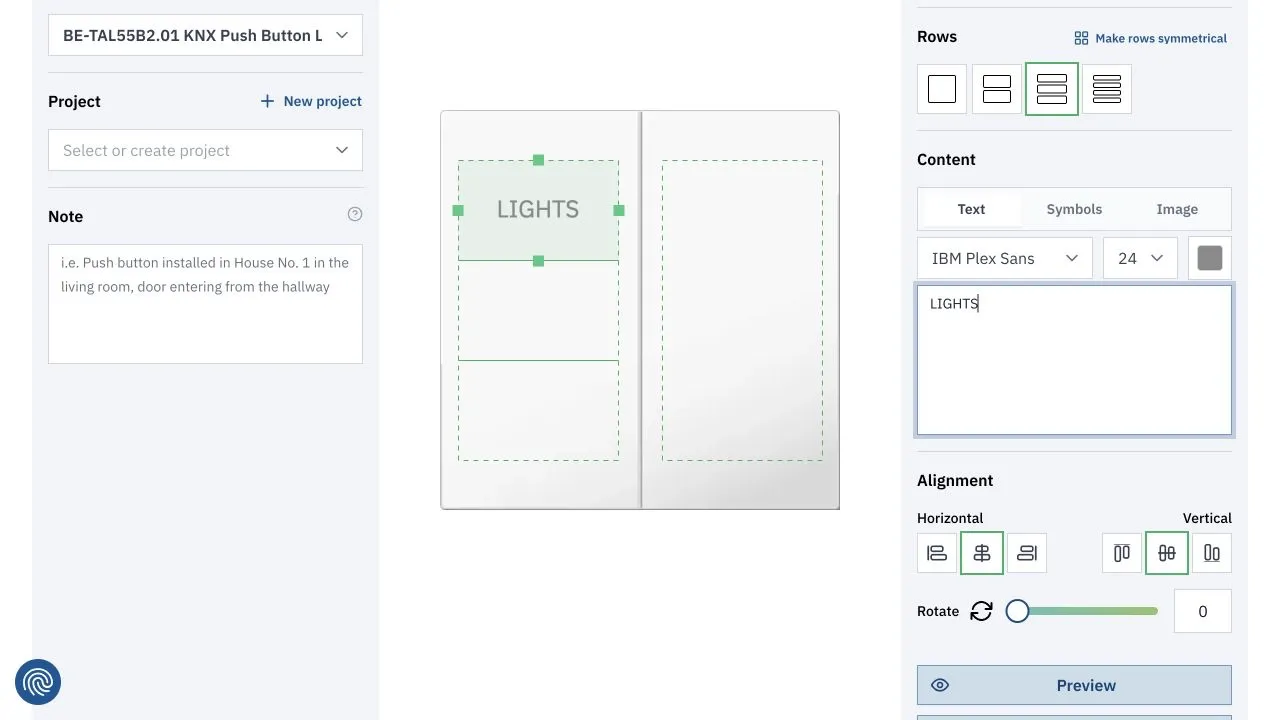
A public MDT configurator example with one area divided into three rows. The green frame is the selected row, while the dashed outline marks the available inscription area.
At first this resembles a free-form drawing tool. That mental model breaks as soon as someone drags a row edge. The outer inscription area cannot change. Rows cannot overlap or leave empty gaps. Every row has a minimum usable height. Moving the bottom of one row must therefore move the top of the next row by exactly the same amount.
The content adds another layer. A text label aligned to the centre of a row has to remain centred while the row changes size. A rotated symbol needs a new position. Text and images must be clipped to the new rectangle, including during the drag rather than only after it ends.
The useful abstraction is not "a set of independently resizable rectangles." It is "a fixed area divided by shared boundaries."
Geometry is validation
We can express the core layout without React or Fabric.js. This definition and the resizing function in the next section form a small resize-boundary.ts module:
export type RowLayout = Readonly<{
  top: number;
  height: number;
  minHeight: number;
}>;

export type EditableArea = Readonly<{
  top: number;
  height: number;
  rows: readonly RowLayout[];
}>;

export const bottomOf = (row: RowLayout) => row.top + row.height;
For a valid vertical layout, four invariants matter:
- The first row starts at the top of the editable area.
- The last row ends at the bottom of the editable area.
- Every row ends exactly where the next one begins.
- No row is shorter than its minimum height.
Together, these rules mean the rows always cover the whole area without overlaps or gaps. They also turn a vague UI requirement into conditions that can be checked independently of the renderer.
The central modelling decision is that adjacent rows share a boundary. If the user drags the line between rows one and two, the operation does not resize row one in isolation. It selects a new boundary position within a valid range, then derives the heights of both rows from that position.
Resizing a shared boundary
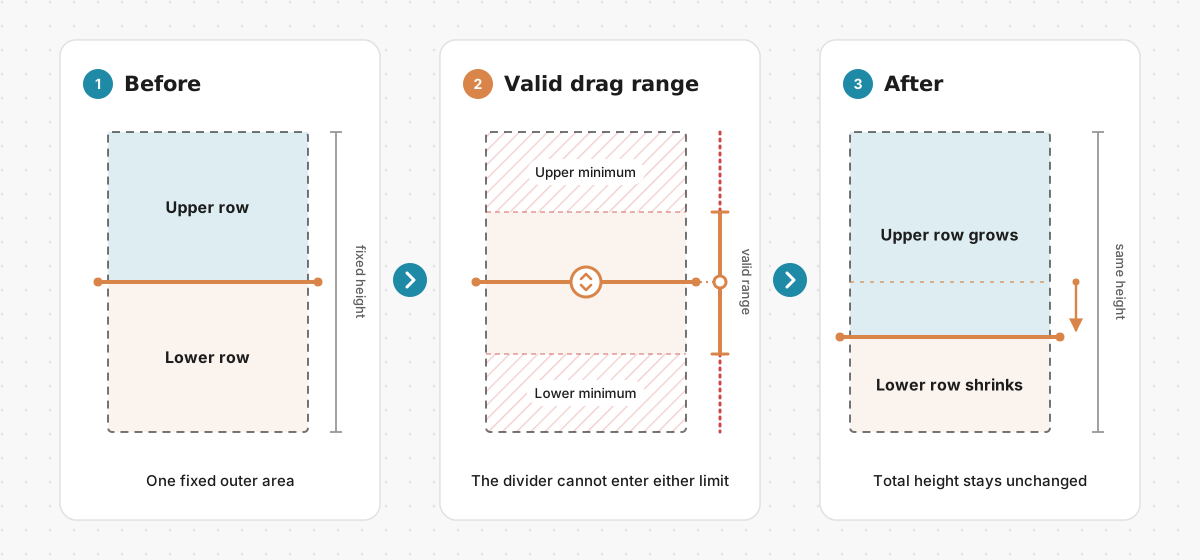
The dragged divider belongs to both adjacent rows. Its valid range starts after the upper row's minimum height and ends before the lower row's minimum height.
The geometry can be implemented as a pure function. This simplified version receives the index of the row above the divider and the pointer's vertical position in canvas coordinates:
const clamp = (value: number, min: number, max: number) =>
  Math.min(Math.max(value, min), max);

export function resizeBoundary(
  rows: readonly RowLayout[],
  upperIndex: number,
  pointerY: number,
): RowLayout[] {
  const lowerIndex = upperIndex + 1;
  const upper = rows[upperIndex];
  const lower = rows[lowerIndex];

  if (!upper || !lower) {
    throw new RangeError("A boundary needs an upper and lower row");
  }

  const lowerBottom = bottomOf(lower);
  const minBoundary = upper.top + upper.minHeight;
  const maxBoundary = lowerBottom - lower.minHeight;

  if (minBoundary > maxBoundary) {
    throw new RangeError("The rows cannot satisfy their minimum heights");
  }

  const boundary = clamp(pointerY, minBoundary, maxBoundary);

  return rows.map((row, index) => {
    if (index === upperIndex) {
      return { ...row, height: boundary - upper.top };
    }

    if (index === lowerIndex) {
      return {
        ...row,
        top: boundary,
        height: lowerBottom - boundary,
      };
    }

    return row;
  });
}
There are two clamps hidden in that one valid range. The upper row prevents the divider from moving above upper.top + upper.minHeight. The lower row prevents it from moving below lowerBottom - lower.minHeight. The combined height never changes because lowerBottom stays fixed while the shared boundary moves.
The function deliberately assumes it receives a valid layout. Validate the complete area when it is created or restored; dragging then only needs to preserve the existing invariants. Keeping those responsibilities separate avoids repeating full-layout repair logic for every pointer event.
Our production implementation grew around Fabric.js scaling events and the four resize handles exposed by each rectangle. Extracting the shared-boundary calculation makes the core rule clearer than it appears inside a renderer event, and it gives us a deterministic unit to test.
Keeping content attached to the layout
Updating the two row rectangles is only half of the interaction. Their content still refers to the previous geometry.
For every affected row, the editor needs to update the frame, refresh its coordinates, rebuild the clip path, and apply the selected alignment. Rotated content needs an additional origin-aware position calculation. Horizontal resizing can also change the usable width of a text box. The neighbouring row matters here too: when its top moves, its content has to move even though the user never selected it.
The adapter below shows that boundary between geometry and rendering. It follows the Fabric.js 5 API used by the application and omits product-specific metadata:
import { fabric } from "fabric";
import type { RowLayout } from "./resize-boundary";

type CanvasRow = {
  frame: fabric.Rect;
  content?: fabric.Object;
  realignContent: () => void;
  repositionRotatedContent: () => void;
};

export function applyLayoutToCanvas(
  canvas: fabric.Canvas,
  layouts: readonly RowLayout[],
  rows: readonly CanvasRow[],
) {
  layouts.forEach((layout, index) => {
    const row = rows[index];
    if (!row) return;

    row.frame.set({ top: layout.top, height: layout.height, scaleY: 1 });
    row.frame.setCoords();

    if (!row.content) return;

    row.content.clipPath = new fabric.Rect({
      left: row.frame.left,
      top: layout.top,
      width: row.frame.getScaledWidth(),
      height: layout.height,
      absolutePositioned: true,
    });

    row.realignContent();
    row.repositionRotatedContent();
    row.content.setCoords();
  });

  canvas.requestRenderAll();
}
An absolute clip path is useful here because its position is expressed in canvas coordinates rather than relative to the content object. Fabric.js documents absolute clip paths as a way to keep an object free to move while a fixed canvas region controls which part remains visible. The production editor recreates that region as a row changes.
The namespace import is specific to the Fabric.js 5 API used in this project. Fabric.js 6 changed to named class imports, but the separation between the geometry function and renderer adapter stays the same.
This adapter is intentionally small. Font metrics, image sizing, horizontal alignment, and rotation policy belong in focused functions rather than in the geometry calculation. The pure function decides what the layout is; the adapter makes Fabric objects reflect it.
Dividing responsibility between React and Fabric.js
React and Fabric.js work with different update models. React describes UI from state. Fabric.js owns mutable canvas objects and changes them during pointer interactions. Trying to mirror every transient object property into React state makes a drag harder to follow and introduces two places that can disagree.
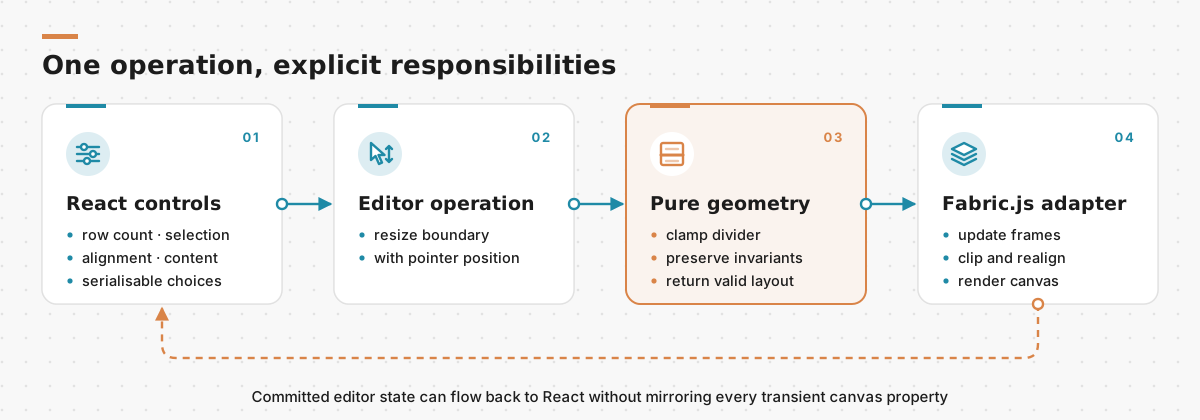
React owns the controls and serialisable editor choices, the geometry operation preserves layout rules, and Fabric.js applies the result to interactive objects.
In the configurator, React state is useful for selected rows, content choices, font values, alignment, and rotation controls. References hold the live Fabric canvas, row frames, and content objects. The operation between them is explicit: a UI or canvas interaction chooses an editor command, the command calculates the next valid layout, and the Fabric adapter applies it.
This boundary also helps persistence. Fabric.js can serialise the visual state of its objects, but its core concepts documentation notes that controls and event handlers are application behaviour rather than part of the saved canvas state. Restoring an editor therefore means restoring data and then reconnecting the behaviours that make the layout valid.
The same principle applies to custom object properties. A row identifier or alignment mode can be useful for rendering and restoration, but Fabric's custom-properties guidance cautions against turning canvas objects into general application data stores. Keeping the domain layout small and explicit makes it possible to validate saved data before creating interactive objects.
Test the rules, not the pixels
Visual tests can confirm that the browser and canvas are integrated correctly, but the constraint rules do not need a browser. They are numbers with stable expected outcomes.
These tests use Node's built-in test runner and exercise the same resizeBoundary function shown above:
import assert from "node:assert/strict";
import test from "node:test";
import { resizeBoundary, type RowLayout } from "./resize-boundary";

const rows: RowLayout[] = [
  { top: 0, height: 120, minHeight: 40 },
  { top: 120, height: 120, minHeight: 60 },
  { top: 240, height: 120, minHeight: 50 },
];

test("moves both rows that share the boundary", () => {
  const result = resizeBoundary(rows, 0, 170);

  assert.deepEqual(result[0], { top: 0, height: 170, minHeight: 40 });
  assert.deepEqual(result[1], { top: 170, height: 70, minHeight: 60 });
  assert.equal(result[2], rows[2]);
});

test("clamps the boundary to the lower row minimum", () => {
  const result = resizeBoundary(rows, 0, 1_000);

  assert.equal(result[0].height, 180);
  assert.deepEqual(result[1], { top: 180, height: 60, minHeight: 60 });
});

test("preserves total height and adjacency", () => {
  const result = resizeBoundary(rows, 1, 285);

  assert.equal(result.reduce((sum, row) => sum + row.height, 0), 360);
  assert.equal(result[1].top + result[1].height, result[2].top);
  assert.ok(result.every((row) => row.height >= row.minHeight));
});
Other useful cases are dragging above the upper limit, requesting a boundary that has no lower row, and loading an area whose minimum heights cannot fit inside its total height. A small browser test can then cover the integration: split an area, drag a divider, and verify that the neighbouring content remains inside its frame.
What we would keep, and what we would refine
The strongest part of this approach is the invariant-first model. Once rows are treated as a partition of one fixed area, adjacent resizing, symmetrical distribution, restoration, and validation all speak the same language. Clipping and alignment become downstream consequences of a layout change rather than independent fixes.
If we were starting the interaction again with the current Fabric.js API, we would place more of the constraint logic in custom control actions. Fabric's current event guidance points out that transform events run after a transform has already happened, while a custom control can constrain the operation before invalid geometry is applied. This is a forward-looking refinement, not a claim about how the original Fabric.js 5 handler worked. The pure resizeBoundary function remains useful in either design; only the adapter and interaction hook change.
We would also keep the scope explicit. This algorithm is for adjacent vertical rows inside a fixed rectangular area. A grid with independently movable cells, snapping, nesting, or arbitrary shapes needs a richer model and may justify a proper constraint solver. Generalising before those requirements exist would only hide the simple rule that makes this editor work.
The lesson travels beyond product labels. Dashboard layout builders, document editors, seating plans, crop tools, and timeline editors all contain interactions where a drag handle represents a business rule. When that happens, geometry is not just rendering data. It is validation, and it deserves a model that can be read and tested without opening a canvas.
Sources