Maestro is an open-source UI automation tool. You write a user journey as a short YAML file and it drives the app on a phone or in a browser the way a person would. Over the past couple of months we used it to build the UI regression suite for a mobile app that ships on Android and iOS, and for its web admin. This post covers what we built, how we structured it so that a QA engineer can own it, the two properties of the tool we had to design around, and where we decided a UI test is the wrong instrument.
Introduction
The product we test is a mobile app that talks to a piece of hardware over Bluetooth, runs on two operating systems and gets new builds several times a week. Regression by hand on every build does not scale, and we did not want UI regression to depend on developer time. What we needed was a suite that QA writes, QA maintains and developers can read in review.
Maestro's pitch fit that. It works at what its docs call arm's length: it does not need the app's source or a test SDK, it reads the accessibility tree the OS already exposes and sends taps and text through the device. Tests are YAML. Waits are built in: an assertVisible retries for up to seven seconds before it fails, so flows do not fill up with sleeps. After a couple of months on real devices we would pick it again, and we would set it up the same way.
Why Maestro and not Appium
The strongest argument for Maestro is how little there is to own. It is one binary. On Android it installs its own driver, and because nothing is compiled a flow runs the moment the file is saved; on our Android phone the first step starts about ten seconds after the command. The Appium equivalent is a server, a driver per platform, a client library in your language and, on a physical iPhone, a WebDriverAgent you build and sign yourself. Our Appium bring-up on that iPhone takes 60 to 90 seconds when everything is healthy.
The second is what comes built in. An assert waits up to seven seconds on its own, extendedWaitUntil covers the slow cases, scrollUntilVisible scrolls until it finds the element, a tap can be marked optional when a prompt may or may not appear, and permission dialogs are handled in the launch command. In Appium every one of those is a helper you write and keep working. Those helpers are where UI suites grow their flaky tests, and we did not write any.
The third is who can read it. A flow with no locators in it reads like the ticket it covers: QA writes it and fixes it between tickets, and a developer reviews it without knowing a test framework. An Appium test is code in a real language, which is its strength and its cost: whoever fixes it has to be an engineer. With one file for both platforms and the artefacts Maestro produces on its own, per-step logs, a screenshot on failure and a JUnit report, the suite is something QA owns rather than something QA asks for.
Appium wins where a test needs real programming: arbitrary gestures, device APIs, anything easier to express in code than in YAML. We use it for exactly that kind of exploratory work on the iPhone. For a regression suite that QA has to maintain, that power was never the bottleneck. Maintenance was, and Maestro was the better trade.
What we built
Close to sixty flows for the mobile app and about as many for the web admin, in a couple of months, written and maintained by QA without developer time. The number matters less than the shape, because the shape is what let the suite grow without slowing down.
A test file reads like the ticket. It has a given, a when and a then, and it contains no locators at all:
appId: ${APP_ID}
tags: [login, smoke]
---
- runFlow: ../handlers/handle_permissions.yaml
- runFlow: ../steps/login/open_login_screen.yaml
- runFlow:
    file: ../steps/login/enter_credentials.yaml
    env:
      EMAIL: ${TEST_EMAIL}
      PASSWORD: ${TEST_PASSWORD}
- runFlow: ../steps/login/tap_submit.yaml
- runFlow: ../handlers/dismiss_save_password.yaml
- runFlow: ../steps/login/verify_signed_in.yaml
Underneath are three layers. Pages are small JavaScript files, one per screen, holding the ids and the visible texts. Steps are shared sequences: open the login screen, enter credentials, verify the home screen. Handlers deal with everything the OS throws at a run: permission prompts, the offer to save a password, a banner. A test calls steps, steps read pages, and handlers are called wherever the OS can interrupt.
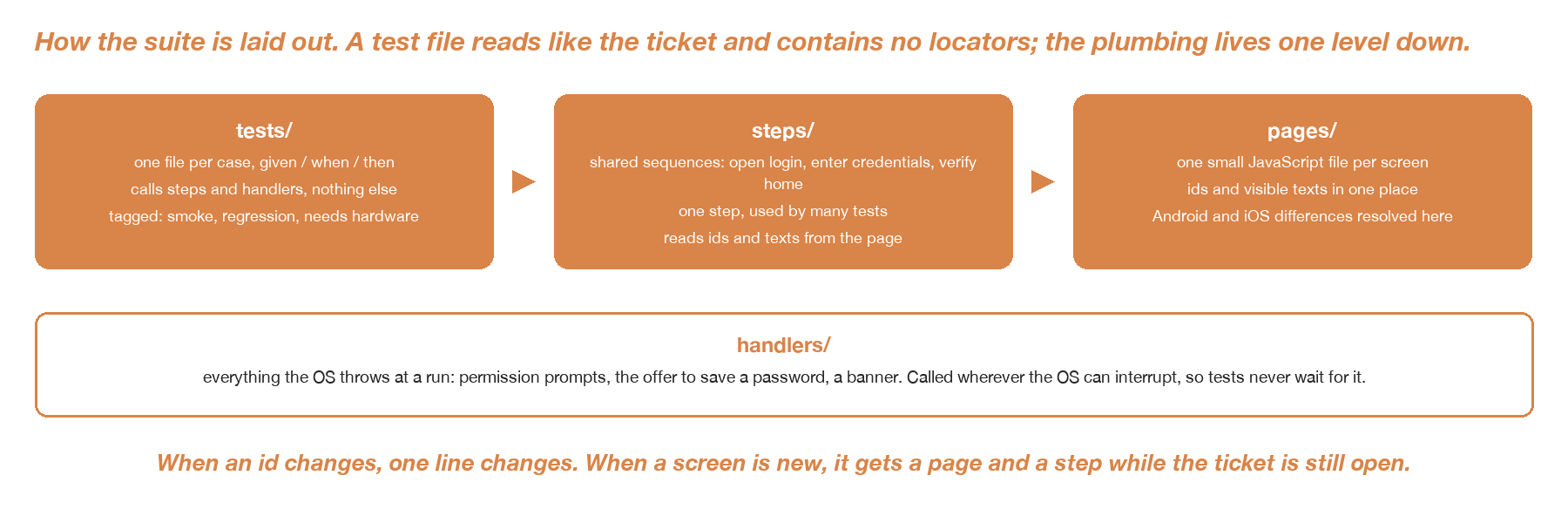
The three layers of the suite and the handlers strip that absorbs the OS.
Two rules came out of this. Android and iOS run the same test, and where they differ, the difference lives in the page file, never in the test. And when an id changes, one line changes. This is what made it a QA-owned suite: a new screen gets its page and its steps while the ticket is still open, and a developer reading the test in review can tell whether it checks what the ticket asked for.
Tags decide what a run includes: a smoke set, the full regression, and the flows that need the hardware on the bench or a real mailbox, which stay excluded until that is there. Credentials come in through environment variables, never through the file. Each test carries the ticket it covers, and the case list in our test management tool mirrors the flows one to one, so coverage is something the whole team can see rather than something QA remembers.
On speed, a UI run is bounded by the app, not by the tool. Measured over our own run logs, a flow on the physical Android phone takes about 53 seconds at the median, with most between 40 and 77 seconds; our flows are whole journeys, so one flow is several checks. On the iPhone the median is about 100 seconds, on the web admin 27 seconds. A run of 50 mobile flows on one Android phone is therefore 45 minutes to an hour, and about 25 minutes on web. We have not measured Maestro against Appium head to head. Where it is clearly faster is the loop around the run: nothing to compile, a run starts within seconds, and a new flow is on the phone as soon as it is saved.
What surprised us
Two properties of the tool shaped the suite more than any feature did.
The first is what visible means. Maestro judges visibility from the accessibility tree, not from pixels. That is why it works on any app, and it has a consequence: an element under a modal is still in the tree. It shows up in our own artefacts. In one run the assert on the home title completed, and the screenshot Maestro saved for the same step shows a dialog over it, with the home screen greyed out behind. Both are true, and only one of them is what a user saw.
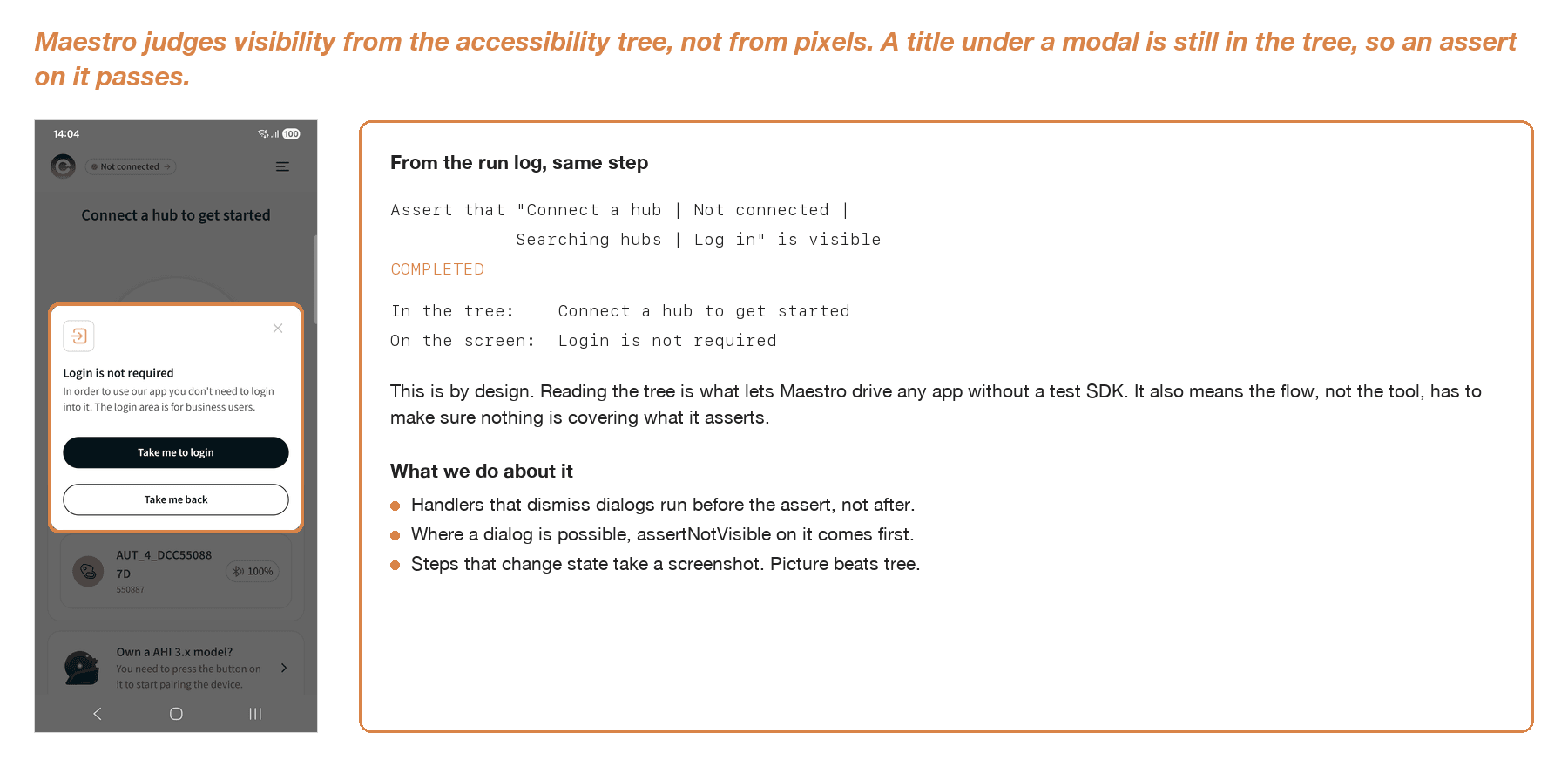
The screenshot Maestro saved for that step, next to the log line it wrote for it.
The fix is in the flow, not in the tool. The handler that dismisses dialogs runs before the assert. Where a dialog is possible, an assertNotVisible on it goes in front of the title check. And steps that change state take a screenshot. Maestro saves a screenshot and the view hierarchy for a failing step on its own, and takeScreenshot gives you one wherever you want it. If the picture and the tree disagree, we trust the picture.
The second is that the phone is part of the system under test. On both platforms Maestro installs a small companion app on the device and drives through it. On a physical Android phone that install happens at the start of every run. When it stalls, the run stalls with it, and Maestro has no timeout of its own for that: the debug log ends at the line naming the device and the first step never starts. So every run has a timeout around it, and a run that never reached its first step is classified as an infrastructure failure, not a test failure. On a physical iPhone the test runner has to be on the phone and running before the flow starts, and the phone has to be unlocked. None of this is complicated, but none of it is in the YAML, and someone has to own the phones.
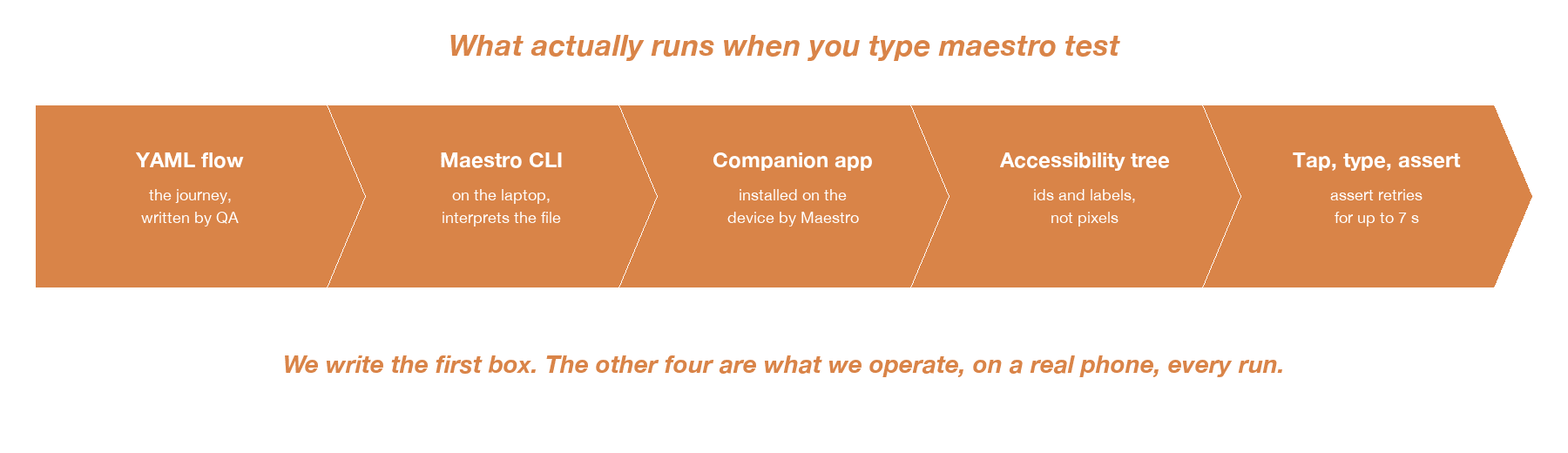
The five things that take part in one run. QA writes the first one.
The trade-offs
The limits are in the docs, if you read past the quick start. Web support is in beta and Chromium only; it worked for our admin portal, and we would not plan a cross-browser strategy on it. On Android, inputText only accepts ASCII, which matters as soon as a form takes a name with diacritics or a non-Latin script. On iOS, hideKeyboard is listed as flaky and the docs suggest tapping a neutral area instead. All of this is documented, and it is the kind of thing to check against your own app before committing.
The bigger trade-off was ours. A phone test takes tens of seconds and a phone. An API test for the same rule takes a second and no hardware. When a ticket says the server must reject a malformed email, the phone test proves the error text is on the screen, and the API test proves the rule. We write the second one, and keep the first only where the screen itself is the requirement.
The same applies in the other direction. Our home screen shows a signal level next to each device. Maestro can read the "100%" label. It cannot know whether the device is connected. When the proof lives in hardware, in a colour or in a pixel, we do not ask a screen-tree assertion to give it.
The rule we use now:
- Maestro: journeys a person does on the phone, where the outcome is on the screen.
- API tests: rules and contracts, status codes, validation.
- Device logs or a human: physical outcomes, colour, timing.
- Nowhere: a test written only so that everything is automated.
The phone test proves the error is on the screen. The API test proves the rule.
Conclusion
Maestro gave us a UI suite that QA owns, developers can read, and both platforms run from one file. That was the requirement, and it met it in a couple of months.
What made it work was the structure around it, not the tool alone. Pages, steps and handlers keep the tests readable. Screenshots at state changes make a green run mean something. A timeout around the run and a person who owns the phones keep the suite running. And a clear line about what belongs in a UI test keeps it from becoming the whole test strategy.
The YAML is the easy part; the docs are right about that. The rest is the job.