What changes when one Lambda environment can serve many requests at once? Lambda Web Functions, launched in October 2026, make that possible with a normal Node.js HTTP server. Waiting on a database or API costs no CPU, but memory is billed while the environment runs. We ran the same Hono API as a Web Function and as an Event Function (classic Lambda) and measured cold starts, scaling, latency and cost.
What are Lambda Web Functions
Lambda now has three form factors: Event Functions (classic Lambda), Web Functions and MicroVMs. Event Functions is the AWS name for the original, classic Lambda function (What is AWS Lambda?), and the rest of this post uses it. AWS describes Web Functions as a way to "run standard HTTP web applications on Lambda without rewriting your code into an event handler" (AWS announcement).
A Web Function is a plain HTTP server, the same kind of app you would run in a container or on a VM. Lambda passes a host:port in AWS_LAMBDA_HTTP_ENDPOINT, and your server has to start listening on it within 10 seconds of the environment starting, or the environment fails to initialize (environment variables, lifecycle). There is no handler function. You also don't need the Lambda Web Adapter, the extension that runs web frameworks on Event Functions by translating events into HTTP requests (runtimes).
Here is the entry point of the Hono app we tested:
import { serve } from '@hono/node-server';
import { app } from './app.js';
const [hostname, port] = (process.env.AWS_LAMBDA_HTTP_ENDPOINT ?? '127.0.0.1:3000').split(':');
serve({ fetch: app.fetch, hostname, port: Number(port) });
The Event Function version wraps the same app in Hono's AWS Lambda adapter:
import { handle } from '@hono/aws-lambda';
import { app } from './app.js';

export const handler = handle(app);
The routes in app.ts are identical in both. Moving an existing Hono or Express API is mostly a change to the entry file.
An Event Function execution environment serves one request at a time. A Web Function environment serves many: maxConcurrencyPerEnvironment defaults to 64 and goes up to 128 (how it works). While one request waits on a database, the same environment serves others.
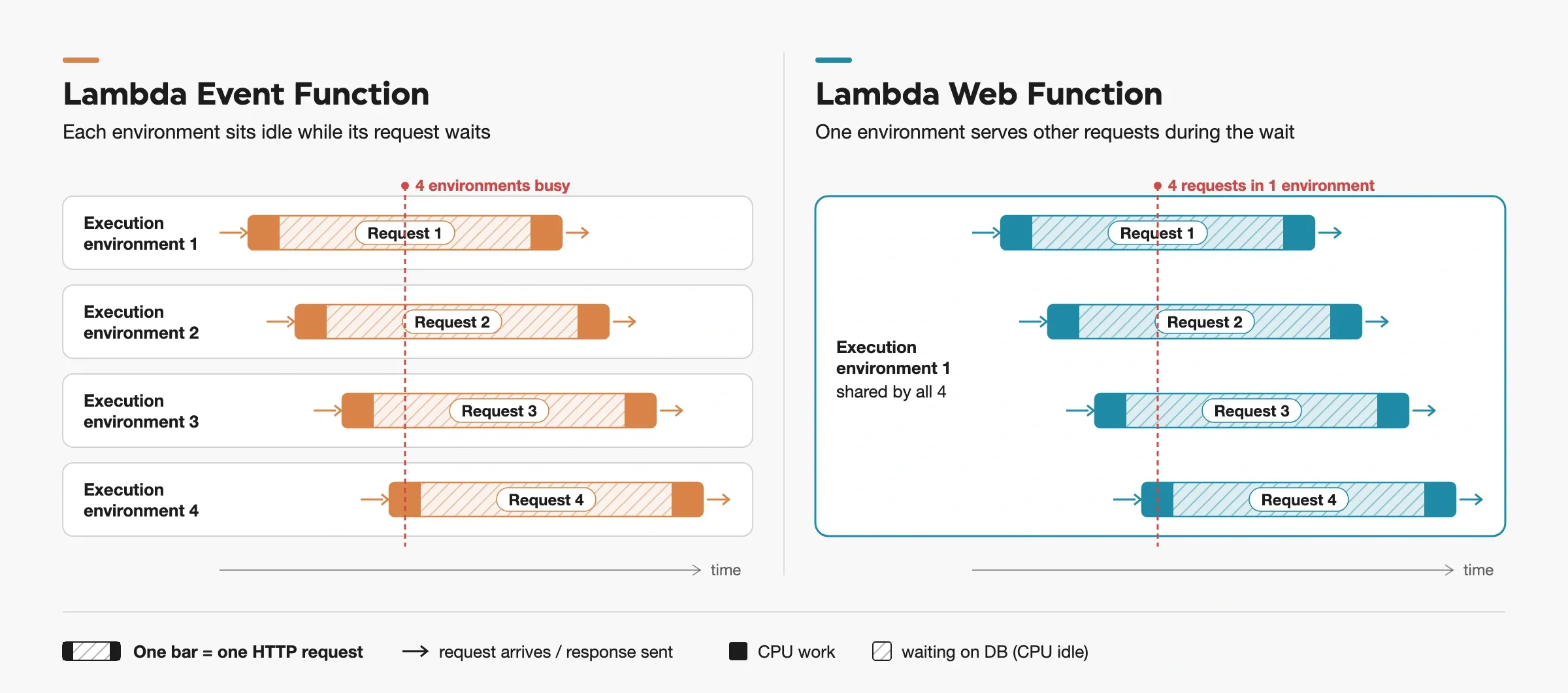
Same four requests. An Event Function holds an execution environment through every wait; a Web Function fills the wait with other requests.
An Event Function has versions and aliases. A Web Function has revisions and endpoints. A revision is an immutable snapshot of code and configuration, like a version. An endpoint is like an alias with its own URL. It routes HTTP traffic to one revision, or splits it between two at most.
Current (November 2026) constraints (limits, HTTP):
- Node.js 24 only, on Arm64 only.
- Every environment has 2 vCPUs and 2 GB of memory. There is no size setting.
- HTTP/1.1 only. Lambda doesn't support WebSocket upgrades and strips the
Upgrade header.
- Code ships only as a .zip in a versioned S3 bucket. No container images.
- No custom domains or direct WAF on the endpoint itself. To use either, put CloudFront in front (networking).
Web Function vs Event Function: the test setup
We deployed the same Hono app five ways in eu-west-1:
| Name | What |
|---|
lwf-hono | Web Function, Node.js 24, default 64 concurrent requests per environment |
lef-hono-512 | Event Function, Node.js 24, Arm64, 512 MB, Function URL |
lef-hono-1024 | Same, 1,024 MB |
lef-hono-1769 | Same, 1,769 MB: one full vCPU |
lef-hono-3538 | Same, 3,538 MB: two vCPUs, as in a Web Function environment |
An Event Function gets CPU in proportion to memory and reaches one full vCPU at 1,769 MB. 512 and 1,024 MB are common sizes for a Node.js API. We added 1,769 and 3,538 MB to see whether an Event Function catches up when it gets a full vCPU, or the two vCPUs a Web Function environment has.
The app has three routes, each one modeling a different kind of workload:
/json returns about 1 KB of JSON./io?ms=N waits N ms on a timer. It stands in for a database or API call./cpu?n=K runs K rounds of SHA-256, calibrated to about 7, 29 and 100 ms of CPU.
We used a timer instead of a real database on purpose. A real database would add its own latency to every number. One caveat is that a real database client also uses CPU for TLS and parsing, which a timer doesn't. Because a Web Function bills CPU time, real I/O-heavy routes would show a smaller gap to Event Functions than ours.
The load client was one c7g.xlarge EC2 instance in the same Region, running k6 at a fixed arrival rate. k6 called each function directly over HTTPS. It reached the Web Function through its public endpoint and each Event Function through a public Function URL, with no API Gateway, CloudFront or IAM auth in between. We started testing in mid-October 2026, using Hono 4.13 and @hono/node-server 2.1. We bundled each app with rolldown into one minified file. The Hono zip was 16 KB.
Cold starts: a full vCPU closes the gap
To force a cold start, we created a new revision of the Web Function before each sample and changed an environment variable on the Event Functions. Then we sent one cold request to /json, five warm requests on new connections and five on a kept-alive connection. Thirty cold samples each.
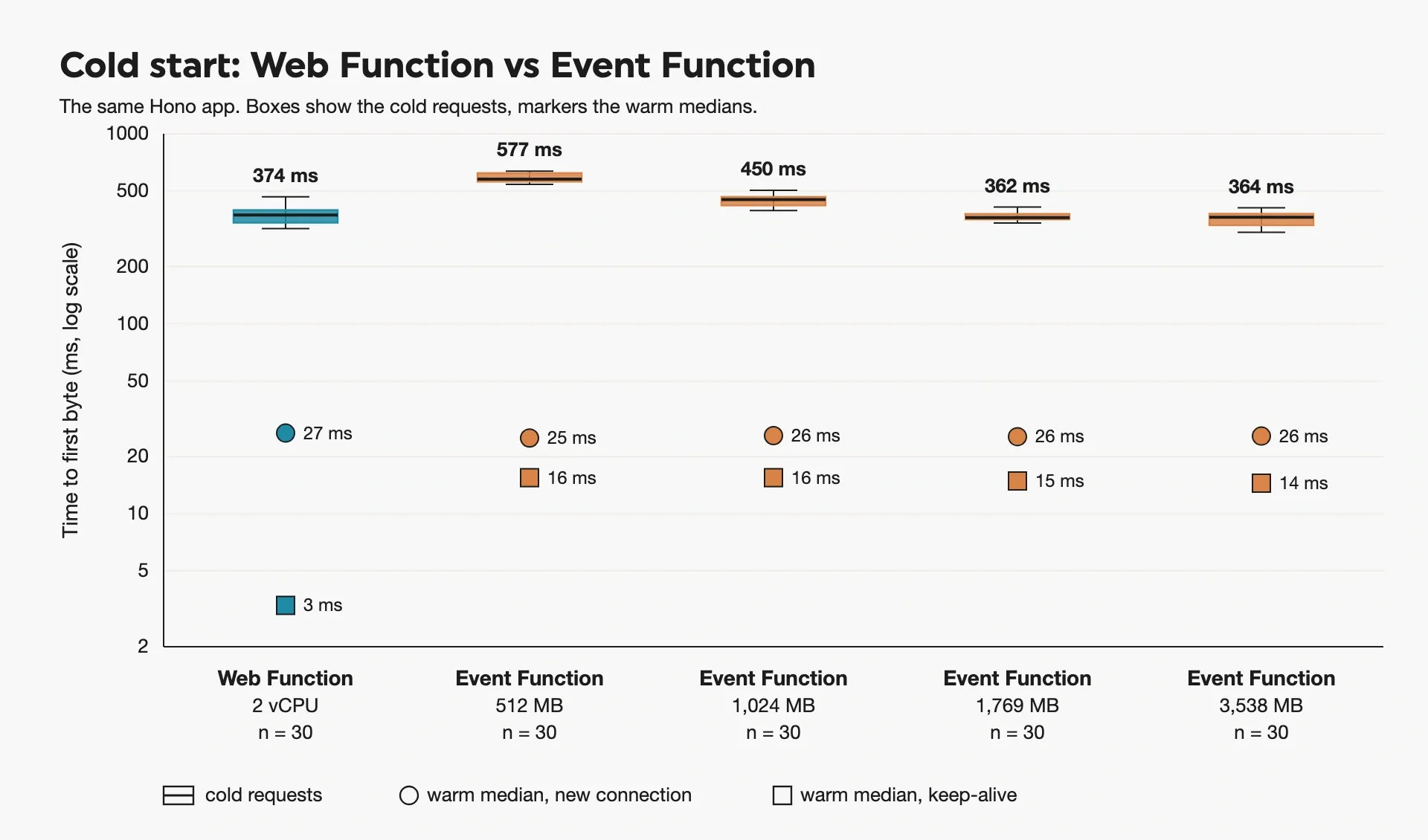
Cold and warm time to first byte, 30 cold samples per function
The Web Function beat the Event Function at the two smaller sizes, and tied it once the Event Function had a full vCPU. The Event Function loses its time in two places, INIT and the first request after INIT.
| Event Function | INIT (Init Duration), median | First request handler time (Duration), median |
|---|
| 512 MB | 128 ms | 311 ms |
| 1,024 MB | 141 ms | 155 ms |
| 1,769 MB | 133 ms | 91 ms |
| 3,538 MB | 149 ms | 77 ms |
INIT took about the same time at every size. The first request after INIT was about 100 times slower than a warm one at the smallest size. Most of that first request is one-time work, such as JIT compilation and loading code on first use. That work needs CPU, and Lambda gives CPU in proportion to memory. So each doubling of memory roughly halves the time. With a full vCPU it shrinks enough that the Event Function matches the Web Function. A second vCPU didn't help further.
Event Functions also bill for cold starts. Since August 2025 the INIT phase is billed, so a cold start costs about 440 ms of billed time at 512 MB.
Warm requests on a kept-alive connection were about 5x faster on the Web Function than through a Function URL. On a new connection, TLS dominates and the two are even.
How long an idle endpoint stays warm
A Web Function environment keeps running for a while after its last request, and its memory is billed the whole time. AWS doesn't document how long that lasts, which matters for both cold starts and cost, so we measured it. After 1, 3 or 5 minutes of idle time, 27 of 27 probes were warm. After 10 minutes or more, 54 of 54 were cold. In the cost runs, an environment shut down about 6 minutes (348-392 s) after its last request.
Don't rely on this window. AWS doesn't document it and can remove an environment at any time. There's also no setting to keep environments warm (lifecycle, scaling).
Framework choice adds up to 60 ms
We also ran Express and Fastify as Web Functions, on the same /json route. A cold start is about 214 ms of platform time plus the app's boot, and boot is mostly module import. Hono started fastest and Fastify slowest, about 60 ms apart. Package size doesn't explain the gap. Fastify's zip (177 KB) is smaller than Express's (233 KB), but it starts slower.
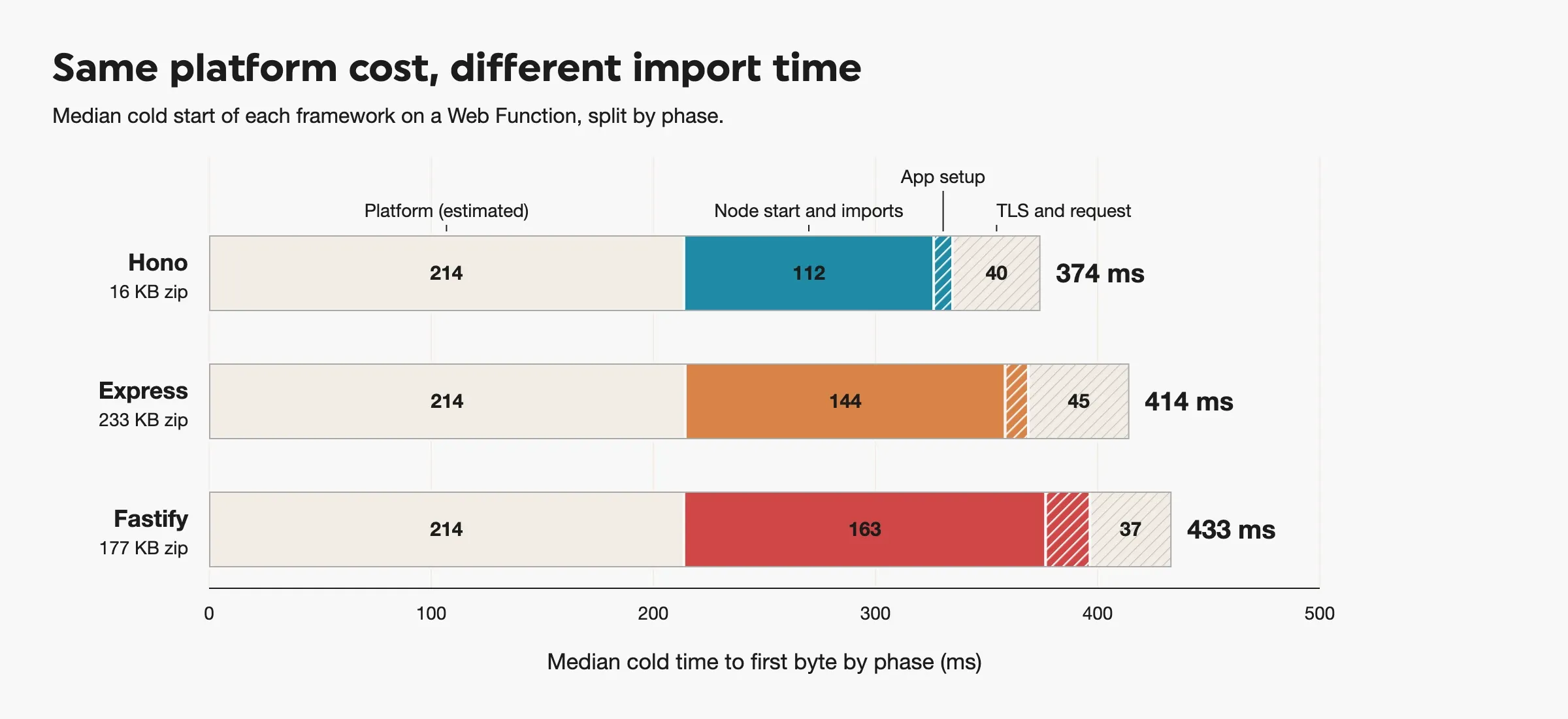
Median cold TTFB, 30 samples per framework. The platform part is estimated from cold TTFB minus warm TTFB minus app boot.
How a Web Function scales
The Web Function scaling docs leave a few details open, so we tested the edges with a Web Function limited to 4 concurrent requests per environment and requests that each hold a slot for 1 second (/io?ms=1000).
Gradual growth stays ahead of demand
The diagram below shows how we ran the test. Each client keeps one request in flight, and we added clients every 30 seconds, from 1 up to 40.
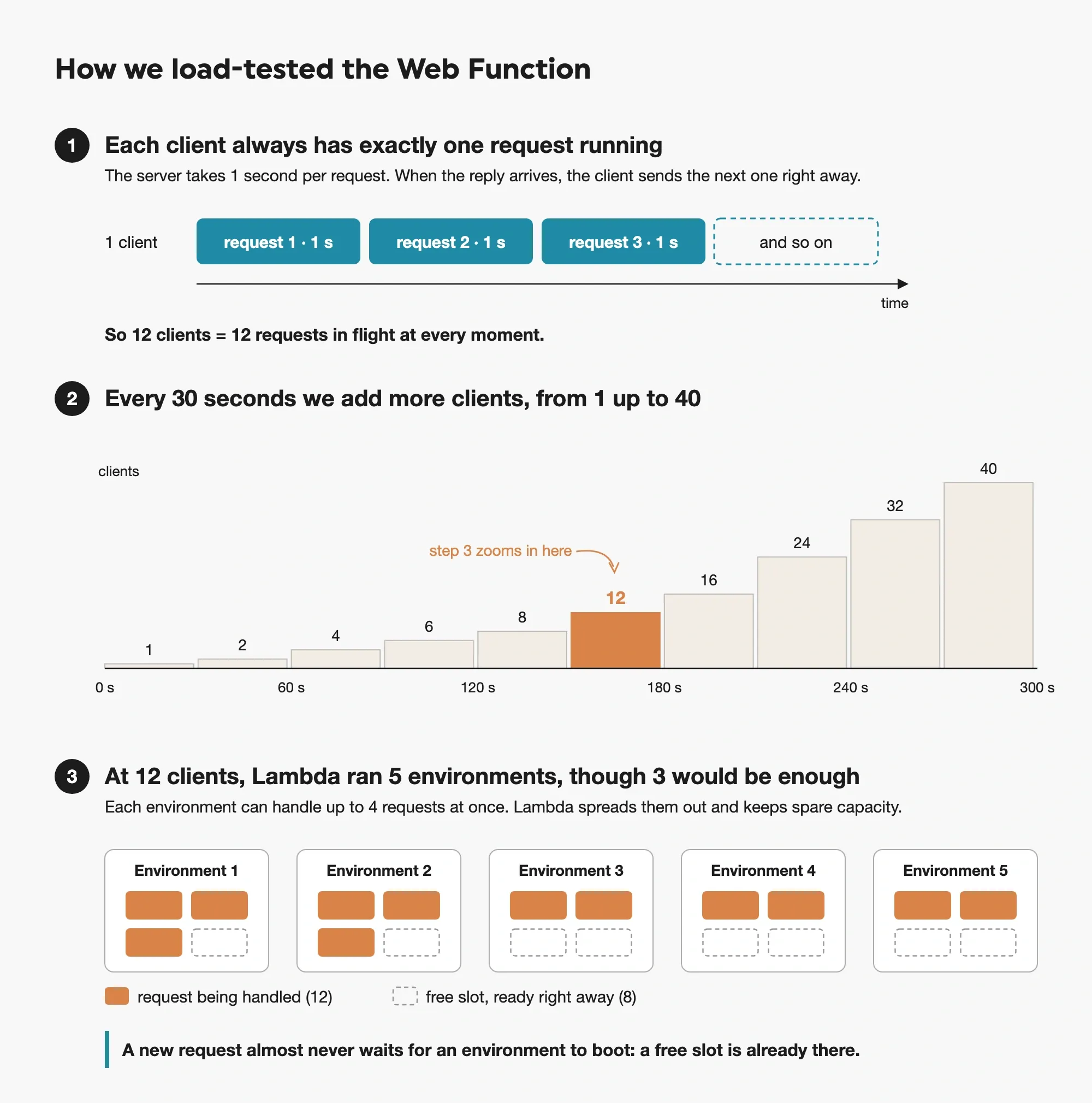
How the test works. The environment count in step 3 is measured; how requests are split across environments is illustrative.
At 40 clients, 10 environments would have been enough. The endpoint started 15. As step 3 shows, it added environments while the running ones still had free slots. AWS calls this headroom. Lambda also starts a new Web Function with a conservative per-environment limit below maxConcurrencyPerEnvironment while it learns the function, so part of the overshoot may come from that. Because new environments finished booting before they got traffic, no request waited for a cold start. Requests that landed on a new environment took only about 10 ms longer than the rest (median), far less than a request pays when it does wait for a cold start (see the burst test below).
What a sudden burst does to an idle endpoint
We sent 40 concurrent requests to an endpoint with no environments. It started 15, all cold, with no 429s. The first requests queued for 415-445 ms (median per repetition), which is about one cold start.
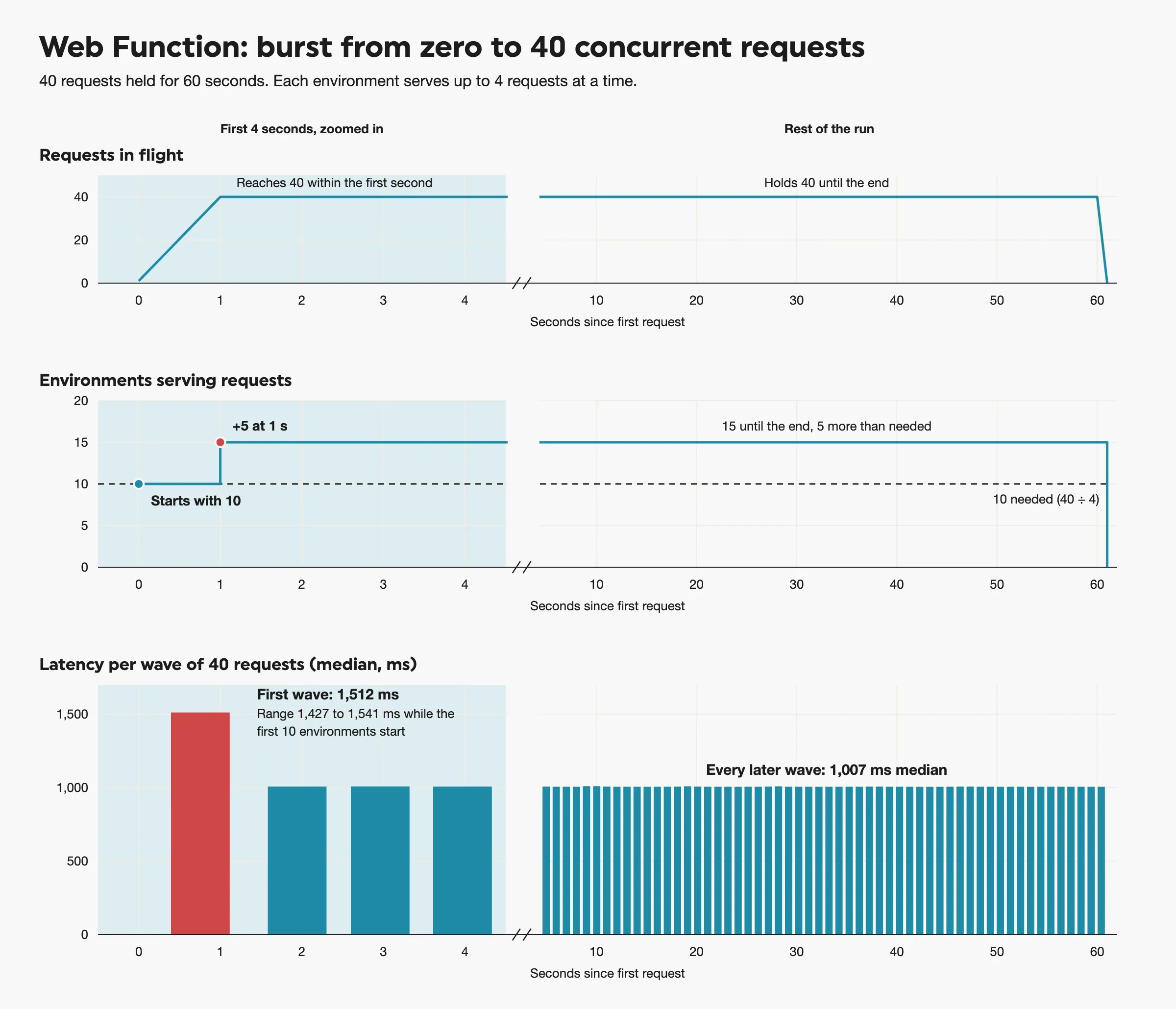
A burst from zero. Top: one red dot per new environment. Bottom: the first requests wait about one cold start, then latency stays at the 1 s the route takes.
With maxEnvironments set to 2, the endpoint could run 8 requests at once (2 environments × 4 each). Every request beyond that got an immediate 429 with Platform.EndpointMaxEnvThrottle. Nothing was queued, and the requests already running kept their normal speed. So set the cap for your peak in-flight requests, and add some margin. Web Functions don't always fill each environment to its limit, so rejections can start before you reach the full 8.
We hit a 10,000 RPS limit
AWS documents per-account limits of 100,000 RPS and 2,000 Arm vCPUs in each Region, shared by all your endpoints, plus 10,000 RPS per endpoint. In October, /json topped out at about 9,500 RPS on all three Web Functions (Hono, Express and Fastify). Everything above that got a 429. Two limits could explain the cap: the 10,000 RPS per-endpoint limit, and our account's Regional limit, which was also 10,000 at the time. With both at the same value, our test can't tell which one throttled us.
Your account can start below the documented values, so run aws lambda-web get-web-account-settings before you load test.
Latency: no Event Function size caught up
An Event Function gets more CPU at larger sizes, so you'd expect it to catch up on CPU-heavy work. It didn't, and the Web Function was faster than every size. We tested a route that needs about 100 ms of CPU per request. The Web Function answered in about 100 ms, whether it got a few requests per second or many. It didn't queue, because it added environments as demand grew. The Event Function was slower at every size, and its slowest requests got slower as the rate rose.
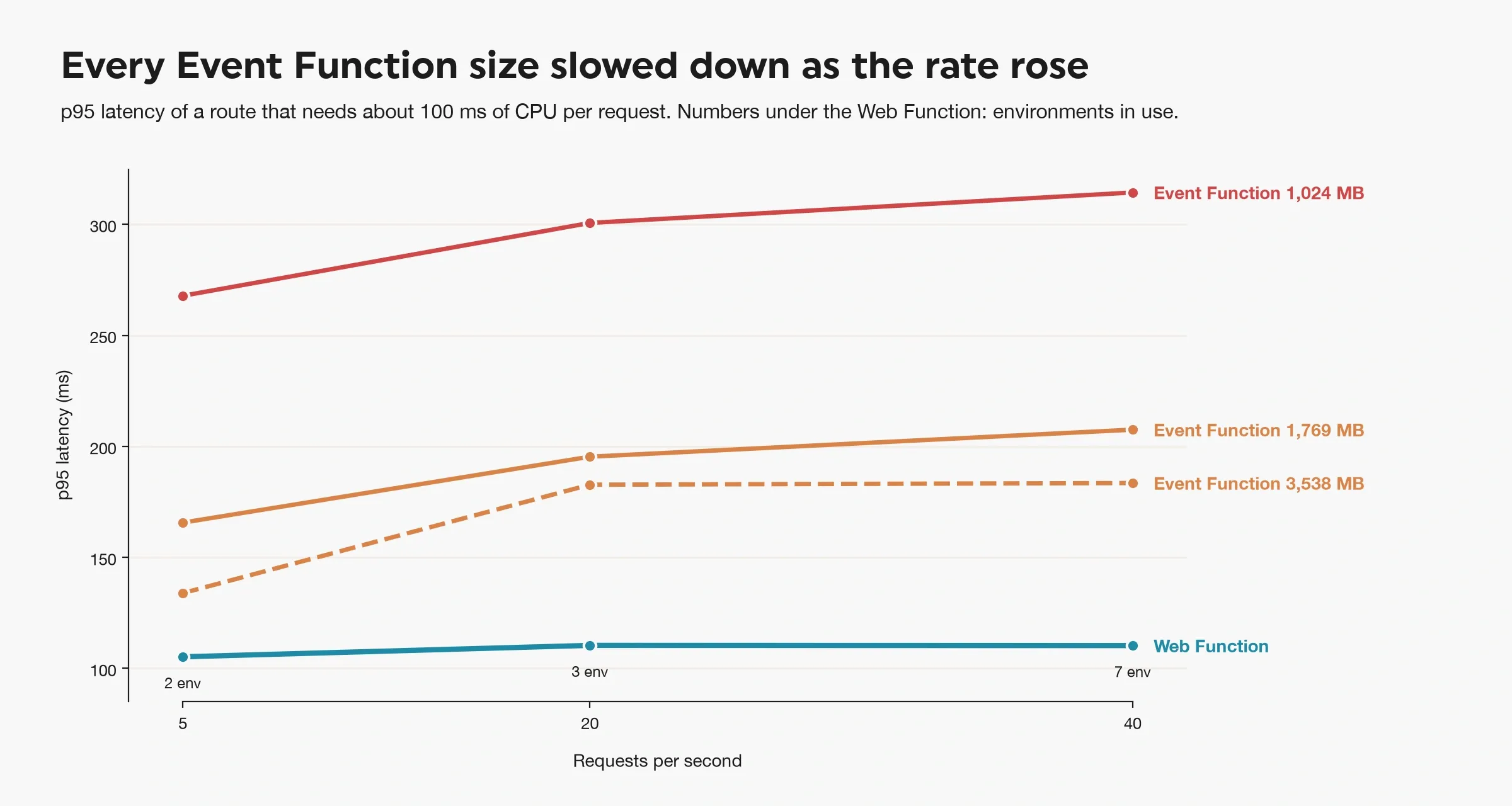
p95 of a ~100 ms CPU route at 5, 20 and 40 req/s, default settings.
The slowdown is inside the function, not the Function URL: Lambda's own REPORT Duration rose the same way. Most likely, each time an Event Function starts a new environment, that environment spends time warming up its JIT. The Web Function instead sends requests to a few long-lived environments that are already warm.
Pricing: when a Web Function is cheaper
Web Functions and Event Functions bill on different units (pricing, eu-west-1 list prices):
| Event Functions (Arm) | Web Functions |
|---|
| Requests | $0.20 per million | $0.30 per million |
| Compute | $0.0000133334 per GB-second of configured memory, wall clock, including INIT | $0.0000291572 per active vCPU-second |
| Memory | included above | $0.0000038603 per GB-second, for each environment's whole lifetime |
Web Functions bill CPU only for active compute, so time spent waiting on I/O costs no CPU (product page). Memory is still billed during the wait, but per environment, and one environment's memory is shared by every request in flight. On an Event Function, a request that waits 50 ms on a database pays 50 ms of configured memory, every time.
How we estimated
We didn't run a month of traffic. We measured what goes into each bill and multiplied by list prices: CPU per request, environments per request rate, how long an idle environment lives, billed ms per Event Function request, cold start cost and log bytes per request. The numbers below come from a model with measured inputs.
AWS bills Web Function memory on what each environment consumes, not the full 2 GB. To get the number, we read our own bill. For the day of the cost runs, Cost Explorer showed 6,019 GB-seconds of Web memory over 25,444 environment-seconds in the platform logs. That is about 0.24 GB per environment, far below 2 GB and a little under the memory the environments reported using. We checked the bill again over the next few days, and the number didn't change. AWS marks the whole month as estimated until the bill closes, so it could still change. Expect it to move with your app's memory use.
Waiting on I/O
On a route that waits on I/O, the two bills have different shapes. Both scale to zero, but a Web Function pays for about 6 minutes of environment after its last request (see the idle test above), so even light traffic keeps one environment billed all the time. Above that its cost grows slowly, because waiting costs no CPU and the requests in flight share one environment's memory. An Event Function starts near zero but pays for every millisecond of every wait, so its cost grows in step with traffic. At low traffic the Event Function is far cheaper, and once traffic passes a couple of requests per second the Web Function wins.
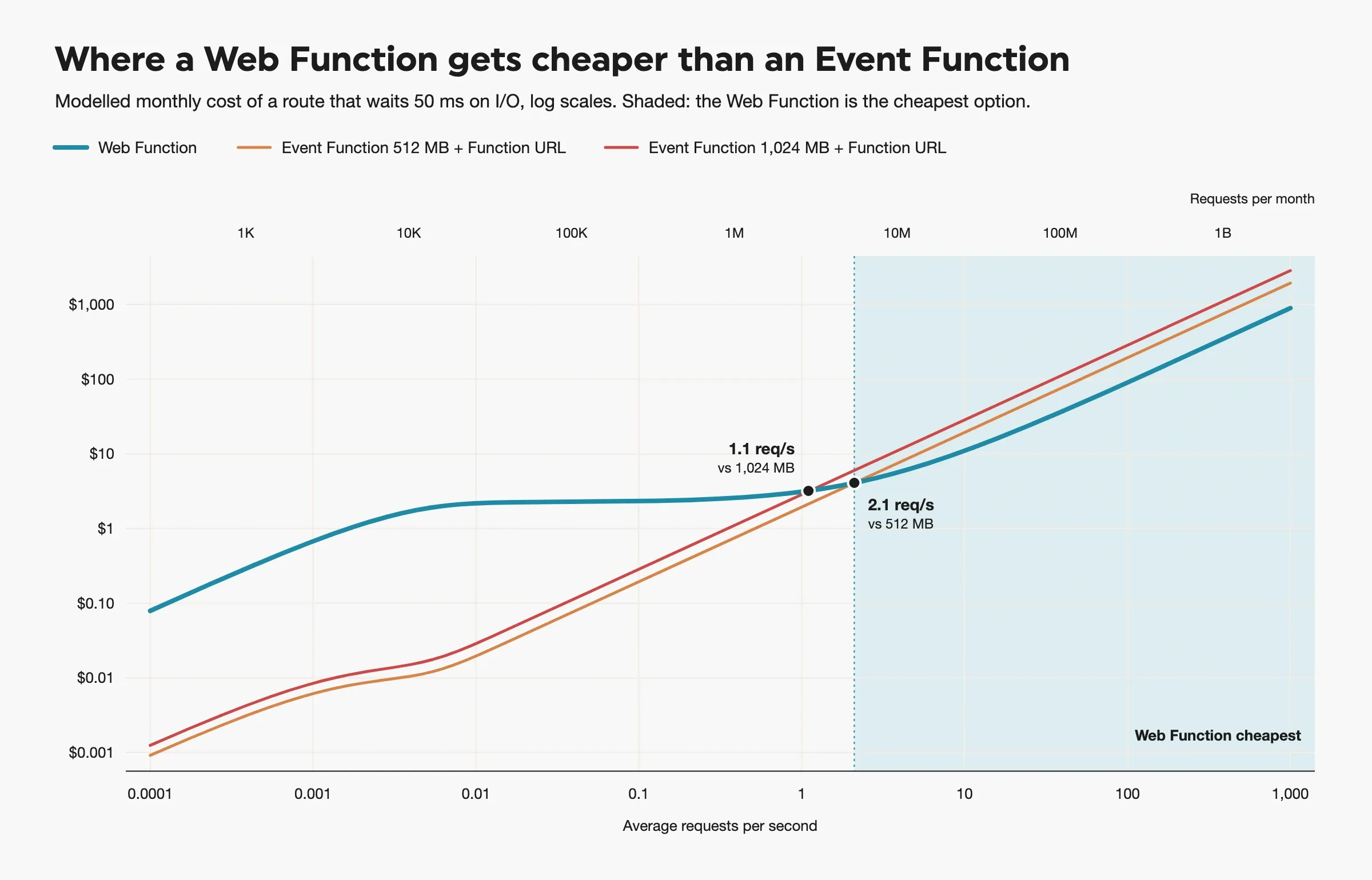
Monthly cost vs request rate, /io?ms=50, eu-west-1 list prices, uniform traffic, Web memory billed at 0.24 GB per environment.
The chart marks where the lines cross for a route that waits 50 ms. A larger Event Function pays more for each wait, so it loses to the Web Function sooner. Longer waits move both crossovers lower, because the Event Function pays for every extra millisecond and the Web Function doesn't. With a 200 ms wait, the Web Function beats 512 MB from well under one request per second.
In dollars, for a 30-day month on the same route:
| Average rate | Requests a month | Web Function | Event Function 512 MB | Event Function 1,024 MB |
|---|
| 0.01 req/s | 26k | $2.18 | $0.02 | $0.03 |
| 1 req/s | 2.6M | $3.11 | $1.94 | $2.85 |
| 10 req/s | 26M | $10.89 | $19.44 | $28.51 |
| 100 req/s | 259M | $90.72 | $194.40 | $285.12 |
CPU-heavy work
For CPU-bound work, which one is cheaper depends on how much CPU each request uses. Per request, the Web Function bills the CPU time, not how long the request ran. Its memory is billed per environment, which at steady traffic adds little. An Event Function bills memory × how long the request ran, and a smaller function is cheaper per millisecond but gets less CPU, so it runs longer. We ran the same route at three CPU levels:
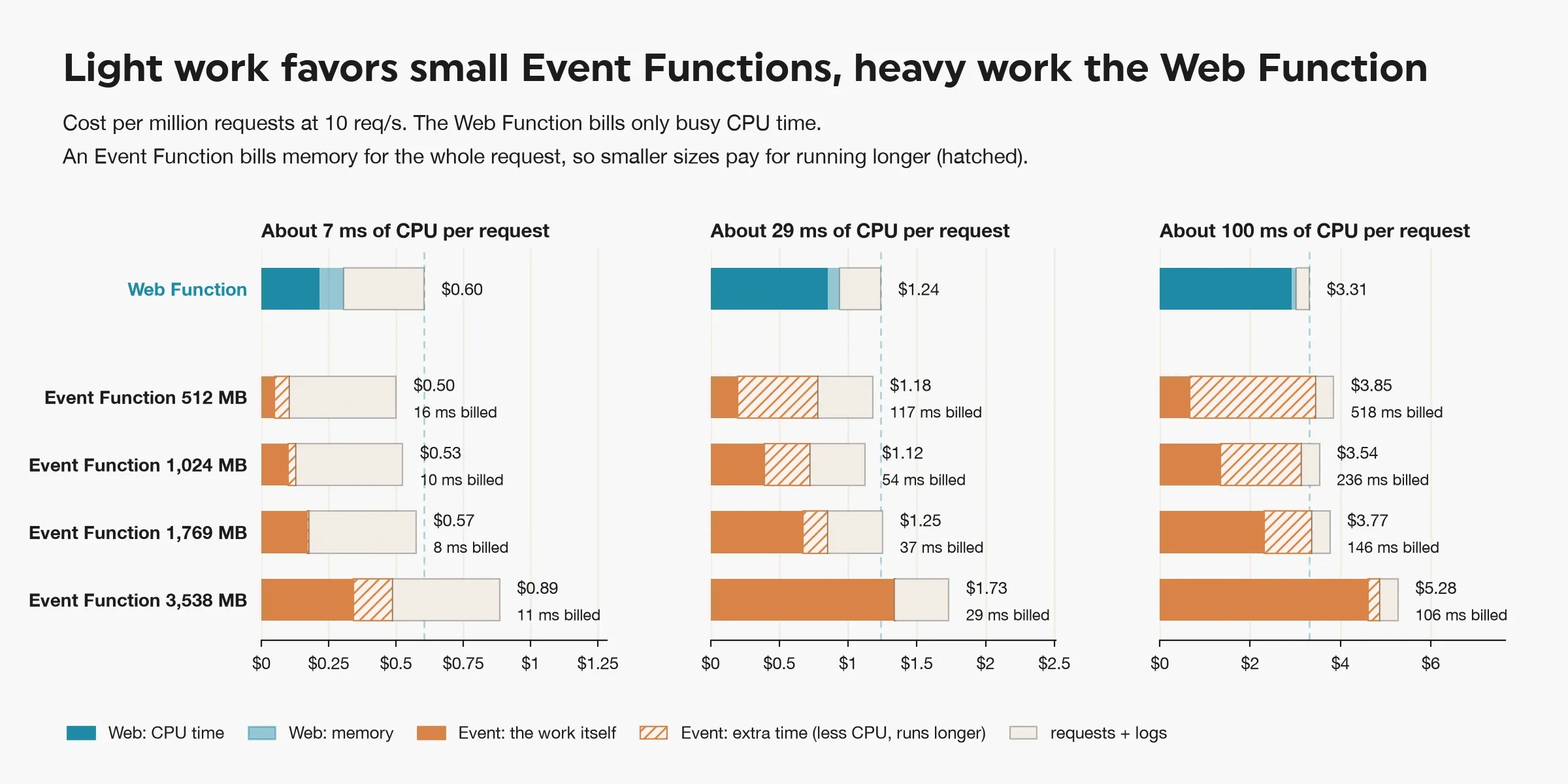
10 req/s, list prices. Solid orange is Event Function memory × the time the work takes on a full CPU, measured on the Web Function. Hatched is the rest of the billed time. Each panel has its own $ scale. "ms billed" is the average billed duration per Event Function request.
With light work, the Event Function is cheaper. The extra billed time (hatched) is small, so the smallest size wins, even though the Event Function pays more for requests and logs. With medium work the two are about even. With heavy work the extra time grows with the work, because a small function has little CPU and runs long: 512 MB was billed about five times as long as the work took. So for heavy work the Web Function and a 1,024 MB Event Function cost about the same. Smaller sizes run too long, and larger sizes cost too much per millisecond. The largest Event Function size is the most expensive option for every workload. It runs fast, but each millisecond costs too much.
Conclusion: when to use which
Event Functions are still the safer default. In our tests they were cheaper or as good for much of what a typical API does, and the Web Function pulled ahead only under specific conditions.
Stay on Event Functions when:
- Traffic is low. A Web Function keeps an environment billed for about 6 minutes after the last request, so it has a cost floor that an Event Function doesn't. On a route that waits on I/O, the Event Function stayed cheaper up to one or two requests per second.
- Routes do little CPU work. With light work the Event Function was cheaper, and with medium work the two were about even.
- Traffic comes in short bursts with quiet gaps. Each burst leaves Web Function environments running and billed after it ends.
- You need a runtime other than Node.js 24, or container images. Web Functions don't support these yet.
Consider a Web Function when:
- Traffic is steady, above a couple of requests per second, and requests spend time waiting on databases or other services. One environment serves many waiting requests on one memory bill, so the gap grows with longer waits and higher traffic.
- Routes are CPU-heavy and latency matters. For heavy work the Web Function cost about the same as the best Event Function size, but it answered faster than every size we tried.
- Traffic grows and cold starts matter. One environment serves many requests at once, so a Web Function starts fewer new environments than an Event Function. In our ramp test it started them early, and no request waited for a cold start.
The repo has the Hono app, with builds for a Web Function and for an Event Function, and the Express and Fastify versions from the cold start comparison.