Brief summary
Testing Android TV apps is often described through remote control navigation, streaming playback and big-screen UI. My experience is slightly different. I work on Android TV apps used in a commercial environment, where the TV is not something a user actively controls every day. It is expected to run reliably, display scheduled content, recover from problems and report what happened. That changed my QA focus from simple screen validation to long-running playback, provisioning flows, kiosk behavior, logs, schedules and device stability.
Introduction
When I first started testing Android TV applications, I expected the biggest difference to be the screen size. In many Android TV projects, the usual focus is remote control navigation, D-pad focus, media playback and layout behavior from a sofa distance.
But not every Android TV app is built for the living room.
Some TV apps are designed to run in the background of a business process. The user is not browsing a catalog, choosing a movie or moving through menus. The device is installed, configured, monitored and then expected to keep working with minimal interaction.
That kind of product changes the QA mindset. The important question is no longer only „does the screen look correct?“ It becomes „will this device still be in the expected state tomorrow morning, after network changes, content updates, schedule changes, power saving rules and thousands of playback events?“
Testing a TV that nobody controls
One of the biggest differences in this type of Android TV testing is the lack of everyday remote control usage. The app runs in a controlled mode and the TV remote is mostly used for basic device actions such as power and volume.
That means many typical Android TV test cases become less important, while other areas become critical as most of the work is „under the hood“ so to speak.
Instead of spending most of the time on focus navigation and menu behavior, QA needs to validate that the app starts correctly, stays in the expected mode, prevents unwanted user access and recovers from unexpected states. A crash is not just a crash. It can mean a black screen in a physical location where nobody is watching logs in real time and even loss of revenue during down time.
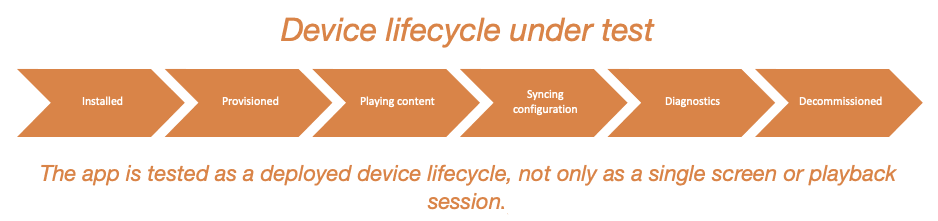
A useful test approach here is to treat the TV as a deployed device, not as an app opened by a user. I started asking questions like:
- What happens after reboot?
- What happens if Wi-Fi is changed?
- What happens if configuration arrives while content is playing?
- What happens if app runs without published content?
- What happens if the device loses connection during sync?
- What happens if the app is left running overnight or during weekend?
These scenarios sound simple, but they often reveal more than a standard regression checklist.
Content playback is only one part of the story
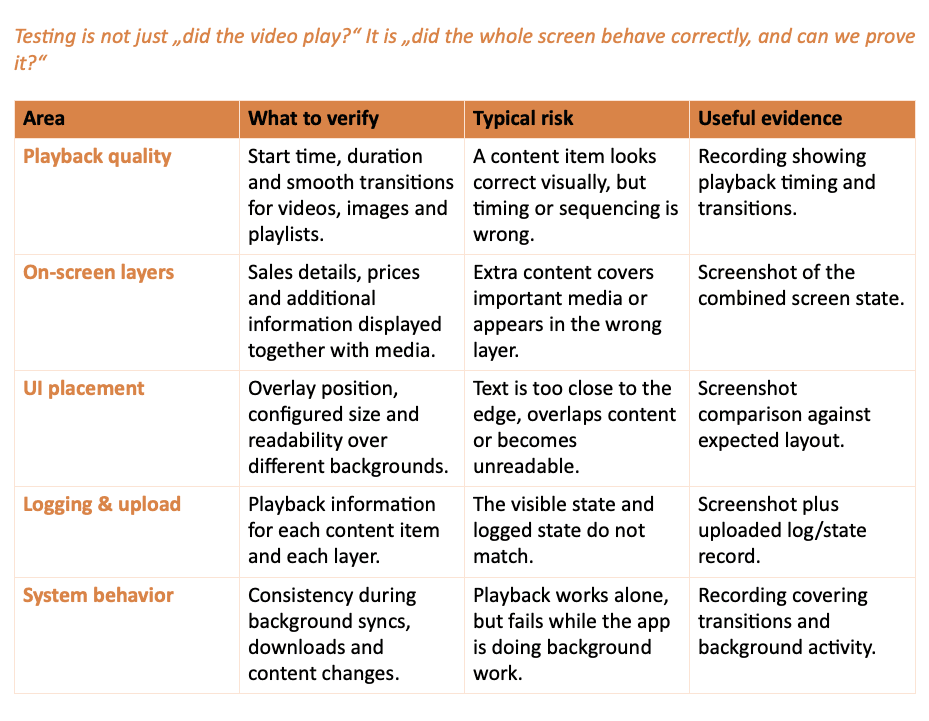
For a TV app that displays media content, playback quality is obviously important. Videos, images and playlists need to start at the right time, play for the expected duration and transition smoothly.
But the real testing challenge begins when content is combined with additional on-screen information.
In my project experience, content could be displayed together with additional content in layers such as sales details, prices or other information. That created a different kind of UI testing. It was not enough to check whether the video played. I also had to check whether the overlay appeared in the correct position, respected the configured size and stayed readable over different backgrounds.
To spice things up even further all the content and layers need to have their specific playback information logged and uploaded with it's own mechanics in place.
This is where screenshots and recordings become valuable. Not for beauty checks, but for evidence. A screenshot can quickly show if some image is too close to the edge, overlaps important content or if there is a mismatch between actual and logged state. Recordings on the other hand help with transitions, consistency or playback during background syncs and downloads.
In this kind of app, media playback is not a single feature. It is the foundation that many other rules depend on.
Configuration and diagnostics need their own test strategy
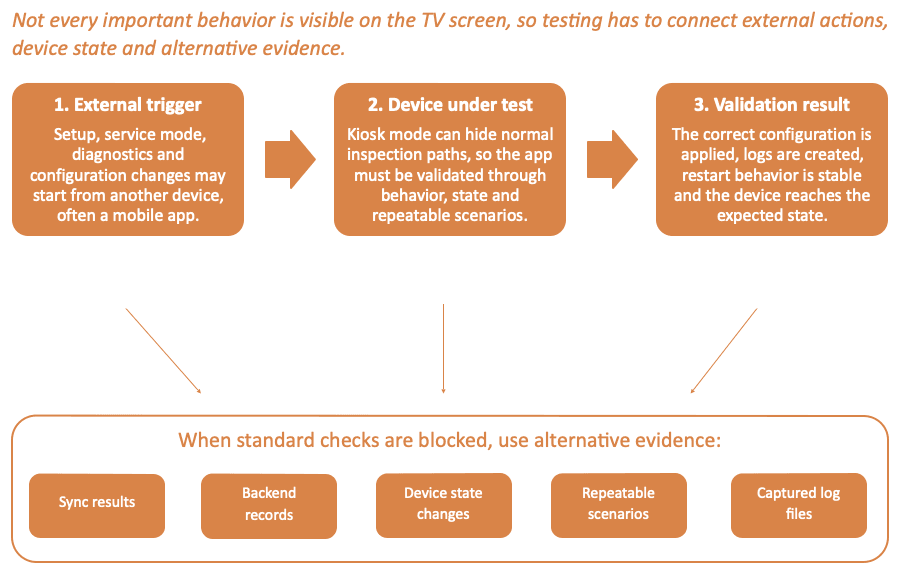
Another important lesson was that not all important features are visible on the TV screen.
Some actions are triggered externally, for example through a mobile app used for setup, service mode, diagnostics or configuration changes. This makes testing more complex because the full user journey involves more than one device.
Provisioning is a good example. From a QA perspective, provisioning is not just „connect the device.“ It includes validating that the correct configuration is applied, the device appears in the expected state, logs are created and the app behaves correctly after restart.
The same applies to service and diagnostics flows. These are often used when something goes wrong or outside of main flow, so they need to be reliable under imperfect conditions. Testing them only in a clean environment is not enough.
This part of testing pushed me to be more creative, because kiosk mode often removed the standard ways of checking what was happening under the hood. I could not always open system settings, inspect previous Wi-Fi connections or rely on debug logs in a release build, so I had to validate behavior through alternative evidence such as sync results, backend records, device state changes and repeatable test scenarios.
Some interesting scenarios were:
- changing network settings and verifying change
- changing heartbeat or sync interval
- publishing content and verifying download started
- starting update and verifying process completed
- decommissioning and verifying that old data and connections don't remain
- catching log files as they were being created
These flows are easy to underestimate because they are not part of normal playback. But when the product is deployed in the real world, they become essential for support and maintenance.
Schedules, power saving and proof-of-play
Scheduling was one of the areas where I learned to slow down and test edge cases carefully.
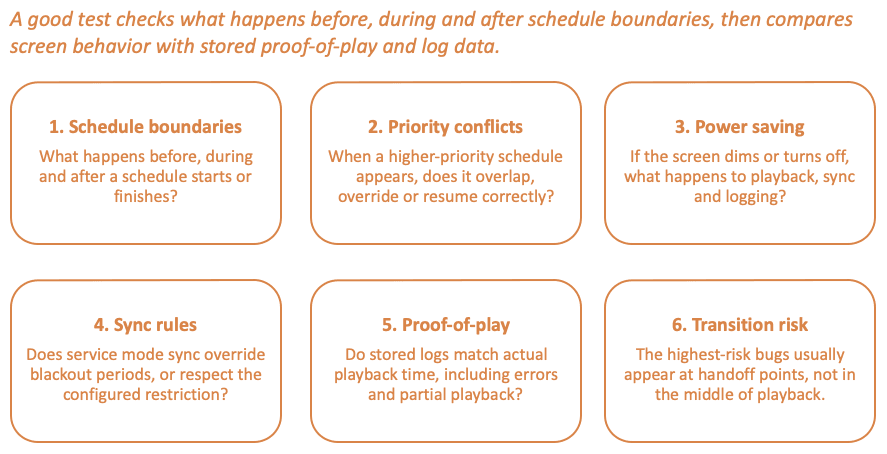
When an app supports scheduled content, power saving and different schedule priorities, QA needs to think like a calendar, not only like a user. A test case is not complete just because one item starts at the correct time. We also need to check what happens before, during and after schedule boundaries.
Power saving added another layer. Depending on configuration, the screen could dim, turn off or stop some sync behavior during specific periods. This created important combinations between content playback, configuration sync and device state, as well as logging behavior.
The highest-risk cases were usually around transitions and raised many questions on how to handle them in the right way:
- schedule starts while content is already playing, should it be delayed for duration of previous content or respect it's exact start time? Same for schedule finish.
- higher-priority schedule overrides a lower-priority one, should they overlap or completely override each other?
- power saving starts during playlist playback, should playback be logged during screen off time or not?
- sync is disabled, should service mode sync be able to override sync blackout or not?
- proof-of-play logs need to match actual playback time, how to handle playback errors in transition if previous content remains and how to handle partial playback (e.g. only overlay image downloaded successfully)?
Proof-of-play logs made testing more measurable. Instead of only checking what appeared on the screen, I could compare expected playback duration with stored playback data. This helped turn visual validation into evidence-based QA.
Conclusion
Testing Android TV apps is not always about remote control navigation and streaming UI. In commercial or unattended environments, Android TV QA becomes a mix of media testing, device testing, configuration testing and long-running reliability testing.
The biggest lesson from my experience is that the most important bugs are often not visible during a quick manual check. They appear after a restart, during a schedule transition, after a network change, when logs are compared with real playback or when a device is left alone long enough.
For me, the takeaway is simple: test the TV as a deployed device, not just as an app on a screen.