Part 1 covered the two stock content-filtering extensions and left a gap: every link tapped inside an app that isn't Safari.
The obvious way to close it is a system-wide VPN tunnel that inspects traffic. App Review permits that, and Apple's engineering documentation tells you not to build it, which is a more interesting position than either half on its own. This post walks through what the network layer can see, which Network Extension provider types you're allowed to ship to a consumer device at all, and the iOS 26 API that closes the gap without ever letting you learn what the user browsed.
This is part 2 of a 2-part series on iOS phishing protection:
- Part 1: Content blockers, SMS filtering, and the VPN question - Safari content blockers,
ILMessageFilterExtension, and where they stop
- Part 2: Beyond Safari and SMS (you are here) - the network layer, what Apple allows, and URL filtering with Bloom filters and PIR
Where Part 1 stops
Part 1 left a coverage map with three grey rectangles on it. Links tapped in Instagram open in Instagram's own WKWebView. Links in Gmail open in Gmail's browser. Chrome and Firefox on iOS have historically been WKWebView underneath, and in the EU they can now ship their own engines under the DMA. Either way, Safari content blocker rules don't reach them. For a user who lives inside a social app and a third-party mail client, the layered defense from Part 1 catches a meaningful but limited fraction of what arrives.
The instinct at this point is to go lower. If the protection can't live in the browser, put it in the network, where every app's traffic has to pass through regardless of which webview rendered the page. On iOS that means a NEPacketTunnelProvider: a VPN extension that owns a virtual interface, reads raw IP packets, and drops the ones headed somewhere bad.
It's a reasonable-sounding plan until you reach TN3120, a technote that sets out what packet tunnel providers are for, and then lists four things they are not meant to do. Implementing a content filter is the first item on that list.
What the network layer can see
Before choosing an API, settle what there is to look at. It disqualifies a lot of designs that sound reasonable in a planning meeting.
A phishing URL has a hostname and a path, and both carry signal. The hostname often carries most of it. faceb00k.example and paypa1-secure.example give themselves away on the name alone, and a domain registered yesterday with no reputation behind it deserves suspicion before anything else is known about it. Most of the blocklist work in Part 1 rests on exactly that.
But the hostname isn't always where the tell is. A phishing page hosted on a compromised WordPress install sits on a legitimate domain with a clean history and years of reputation, and the only thing separating it from the rest of that site is the path. Part 1 had a content blocker rule for that case: a wp-admin path with a login= query parameter.
Now put that request on the wire under HTTPS and look at what a tunnel process can read:
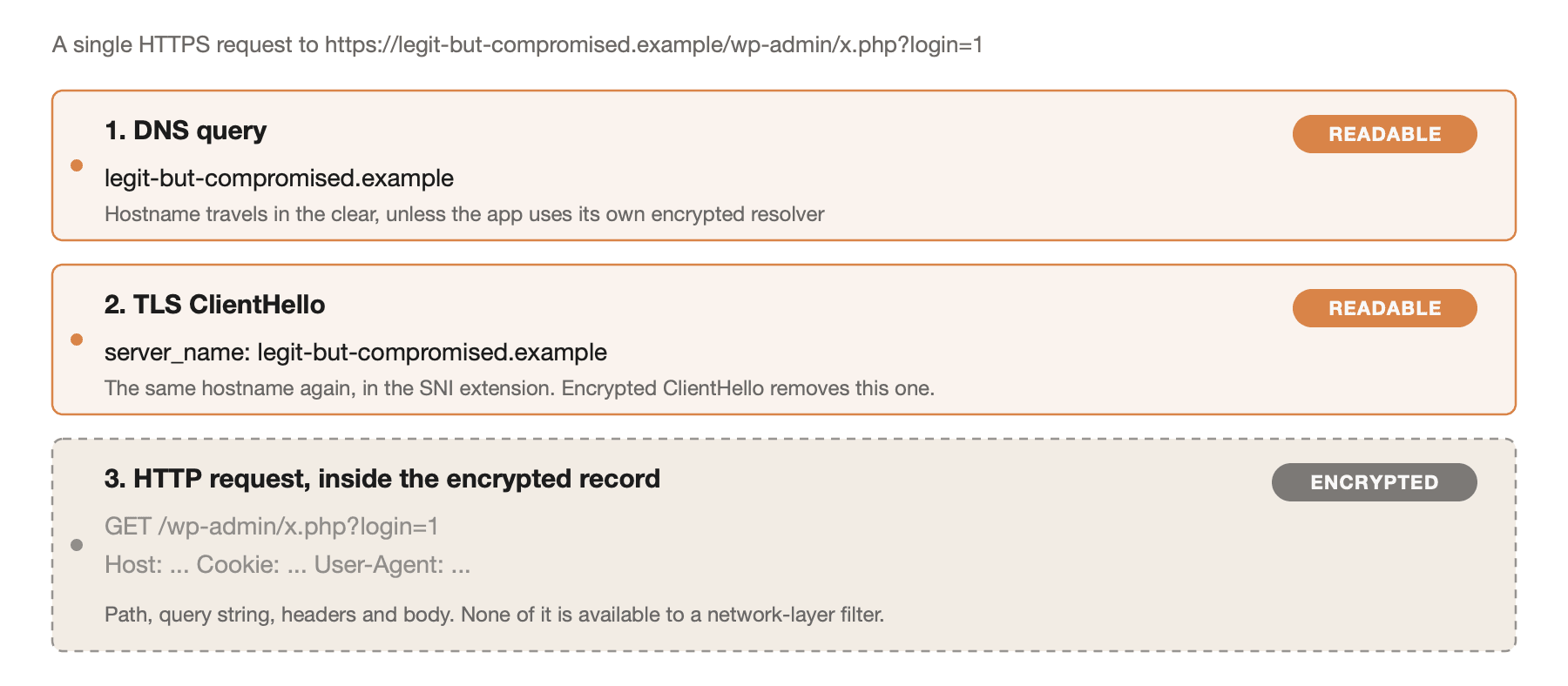
What a network-layer filter can read from an HTTPS request. The hostname appears twice in the clear, in the DNS query and the TLS ClientHello. The path, query string, and headers are inside the encrypted record and unavailable.
You get the hostname, twice, and nothing else.
The trade-off, plainly: the network layer buys reach across every app on the device and pays for it in path precision. A content blocker in Safari matches a URL pattern; a tunnel matches only a name. That is blunter than it sounds. Blocking legit-but-compromised.example at the DNS layer takes down the whole site rather than the one phishing page on it, and under an SNI filter a shared host serving thousands of sites behind one certificate is a single indivisible target.
Two further erosions matter here. Encrypted ClientHello puts the SNI hostname inside an encrypted extension, removing the second of the two places the name appears in the clear. And any app that ships its own DNS-over-HTTPS resolver resolves names inside its own HTTPS session, which a DNS-layer filter never sees at all. Both are deployed today and both are growing.
The VPN answer and where Apple stands
NEPacketTunnelProvider has been available since iOS 9, needs only the Network Extensions entitlement, and in full-device mode carries no supervision requirement. On paper it is the one network-layer API a consumer App Store app can freely ship. That combination is why it's the first thing most "build your own iOS content filter" write-ups reach for.
Two of TN3120's four unsupported scenarios describe the anti-phishing design directly. The first is unambiguous: "Do not use a packet tunnel provider to implement a network content filter." The reasoning is architectural rather than policy. Packets read from NEPacketTunnelFlow are meant to be encapsulated and forwarded to a tunnel server; dropping them or re-injecting them locally is a content filter's job, and Apple points you at the content filter providers instead.
The second is the DNS variant of the same idea: don't use a packet tunnel to intercept all of the system's DNS traffic. Apple's objection is practical, and it matches what anyone who has tried it will report, since system-wide DNS interception through a tunnel generates an unbounded supply of edge cases across network transitions, captive portals, and tethering. The technote names the two APIs built for the job instead: NEDNSProxyProvider and the DNS Settings API.
Two things are easy to run together here, and conflating them leads to the wrong conclusion.
Nothing in the guidelines makes TN3120 a rejection criterion. A technote isn't a guideline, and the guidelines are in fact explicit that this category of app may ship. Guideline 5.4 states that parental control, content blocking, and security apps, among others, from approved providers may use the NEVPNManager API, and a packet tunnel is configured through NETunnelProviderManager, which subclasses exactly that. So the architecture itself is not what gets you rejected. It's a named, contemplated category.
The conditions attached to it are a different matter. You must be enrolled as an organization, declare on screen what data you collect before the user commits to anything, and commit in your privacy policy never to sell or disclose it, with removal from the App Store and possible expulsion from the Developer Program if you don't. And that phrase "approved providers" is doing a lot of quiet work: Apple uses it in 5.4 without publishing anywhere what approval involves or how you obtain it. Compare guideline 5.5, which says outright that MDM apps "must request this capability from Apple." For 5.4 there is no equivalent sentence, so scope that unknown early rather than assuming it resolves itself.
So the technote doesn't cost you permission. It costs you support. You're building on behavior Apple has not committed to, which means it can shift between iOS releases without anything being considered broken, a bug report against it is likely to come back as an unsupported configuration, and the endless edge cases the technote warns about are yours to absorb. On a security product, where the failure mode is silently passing traffic you were paid to block, that's an uncomfortable foundation to choose when a supported one is available.
Read TN3120 before writing a line of tunnel code. It's short, and it reframes the decision.
What you're allowed to ship
The corrective to the packet tunnel is to look at the provider types Apple built for filtering and check who is permitted to run them. TN3134 documents the deployment requirements for every Network Extension provider type. Condensed to the iOS rows that matter here, plus DNS settings, which isn't a provider type and so isn't in TN3134 but belongs in the comparison:
| Provider | Min iOS | Who can ship it | What it sees |
|---|
| Packet tunnel | 9.0 | Any app; per-app mode needs a managed device | Raw IP packets, but not for filtering |
Content filter (NEFilterDataProvider) | 9.0 | Supervised devices only; iOS 15+ also Screen Time apps on child devices; iOS 16+ per-app on managed devices | Per-connection flows, pass or block |
| DNS proxy | 11.0 | Supervised devices only; iOS 16+ per-app on managed devices | All DNS queries on the device |
| DNS settings | 14.0 | Any app, user must enable it in Settings | Nothing directly; you run the resolver |
| URL filter | 26.0 | Any app, after registering the configuration with Apple | Full URLs, via a filter you can't read |
The two providers that do exactly what an anti-phishing product wants are both gated. NEFilterDataProvider is the Network Extension content filter, a different thing from the Safari content blocker in Part 1 despite the shared word: it sees every connection the device opens and decides per flow. Per Apple's documentation on NEFilterManager, its configurations can only be created on supervised devices in distribution builds. During development you can sign with get-task-allow to bypass that, which is precisely the kind of thing that works beautifully until you ship. DNS proxy providers are supervised-only too.
Supervised is a stronger state than merely MDM-managed, and the difference matters here. On iOS, supervision comes from Automated Device Enrollment or Apple Configurator. A device enrolled through User Enrollment or a profile the user installed is managed but not supervised, so an enterprise fleet on User Enrollment still can't ship a content filter. Either way it isn't something a consumer can opt into for an app they downloaded. Building for a supervised fleet, both are open to you and the rest of this post matters less. Building for the App Store, they aren't.
One narrow exception: since iOS 15, these content filters are also available to apps using the Screen Time APIs, under the com.apple.developer.family-controls entitlement. That entitlement needs Apple's approval before distribution, and filters in this mode only work on child devices. It's a real path for a parental controls product and a dead end for anything else.
That leaves two options for a consumer app. One has been available since iOS 14 and is modest. The other arrived in iOS 26 and is the actual answer.
Encrypted DNS you can ship today
NEDNSSettingsManager lets an app install a system-wide DNS configuration pointing at a DNS-over-HTTPS or DNS-over-TLS resolver. DNS queries on the device go to the server you nominate, with a set of exceptions the system grants automatically. It's available from iOS 14 and it needs no supervision. It also isn't a VPN configuration, so it doesn't consume the device's single VPN slot, though as we'll get to, that isn't the same as coexisting with one.
Configuration is short:
import NetworkExtension

enum DNSProtection {
    static func install() async throws {
        let manager = NEDNSSettingsManager.shared()
        try await manager.loadFromPreferences()

        let settings = NEDNSOverHTTPSSettings(servers: ["203.0.113.10", "203.0.113.11"])
        settings.serverURL = URL(string: "https://dns.example.com/dns-query")

        manager.dnsSettings = settings
        manager.localizedDescription = "Phishing protection"

        try await manager.saveToPreferences()
    }
}
The servers array holds your resolver's IP addresses and serverURL is the DoH endpoint in RFC 8484 form. The addresses sidestep a chicken-and-egg problem: the endpoint's own hostname would otherwise need resolving before the resolver is reachable. Note what the code doesn't contain: any filtering logic. You haven't built a filter on the device, you've built a resolver in a datacenter and pointed the device at it, and every decision happens server-side.
Five consequences follow, and together they're why this is a partial answer:
- The user has to enable it. Saving the configuration doesn't activate it. It appears in Settings under DNS, and until the user goes there and turns it on, nothing happens. Same install-funnel problem as the SMS filter in Part 1, with the same conclusion: for users who came for this feature, the friction is acceptable.
- You see every hostname the user resolves. Part 1's extensions could not leak browsing history even if their developer wanted them to. A DoH resolver you operate receives the user's entire name-resolution stream, tied to an IP address, in real time.
- Blocking looks like breakage. An NXDOMAIN reaches the user as a page that won't load. No explanation, no "we protected you," no way to proceed if you got it wrong, and no hook to present a block page, because at resolution time nothing knows a browser is involved.
- The system grants exceptions you don't control. Captive network detection is automatically exempted, which is exactly the moment a user is most likely to be on a hostile network. Network Rules let you scope the configuration further, but the built-in exemptions are not yours to override.
- An active VPN silently overrides it. Apple is explicit about this: resolution inside a VPN tunnel uses the VPN's DNS settings, not your system-wide configuration. Any user running a VPN loses this layer entirely, and your app has no way to detect that it has stopped protecting them. A failure mode invisible to both user and developer is the worst kind a security feature can have.
It's worth having as a layer, and it isn't the thing that closes the gap Part 1 left open.
URL filtering without seeing the URLs
iOS 26 added a Network Extension provider type built for this exact problem. NEURLFilterManager filters full URLs - path, query, and fragment included - across everything using WebKit or URLSession, and it does so without you ever learning which URLs a given user requested.
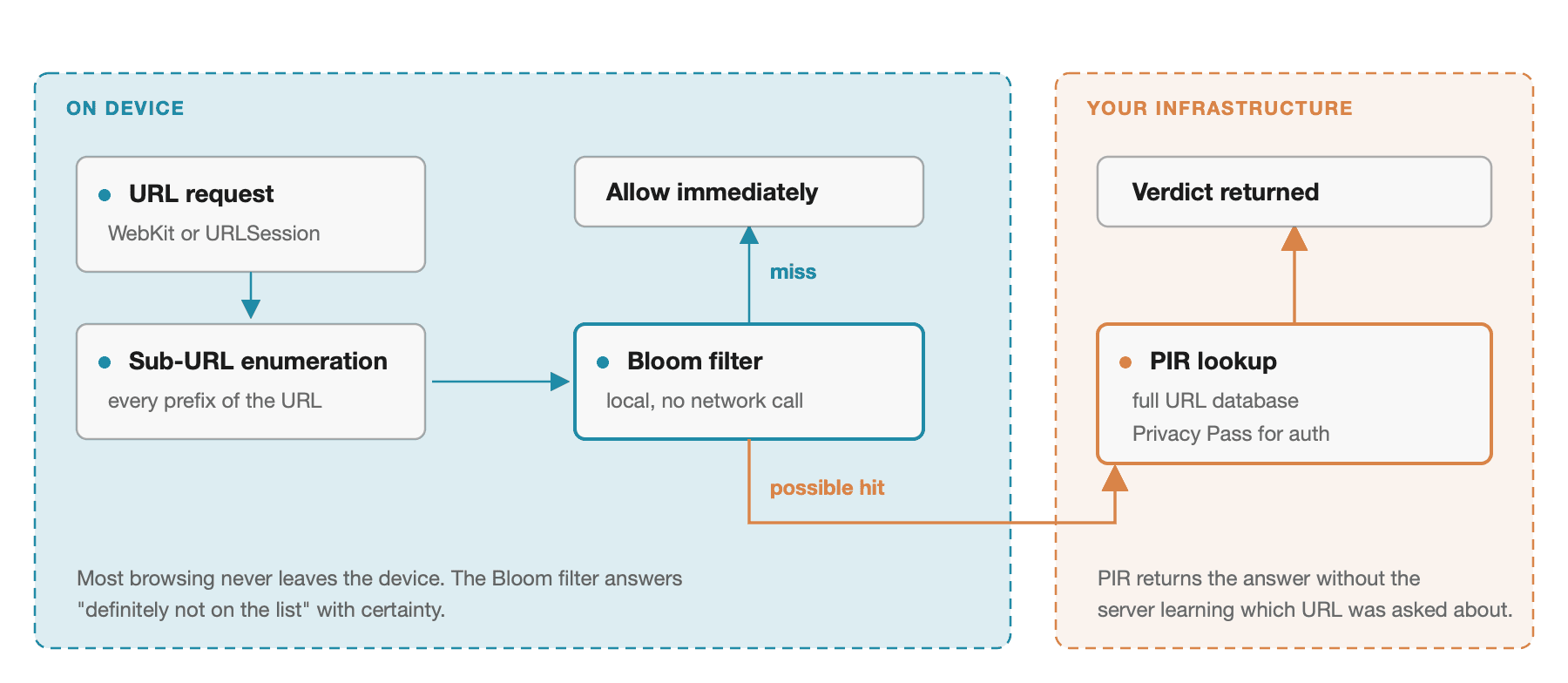
The two-stage URL filter. A Bloom filter on the device clears the overwhelming majority of URLs without any network call. Only a Bloom hit triggers a PIR query, and the PIR protocol means the server answers without learning which URL was asked about.
The system first enumerates every sub-URL of the request. For https://www.sub1.example.com/a/b/c?id=123#fragment that means 48 entries running from example.com through sub1.example.com:443/a/b/c?id=123#fragment, with www. stripped and port-qualified and trailing-slash variants included. Each is tested against a Bloom filter your extension supplies. A Bloom filter can say "definitely not present" with certainty and "possibly present" with a tunable false-positive rate, so the vast majority of ordinary browsing clears locally with no network traffic at all.
Only on a possible hit does the system query your off-device URL database, and it does so over Private Information Retrieval. PIR lets a client retrieve an entry from a database without the server learning which entry was requested. Privacy Pass supplies the authentication half: the client redeems an anonymous token that proves it is entitled to ask, without carrying an identity. Oblivious HTTP supplies the last piece, relaying the request through an Apple-hosted relay so your gateway never sees the client's IP address. PIR hides the query, Privacy Pass hides who is asking, OHTTP hides where they are asking from.
That is why this one is open to consumer apps while the content filter and the DNS proxy are restricted to supervised devices: the guarantee lives in the protocol rather than the deployment rules, so Apple doesn't need an MDM to enforce it.
Configuration lives in the host app:
import NetworkExtension
enum URLFilterSetup {
static func enable() async throws {
let manager = NEURLFilterManager.shared
try await manager.loadFromPreferences()
try manager.setConfiguration(
pirServerURL: URL(string: "https://pir.example.com")!,
pirPrivacyPassIssuerURL: URL(string: "https://issuer.example.com")!,
pirAuthenticationToken: "<token>",
controlProviderBundleIdentifier: "com.ignit.phishprotect.URLFilterControl"
)
manager.isEnabled = true
manager.shouldFailClosed = false
do {
try await manager.saveToPreferences()
} catch NEURLFilterManager.Error.configurationUnchanged {
}
}
}
shouldFailClosed is the decision to think hardest about. Fail closed and a PIR server outage blocks the user's browsing; fail open and an outage silently disables your protection. For a consumer phishing filter the argument for open is that a filter which bricks the internet gets uninstalled and then protects nobody. That's a product judgment rather than a security one, and a corporate deployment would reasonably choose the opposite.
The extension implements three methods, and only one of them does any work:
import NetworkExtension
final class URLFilterControlProvider: NEURLFilterControlProvider {
func start() async throws {}
func stop(reason: NEProviderStopReason) async throws {}
func fetchPrefilter(
existingPrefilterTag: String?
) async throws -> NEURLFilterPrefilter? {
let latest = try await BlocklistService.currentPrefilterTag()
guard latest != existingPrefilterTag else { return nil }
let bloom = try await BlocklistService.downloadPrefilter(tag: latest)
return NEURLFilterPrefilter(
data: .smallFilter(bloom.bytes),
tag: latest,
bitCount: bloom.bitCount,
hashCount: bloom.hashCount,
murmurSeed: bloom.murmurSeed
)
}
}
The tag comparison is the whole update protocol, and it's the same refresh pattern as Part 1's content blocker: the system calls this on the interval set by prefilterFetchInterval, which defaults to 86400 seconds and floors at 2700, and returning nil means nothing changed. A once-a-day default on a phishing blocklist is a product decision, not a detail. The first call must return a real one. PrefilterData has a second case, .temporaryFilepath, for filters too large to hand over as a Data blob, which is the one you'll want once the dataset is real.
The constraints that shape the work:
- You have to build the Bloom filter to spec. 32-bit FNV-1a and 32-bit MurmurHash3 with double hashing, and
bitCount and hashCount derived from your dataset size and chosen false-positive tolerance. Apple publishes the formulas and a Bloom filter tool. Get the parameters wrong and you either bloat the filter or push your false-positive rate up, which converts directly into PIR queries you're paying to serve.
- You have to operate three server-side pieces, not one. The PIR server that answers lookups, a Privacy Pass issuer that mints anonymous authentication tokens, and an Oblivious HTTP gateway that Apple's relay forwards to. Apple provides sample code and hosts the relay; the rest is infrastructure you now own, and it's why this API is not a drop-in.
- You have to register the configuration with Apple. The URL filter configuration is registered on the identity page in the developer portal. Plan for it rather than discovering it at submission: it's the same shape of gate as 5.4's approved-provider status.
- The user still has to approve it. Applying the configuration prompts the user to allow the filter, asks for the device password, and sends them into Settings to confirm. The same install-funnel cost DNS settings carries applies here too.
- No wildcards, no regex. Neither the Bloom filter nor the PIR database supports pattern matching. Every URL you want to block is an exact entry.
urlParsingConfiguration and urlParsingRegularExpression let you control which URL components get parsed, which is where flexibility comes from instead.
- Punycode your dataset. The system Punycodes URLs before parsing them, so an internationalized domain in your database that isn't already Punycoded will never match. Lookalike domains are central to phishing and many use non-ASCII characters, so this is not a footnote.
- iOS 26 and up. A hard floor.
For apps that use neither WebKit nor URLSession, NEURLFilter.verdict(for:) is the voluntary escape hatch - the app asks and honors the answer:
switch await NEURLFilter.verdict(for: url) {
case .deny:
return
case .allow, .unknown:
break
@unknown default:
break
}
Verdict has three cases, not two. .unknown means validation failed rather than that the URL is bad, so treating it as a block is a fail-closed choice: the same decision as shouldFailClosed, and worth making deliberately rather than letting a guard make it for you.
It's opt-in by definition, so it doesn't cover a hostile or indifferent app. It also isn't needed for most third-party browsers on iOS: they're WebKit-based, so they're already covered by the automatic path without doing anything. Where it earns its place is the case the DMA opened up, and Japan after it: a browser shipping its own engine and its own networking stack, which the automatic path doesn't reach. No vendor has shipped one on iOS yet, so this is a hedge against a future rather than a gap you can measure today.
The privacy inversion Apple designed around
Part 1's extensions were safe because they were blind. A content blocker hands Safari a JSON file and never learns what was loaded. An SMS filter gets two strings and can't persist them anywhere that ties back to the user. Neither could betray the user even if its developer wanted it to, and that structural guarantee is why Apple lets any app ship them.
A tunnel inspecting every packet inverts that completely. It would make whoever ships it the single point through which every one of their users' network requests passes, and every privacy commitment becomes a promise rather than a property. The URL filter gets the same reach without the inversion, because the protocol prevents its operator from reconstructing any individual user's browsing rather than a policy promising they won't.
iOS 27 adds a reportEndpoint that periodically POSTs the list of URLs the filter blocked, over the same OHTTP relay as the PIR traffic. It only works on supervised devices, so it's a managed-deployment feature rather than a consumer one, and it's the one channel where real URLs come back to you. Worth knowing it exists before someone proposes it as the telemetry answer.
Where this leaves the stack
Across both posts, the full picture for a consumer iOS app:
| Channel | Tool | Precision | Cost |
|---|
Safari and SFSafariViewController | Safari content blocker | Full URL patterns, declarative | Rule limit, no runtime logic |
| SMS from unknown senders | ILMessageFilterExtension | Sender and body only | User must enable, one filter per device |
Every WebKit and URLSession request | URL filter, iOS 26 | Full URLs, exact match | PIR server, Bloom filter pipeline |
| Name resolution, device-wide | DNS settings | Hostname only | You see all hostnames; an active VPN overrides it |
| Non-WebKit apps | NEURLFilter.verdict(for:) | Full URL, voluntary | Only works if the app cooperates |
| Everything else, pre-iOS 26 | Packet tunnel | Hostname only | Permitted by review, unsupported by engineering |
The recommendation: ship Part 1 properly and measure what's getting through before building any of this. Content blockers and SMS filtering are the two channels iOS gives you a first-party hook into, and they cost a fraction of anything in this post with none of the operational risk. If the gap that remains is real and measurable, the URL filter is the right way to close it on iOS 26 and up.
Below that line it doesn't exist, and this is the one place we'd argue with our own conclusion. If a large share of your users are still on iOS 18 or earlier, the URL filter protects none of them, and a packet tunnel is permitted, shippable, and one of the very few system-wide options that exists at all. What it can't be is the destination: a tunnel reads hostnames and never paths, so on the case that matters most, a phishing page on a compromised legitimate domain, it is blunter than the thing that replaces it. Treat it as a bridge with a scheduled end.
The assumption to abandon is that the privacy cost is the unavoidable price of covering more channels. It holds for the tunnel. It does not hold for the URL filter, and knowing which of the two you are building on is a decision to make before the first line of code rather than after.