On iOS, anti-phishing is never one feature. No single API covers the whole problem, so the job is matching the right Apple primitive to each surface and being clear about what's left uncovered. This first post is about the two stock content-filtering extensions we reach for first - Safari content blockers and SMS message filtering.
What they do, where they stop, and the code we actually ship. Part 2 picks up where they run out, down at the network layer.
Introduction
A user gets an SMS from a number they don't recognize. The message says their package is held at customs and links to a shortened URL. They tap it. Safari opens. The page looks legitimate enough, asks for a card to "release the parcel," and the next day the card is being used in another country.
This sequence has at least three points where iOS could have intervened: the SMS itself, the link Safari was asked to open, and the page Safari rendered. Apple provides a targeted extension point for the first two and partial coverage of the third. Outside Safari there is no built-in content-filtering extension point at all. A link opened in Messenger, in a social app's in-app browser, or in an email client's WKWebView is invisible to the two extensions this post covers. It is not unreachable in absolute terms: a system-wide VPN tunnel can still inspect the network traffic those apps generate, which is exactly the approach Part 2 takes. It is just out of reach of anything short of that.
In our hands-on experience, no single API covers the whole problem. Anti-phishing on iOS is a composition exercise: pick the right Apple-provided primitive for each surface, accept the gaps that can't be closed, and reach for heavier machinery only when the gaps actually matter.
This post is the practical guide we wish we'd had when we started. It walks through the two Apple-blessed extensions for content filtering, Safari content blockers and SMS message filter extensions, with the constraints, the trade-offs, and the code that goes with them. In Part 2 we'll cover what happens when those aren't enough and protection has to drop down to the network layer.
Phishing on iOS is a multi-channel problem
The instinct when someone says "we need anti-phishing protection" is to think of it as one feature. It isn't. Phishing reaches users through whichever channel happens to be unmonitored, and on iOS those channels have very different rules about who's allowed to see what.
Here's the rough map of where phishing links land and what iOS provides for each:
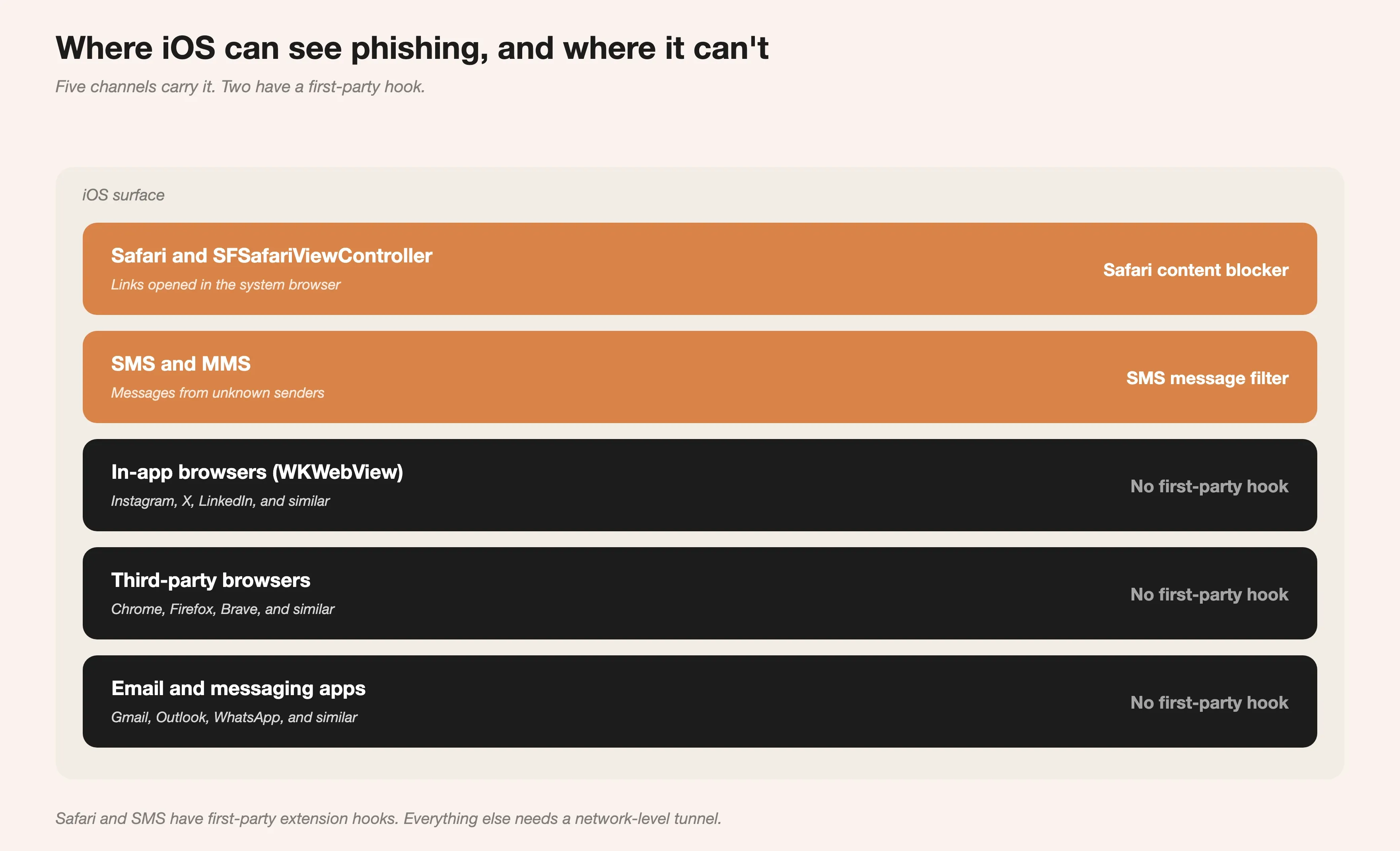
iOS phishing channels and their coverage. Safari and SMS have first-party extension hooks; in-app browsers, third-party browsers, and other messaging apps do not.
The two channels iOS gives us a hook into are also the two most common attack surfaces in consumer phishing campaigns. That's the good news. The bad news is that the rest of the surface, every third-party app that can open a URL, is invisible from a normal app's perspective. Closing that gap is what Part 2 is about. Before reaching for the bigger hammer, it's worth knowing exactly what the two stock extensions can and can't do.
Safari content blockers
Safari content blockers are a Safari App Extension that ships inside the iOS app and provides a list of rules Safari applies when loading pages. The defining property, and the reason Apple is comfortable letting them exist, is that the extension never sees the user's browsing.
The extension hands Safari a JSON file. Safari compiles it into an internal format and applies the rules to every page load. Extension code never runs on a per-request basis, never gets URLs, never gets page content. From a privacy standpoint this is exactly the property to want. From a flexibility standpoint, it rules out runtime decisions, which is the constraint that shapes everything else.
How the rule format actually works
Each rule is an object with a trigger and an action. The trigger describes which requests the rule applies to, the action describes what Safari should do. The grammar is small but more expressive than it first appears.
Here's a tiny blocklist with three rule types we use in production:
[
  {
    "trigger": {
      "url-filter": ".*",
      "if-domain": ["*known-phish.example", "*paypa1-secure.example"]
    },
    "action": { "type": "block" }
  },
  {
    "trigger": {
      "url-filter": "https?://[^/]+/wp-admin/.*\\.(php|html)\\?login="
    },
    "action": { "type": "block" }
  },
  {
    "trigger": {
      "url-filter": ".*",
      "if-domain": ["*shady-marketplace.example"]
    },
    "action": {
      "type": "css-display-none",
      "selector": ".checkout-form, [data-pay-button]"
    }
  }
]
The first rule blocks every request on a specific list of known phishing domains, the bread and butter of a blocklist-based filter. The second uses a URL-filter regex to block a pattern common in compromised WordPress installs. The third is the one that surprises people: content blockers can hide elements with CSS. We use this sparingly, but for sites that haven't been delisted yet and still serve known-bad checkout widgets, hiding the widget is sometimes more useful than blocking the whole page.
Test every rule on a real device before shipping. Safari silently drops rules it can't compile.
The 150,000 rule limit and what it forces
Safari caps the number of compiled rules per content blocker at around 150,000. That figure isn't in the API reference; it comes from Apple's Developer Technical Support on the developer forums, which note Safari raised the ceiling from 50,000 to 150,000. It sounds like a lot next to commercial phishing blocklists that routinely have hundreds of thousands of entries, many of them redundant once compiled.
A few things this constraint forces:
- Domain consolidation. One rule with
if-domain listing fifty domains is one rule, not fifty. Group aggressively.
- Wildcard discipline. A rule with
url-filter: ".*" and if-domain: ["*evil.example"] is far cheaper than fifty rules with explicit URLs on the same domain.
- More than one content blocker. iOS allows multiple content blockers per app. We've split a large blocklist across five extensions to get well past a single extension's ceiling. It works, but every extension is its own compile step and its own failure mode, so add them deliberately rather than by default.
The trade-off worth stating plainly: the rule limit isn't really a limit on coverage, it's a limit on how lazy the blocklist pipeline is allowed to be. A well-maintained 80,000-rule list outperforms a sloppy 200,000-rule one.
Keeping the blocklist fresh
Say the app was installed three weeks ago. A new phishing campaign launched yesterday. How do new rules reach Safari without an app update?
The host app fetches updated rules, writes them to the App Group container that both the host and the extension can read, then asks Safari to reload the extension. The reload call is what actually triggers Safari to re-read and recompile.
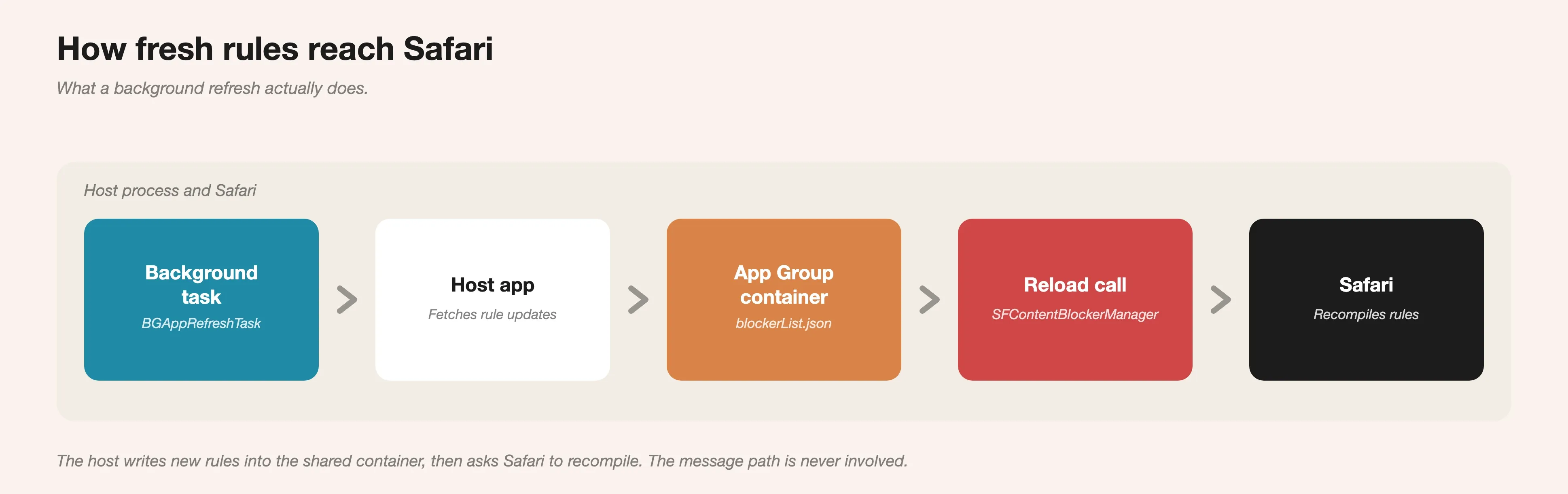
The blocklist refresh path. A background task wakes the host app on Apple's schedule; the host writes fresh rules into the shared App Group container, then asks SFContentBlockerManager to reload so Safari recompiles them.
import SafariServices
enum BlocklistError: Error {
case containerUnavailable
}
enum BlocklistUpdater {
static let contentBlockerBundleID = "com.ignit.phishprotect.ContentBlocker"
static let appGroupID = "group.com.ignit.phishprotect"
static func writeAndReload(rules: Data) async throws {
guard let container = FileManager.default
.containerURL(forSecurityApplicationGroupIdentifier: appGroupID)
else {
throw BlocklistError.containerUnavailable
}
let rulesURL = container.appendingPathComponent("blockerList.json")
try rules.write(to: rulesURL, options: .atomic)
try await withCheckedThrowingContinuation { continuation in
SFContentBlockerManager.reloadContentBlocker(
withIdentifier: contentBlockerBundleID
) { error in
if let error {
continuation.resume(throwing: error)
} else {
continuation.resume()
}
}
}
}
}
Two things to know. First, the reload can fail. Safari reports a compile error on the JSON, and the message is useful, so log it. Second, this is the right place to wire in BGAppRefreshTask so the list gets pulled on Apple's schedule instead of only when the user opens the app. We won't go deeper into background tasks here; the documentation is good and the integration is straightforward.
What content blockers can't do
The two limits that bit us hardest:
- Coverage is Safari only. Apps that open links in
SFSafariViewController (the in-app Safari sheet) inherit the rules, which is great. Apps that embed a WKWebView directly do not, and many social apps and email clients use a custom WKWebView-based in-app browser rather than the Safari sheet. Tapping a link in such an app opens it in that app's own webview, where the rules don't apply. (WKWebView can run the same rule grammar, but only via a WKContentRuleList the hosting app compiles for itself; one app can't reach another app's webview.)
- No runtime logic. There's no way to ask "is this URL suspicious based on its structure and what we know about its history" at request time. Everything is precomputed and declarative. Behavioural analysis needs a different tool.
These aren't bugs. Apple deliberately restricted the API to make the privacy story tenable. They also define the shape of the gap other tools have to fill.
SMS message filtering
A fairly unknown extension. ILMessageFilterExtension shipped in iOS 11 and has been expanded steadily since. It classifies messages from unknown senders into the categories shown in the Messages app's "Unknown Senders" tab. Once one is enabled, Messages routes incoming SMS and MMS from senders not in the user's contacts to the extension, and the extension decides what bucket they land in.
The filter has to be enabled explicitly in Settings, Apps, Messages, Unknown & Spam, and only one filter can be active at a time. So the install funnel is non-trivial, but for users who care about phishing the friction is worth it.
How ILMessageFilterExtension works
The extension runs in a heavily sandboxed process. By default it has no network access at all. The filtering decision is expected to happen offline, based purely on the sender and message content Messages provides.
Privacy is the first constraint here, not an afterthought. The extension cannot persist the message or the sender anywhere that ties them back to the user: it cannot write them to the App Group container the host app reads and cannot correlate a message with a known device or account. A classification goes back to Messages and nothing about that message is allowed to leave the sandbox. Every design decision below is downstream of that rule.
Here's a minimal handler:
import IdentityLookup
final class MessageFilterExtension: ILMessageFilterExtension,
ILMessageFilterQueryHandling {
func handle(
_ queryRequest: ILMessageFilterQueryRequest,
context: ILMessageFilterExtensionContext,
completion: @escaping (ILMessageFilterQueryResponse) -> Void
) {
let response = ILMessageFilterQueryResponse()
response.action = classify(
sender: queryRequest.sender,
body: queryRequest.messageBody
)
completion(response)
}
private func classify(sender: String?, body: String?) -> ILMessageFilterAction {
guard let body = body?.lowercased() else { return .none }
if containsKnownPhishURL(in: body) { return .junk }
if matchesShortenerPattern(in: body) && hasUrgencyLanguage(in: body) {
return .junk
}
if isLikelyPromotional(body) { return .promotion }
return .none
}
}
A few things worth flagging:
ILMessageFilterAction has more options than .junk and .none. .allow shows the message unfiltered; .promotion and .transaction route the message into the corresponding tab in Messages, which is useful: users keep their order confirmations findable without those messages cluttering the main inbox.- The completion handler must be called. If the extension hangs, Messages times out and falls back to delivering the message. Don't do expensive work here.
- Returning
.none means "not sure, treat this as a normal unknown-sender message." That's the right answer when confidence is low. False positives in junk classification damage user trust faster than a missed phish does.
The offline-first design is deliberate. Apple doesn't want the extension shipping users' messages off-device for classification without explicit opt-in. Which brings us to the part where that's sometimes necessary.
When offline isn't enough: the network capability
A message filter extension can defer a decision to a server, and the mechanism is simpler than it sounds. There is no networking entitlement involved. The messagefilter service is added to the app's Associated Domains, and an ILMessageFilterExtensionNetworkURL key is added to the extension's Info.plist pointing at an HTTPS endpoint. When the extension can't classify a message locally, it returns a deferred response instead of an action, and iOS itself makes the network call.
The privacy property that matters: iOS, not the extension, dispatches that request. The body is built from the same ILMessageFilterQueryRequest fields the system already had, the sender and the message body, and the extension never gets to add to it. The backend sees a message to classify, not a person. That constraint is the whole reason Apple is willing to allow a network hop at all, and it shapes what the backend can and can't be designed to do.
App Review scrutinizes the network path before these apps can ship, and wants to see a backend that does not log message contents, an Associated Domains entry configured correctly, and a justification in the App Review notes for why offline classification isn't sufficient.
The signal problem
It's worth being clear about what Apple provides here and what it doesn't. iOS does not classify anything. When handle(_:context:completion:) fires, the extension gets two pieces of data: the sender string and the message body. That's it. No device context, no user history, no information about prior messages from this sender, no telemetry from other users. Apple hands over a hook and two strings. Every layer of actual phishing judgement is something the team has to build.
Phishing SMS authors know how thin that input is and design around it. The patterns we see most often:
- Lookalike domains in shortener-wrapped URLs.
paypa1.com instead of paypal.com, dh1-customs.com instead of something believable.
- Urgency language in whatever language the user speaks. "Your account will be locked," "package held," "verify within 24 hours."
- Fresh sender numbers that have no public reputation because they were activated for this campaign yesterday.
The approach that held up for us is a cascade of cheap-to-expensive layers, ordered so the common cases never reach the costly one. First, every URL in the message is checked against an allowlist of known-good domains. If all of them are on it, the message is treated as safe and passed through. If not, the URLs are checked against a blocklist of known-bad domains; a hit there is enough to mark the message junk offline. Only when neither list is decisive does the message go to the deferred network path, where a backend makes the call using an LLM and a URL reputation service for domains with no local verdict. The backend only ever sees the sender and message body iOS forwards, never the user.
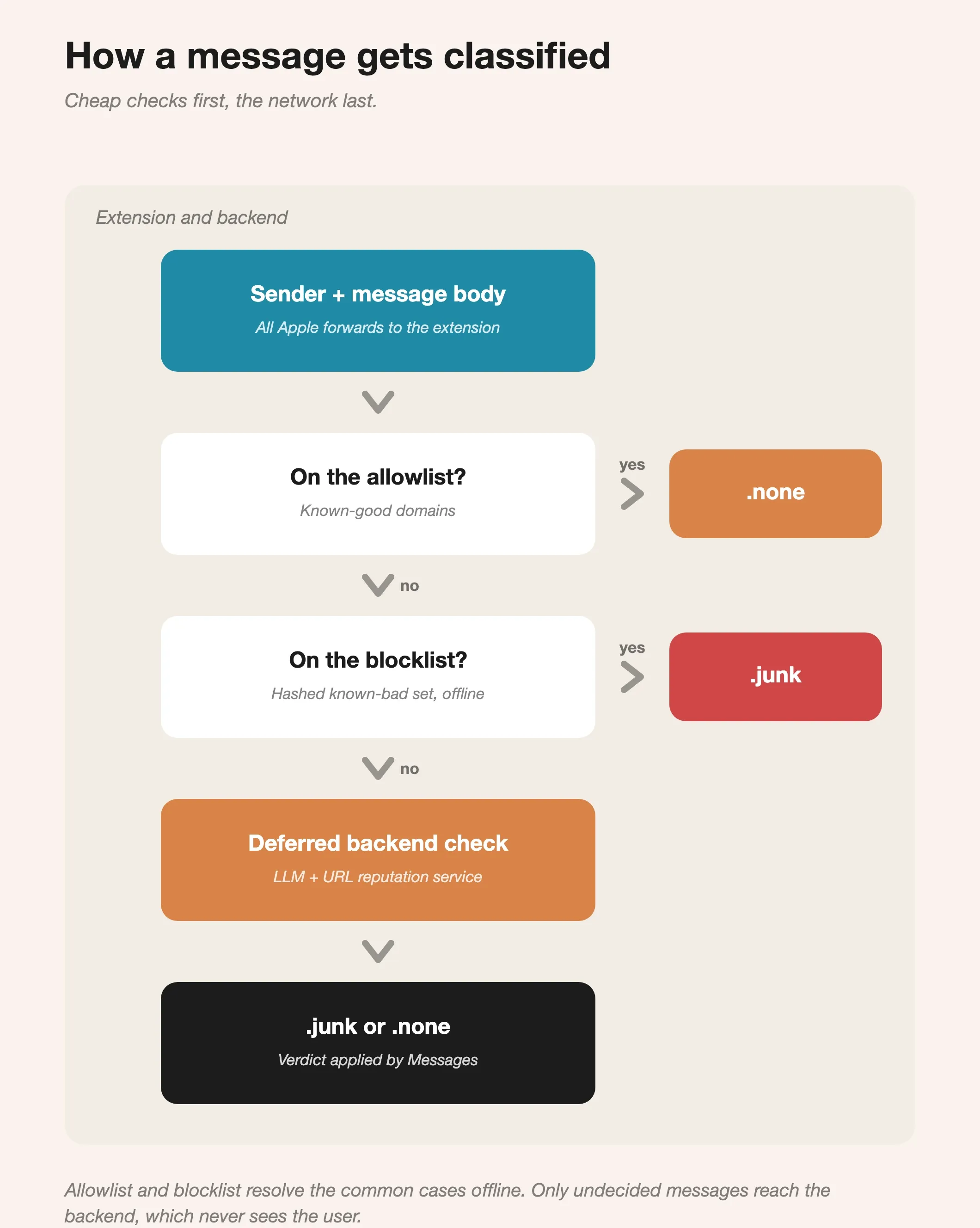
The classification cascade. Allowlist and blocklist resolve the common cases offline; only undecided messages reach the backend, which never receives anything that identifies the user.
What doesn't work is trying to reason about message intent from natural language with heuristics alone. The signal is too thin and the false-positive cost is too high, which is exactly why the undecided cases are worth deferring rather than guessing.
Treat the SMS filter as a high-precision, medium-recall tool. It should catch the obvious campaigns reliably and stay quiet on everything ambiguous. The ambiguous cases are what the deferred path is for.
The coverage gap
Putting both extensions together, we've covered Safari (and any app using SFSafariViewController) and SMS from unknown senders. For a real user, those are the two highest-volume phishing channels, and a well-built layered defense here is valuable.
But the coverage map from earlier in this post still has three big grey rectangles. Links tapped inside Instagram, X, or LinkedIn open in those apps' own webviews. Links in Gmail or Outlook open in those clients' own browsers. Chrome and Firefox on iOS use WKWebView under the hood, so our Safari rules don't reach them either. WhatsApp, Telegram, Signal: none of them route through Safari.
For a user who does most of their browsing in Safari and gets phishing primarily through SMS, the layered approach is sufficient. For a user who lives inside Instagram and Gmail, the layered approach catches a meaningful but limited fraction of the threat.
When layering is enough
The layered approach covers SMS and Safari, the two channels that carry the overwhelming majority of consumer phishing, at a fraction of the cost and operational risk of a system-wide VPN. Shipping it well and being honest about the remaining gap beats shipping a heavier thing badly.
When a product genuinely needs the channels the two extensions can't see, the protection has to move down to the network layer, and there's more than one way in. A NEPacketTunnelProvider routes traffic through an in-app filter. A VPN configuration paired with a custom DNS resolver blocks at name resolution. A NEDNSProxyProvider does the same on managed devices, where the device being supervised changes what's allowed. Each trades reach, battery, and operational cost differently.
Part 2 works through those options: what NEPacketTunnelProvider actually does, the architecture decisions that come up first, and the ones we're currently making on our own implementation.