How to design scalable, composable React data grids without turning tables into unmaintainable UI systems
Tables are one of the most common UI patterns in admin and dashboard applications, but they are also easy to underestimate. Even standard requirements like sorting, filtering, pagination, row selection, and async data loading introduce a meaningful amount of state and interaction complexity.
Building tables manually can work at first, but as requirements evolve, hand-rolled implementations often become large stateful components with duplicated logic and fragile abstractions. The opposite approach is adopting a fully integrated data grid, which can be productive but may introduce tradeoffs around customization, styling, and design-system integration.
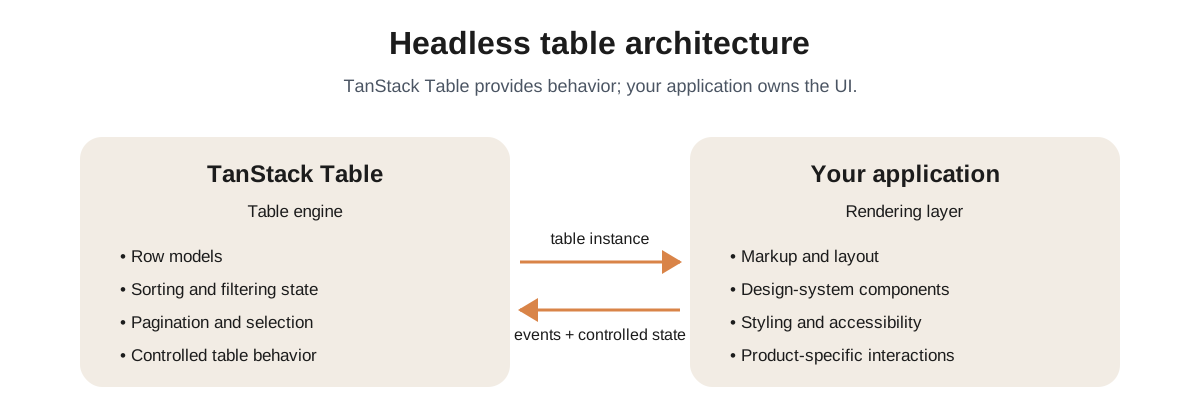
This is where TanStack Table becomes valuable. It does not try to own your UI layer. Instead, it provides a headless table engine responsible for table state and behavior while leaving rendering under your control.
Choosing the right table architecture
From an architectural perspective, the main question is who owns the table: the application, a UI-inclusive grid library, or a headless engine combined with your own design system.
Some libraries take ownership of behavior and presentation together. A headless library like TanStack Table takes ownership of table behavior while leaving rendering, styling, and product-specific composition to the application.
Building from scratch gives complete control over markup, styling, interactions, and data flow. (a similar build-versus-buy tradeoff appears across many technical decisions; we explored a similar decision framework in our article on choosing the right IoT platform strategy.) For very simple tables, that may be enough. But once requirements expand, complexity appears quickly. Sorting needs to handle different data types, filtering needs controlled inputs and debouncing, pagination needs to work with loading and selection states, and selected rows need stable identity so they do not break when pages, filters, or server responses change.
A fully integrated data grid takes the opposite approach. It provides behavior and UI together, which can be the right tradeoff for internal tools or products that need complex grid features quickly. The limitation appears when the table needs to fit into a broader frontend architecture. High-quality applications usually rely on a design system, and when a table library owns too much of the rendering layer, teams often end up overriding styles, replacing internal renderers, or accepting inconsistencies between the table and the rest of the product.
Headless architecture is valuable because it draws a cleaner boundary. The library owns difficult table behavior, while the application owns rendering, styling, composition, and product-specific interaction design. This is the same broader pattern used by libraries like Radix UI and Headless UI for dialogs, dropdowns, tabs, and menus. TanStack Table applies that idea to data tables.
A minimal setup shows the separation clearly:
const columns = [
  { accessorKey: 'name', header: 'Name' },
  { accessorKey: 'email', header: 'Email' },
]

const table = useReactTable({
  data,
  columns,
  getCoreRowModel: getCoreRowModel(),
})
The table instance acts as a state and behavior engine, while rendering remains under application control. That makes TanStack Table a natural fit for design-system-driven applications without forcing developers into predefined rendering constraints.
Designing composable table systems
One of the biggest frontend mistakes teams make is treating tables as single-purpose components. In reality, tables evolve continuously: they become searchable, sortable, filterable, server-driven, permission-aware, customizable, and sometimes virtualized.
Instead of building giant table components, TanStack Table encourages developers to separate concerns into reusable primitives: column definitions, rendering concerns, feature state, domain-specific behavior, and data fetching.
Column definitions can become a declarative configuration layer:
const columns = [
  {
    accessorKey: 'status',
    header: 'Status',
    cell: ({ row }) => <StatusBadge status={row.original.status} />,
  },
  {
    accessorKey: 'createdAt',
    header: 'Created',
    cell: ({ row }) => <DateCell value={row.original.createdAt} />,
  },
]
This keeps formatting and behavior centralized instead of scattering them across the UI.
State ownership is another important architectural decision. Sorting may need to sync with URL parameters, filters may need to persist across navigation, pagination may drive backend queries, and selection state may trigger bulk operations elsewhere in the application.
TanStack Table’s controlled state model supports this naturally:
const [sorting, setSorting] = useState([])

const table = useReactTable({
  data,
  columns,
  getCoreRowModel: getCoreRowModel(),
  state: { sorting },
  onSortingChange: setSorting,
  getSortedRowModel: getSortedRowModel(),
})
The key advantage is that TanStack Table does not force state ownership decisions on you. You can keep state local for small tables or move it into URL state, global state, or server state as requirements evolve.
Client-side vs server-side responsibilities
One of the most important architectural decisions in table-heavy applications is deciding which responsibilities belong to the client and which belong to the server. This is not only a frontend concern: if sorting, filtering, pagination, or search moves to the server, the backend also needs to expose APIs that can represent those operations cleanly.
Unless we're working with a very large dataset, client-side tables are often the simplest solution. The browser can handle sorting, filtering, pagination, and row transformations locally, keeping interactions responsive and backend implementations simpler. Modern browsers are powerful enough to handle surprisingly large datasets with decent performance.
TanStack Table is designed to scale up to 10s of thousands of rows with decent performance for pagination, filtering, sorting, and grouping.
TanStack Table Docs
Pagination guide
That does not mean client-side pagination is always correct. Very large payloads, expensive queries, memory constraints, and complex rendering still matter. The point is that the decision should be based on actual constraints rather than assumptions about scale.
Performance, pagination, and virtualization
The client-side vs server-side decision is often really a performance decision. If the bottleneck is fetching or querying data, moving work to the server may be the right answer. If the bottleneck is rendering too many DOM nodes, server-side pagination alone may not solve the problem. In that case, virtualization may be a better answer.
Virtualization, sometimes called windowing, renders only the rows currently visible in the viewport while preserving the experience of browsing a much larger dataset. TanStack Table integrates naturally with TanStack Virtual for this use case:
const rowVirtualizer = useVirtualizer({
  count: rows.length,
  getScrollElement: () => parentRef.current,
  estimateSize: () => 48,
})
Pagination, virtualization, and server-side data solve different constraints. Pagination limits how much data users interact with at once. Virtualization reduces rendering cost. Server-side operations reduce payload size and move expensive querying away from the browser.
When applications do need server-side behavior, TanStack Table still works well because table state is fully controllable:
const table = useReactTable({
  data,
  columns,
  rowCount: totalRowCount,
  getCoreRowModel: getCoreRowModel(),
  manualPagination: true,
  manualSorting: true,
  state: { sorting, pagination },
  onSortingChange: setSorting,
  onPaginationChange: setPagination,
})
That state can then drive API requests, often through TanStack Query:
const usersQuery = useQuery({
  queryKey: ['users', sorting, pagination],
  queryFn: () => fetchUsers({ sorting, pagination }),
})
There is no universally correct approach. Client-side tables are often fine for smaller datasets, server-side approaches become preferable when data volume or querying cost grows, and virtualization is useful when rendering cost is the main constraint.
Long-term maintainability
Performance is only one part of building sustainable table systems. The other part is whether the architecture remains understandable as tables grow across the application.
A common mistake is treating each table as a one-off component. That works for a while, but the same patterns usually appear repeatedly: column formatting, empty states, loading states, row actions, toolbar controls, filters, and API synchronization.
TanStack Table’s headless model makes it easier to extract those patterns without coupling them to a specific visual implementation. Teams can build reusable table primitives while still allowing individual screens to define their own columns, actions, and data-fetching behavior.
The same flexibility also means accessibility ownership stays with the application. TanStack Table can provide the state and behavior model, but teams still need to build accessible headers, controls, selection states, focus behavior, and keyboard interactions into their own components. Headless architecture gives control, but it does not remove responsibility.
This flexibility comes with tradeoffs. TanStack Table has a steeper learning curve than UI-first table libraries, and there is more upfront setup because developers are responsible for rendering and composition decisions themselves. For very small tables, a simpler solution may be more productive. If the hardest part of the project is polished table chrome, keyboard behavior, in-cell editing, or spreadsheet-like interactions, a more integrated grid may be the better tradeoff.
But once table complexity starts growing, the architectural flexibility of a headless approach becomes difficult to replace.
The real challenge is not simply adding features like sorting, filtering, or pagination. It is designing tables that remain maintainable as requirements grow across the application. TanStack Table helps by separating table logic from rendering, giving teams a composable foundation without locking them into a specific UI implementation.
When to use this approach
A headless table is a good fit when:
- The application already has a design system and tables need to match its components exactly
- Table state needs to live outside the table - in URL parameters, a global store, or driven by a query library
- Multiple screens share table patterns and a shared primitive layer would reduce duplication
- Requirements are still evolving and locking into a UI-opinionated library would create friction later
It is probably not worth the setup cost for a single simple table in a project with no design system and no plans for growth. In that case, a simpler integrated solution or a hand-rolled component may be a better solution.
Where to start
The TanStack Table documentation is well-structured. The core guide and the sorting and pagination guides cover most real-world requirements. From there, the TanStack Virtual docs are worth reading if the dataset is large, and TanStack Query pairs naturally once server-side state is involved.