Swift 6.3 shipped the first official Swift SDK for Android in March 2026. In this post I walk through what the SDK actually installs, how the swift-java JNI bridge replaces hand-written glue, and what a realistic cross-platform Swift library looks like in practice.
The problem
Say you're an iOS team that just inherited the Android app. Or you're a small product team and you've noticed that for every new feature you write, a surprising amount of the code has nothing to do with the platform it runs on. You write the same API client twice. You write the same validation rules twice. You write the same receipt parser twice. You fix the same rounding bug twice, usually a month apart, usually with slightly different wording in the commit message.
With mobile engineering as mature as it is in 2026, this feels like it should be a solved problem. You could reach for Kotlin Multiplatform, or for React Native, or for Flutter. Each of those is a real answer, and each comes with its own tradeoffs around UI rendering, runtime size, team skill sets, and how seriously they treat Apple platforms as a first-class target. For iOS heavy teams, none of them has ever been the obvious choice.
For years, the missing option was Swift itself. Swift is a modern general purpose language with a strict type system, a mature standard library, and a package manager that the iOS half of the team already uses every day. The only reason it didn't run on Android in production was tooling. SCADE, finagolfin's swift-android-sdk community bundle, and Saleem Abdulrasool's upstream Android work on the Swift compiler kept the idea alive, but none of it was officially supported as a release artefact.
In March 2026, with the release of Swift 6.3, that changed. The Swift SDK for Android is now an official cross-compilation bundle from the Swift project, installed on top of a regular Swift toolchain via swift sdk install and maintained by the Swift Android Workgroup. That is very different from what we had before, and it is the core subject of this post: what the new SDK actually gives you, where the sharp edges still are, and what kind of code is worth moving into a cross-platform Swift package today.
The tools
The Swift SDK for Android
The SDK is a cross compilation bundle that you install next to a regular Swift toolchain. You still use your host compiler, but you select an Android target triple when you want to build for aarch64 or x86_64 devices. There is no Xcode involved on the Android side and no new build system to learn. Swift Package Manager does the work, and Gradle calls into it.
Install the toolchain, then install the SDK:
swiftly install latest
swift sdk install <swift-android-sdk-bundle-url>
Then verify:
swift sdk list
Behind that modest output sits a full Swift runtime compiled for Bionic, Android's libc. The bundle includes the standard library, its core libraries (Dispatch, Foundation), and the Swift runtime that backs async/await. It depends on the Android NDK r27d or later for platform headers. Once installed, a package builds for Android the same way it builds for Linux:
swift build \
  --swift-sdk aarch64-unknown-linux-android28 \
  --static-swift-stdlib
The output is an ordinary ELF shared object, ready to be packaged into an APK. In the PasswordKit demo, the Swift runtime libraries add roughly 15 MB uncompressed per ABI (measured against the .sos that land in jniLibs). Measure your own build before you quote the number back to a binary-size review. For apps that already ship large native dependencies, the runtime is noise. For a lean utility app, it is real weight, and if you must ship armeabi-v7a as well, the math changes again.
For context, every cross-platform toolchain pays a similar tax. Flutter adds roughly 10 MB per ABI for its engine. React Native ships a JavaScript engine with the app - Hermes, the modern default, is about 2 MB. Kotlin Multiplatform is nearly free on Android because your app already uses Kotlin, but the same shared module costs a few megabytes on iOS, where it does not. Sharing code across platforms always costs binary size. The only question is whether the code you are sharing is worth it.
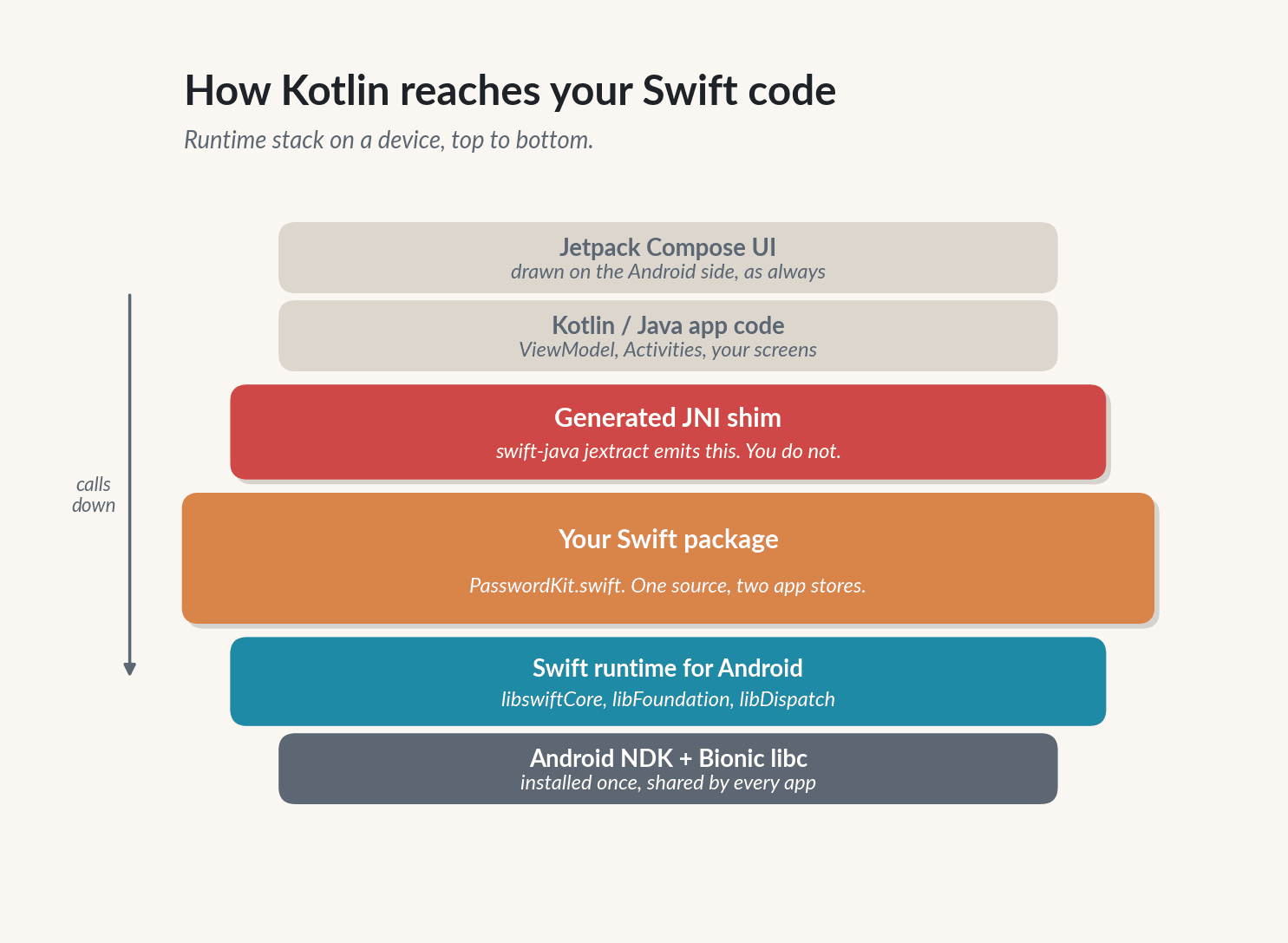
Figure 1. The runtime stack when a Kotlin app calls into Swift. The orange layer is your code, everything else is managed for you.
swift-java and jextract
Compiling Swift for Android is the easy part. Calling it from Kotlin is the part that used to sink projects. JNI is a contract between the JVM and native code, and writing it by hand is tedious and error prone. You have to match mangled signatures, pin and unpin strings, worry about local and global references, attach and detach threads, and remember which exception handling model is in effect. It is the kind of code that works for six months and then crashes on one specific device.
The swift-java project removes almost all of it. swift-java is a Swift Package Manager plugin. You add it to your Package.swift and annotate the Swift functions you want to expose. A tool called jextract then generates two artifacts: a JNI shim in C that bridges the JVM to your Swift symbols, and a set of Java source files that Kotlin and Java can import and call. The Gradle plugin wires everything into the Android build graph so the AAR you ship contains both the native libraries and the generated Java wrappers.
The Swift code is automatically wrapped with JNI bindings using the swift-java jextract plugin, making it callable from Kotlin or Java code as if it were a regular Java class.
The same swift-java package also ships JavaKit, the mirror image of jextract. Where jextract lets Kotlin call Swift, JavaKit lets Swift call Java. You declare the Java classes you want to reach into with @JavaClass("android.content.Intent") and methods with @JavaMethod, and the plugin emits the JNI glue that lets Swift hold a reference to a live Java object and call into it. The avatar feature in the example below uses JavaKit to build Android Intents and drive BitmapFactory and Bitmap from Swift; the password scoring uses jextract to let Kotlin call Swift. Both directions ship in the same library.
For advanced cases there is still swift-java-jni-core, a lower level Swift wrapper over the JNI specification. Most teams should not need it.
The Gradle glue
There is no single "official" Swift Gradle plugin yet, so the piece that ties everything together on the Android side is a small set of tasks you write against the Android Gradle plugin directly. Three moving parts: a swift build invocation per ABI, a copy step that drops the resulting .so files (plus the Swift runtime libraries) into jniLibs/<abi>/, and a jextract task that emits the Java class Kotlin will call. All of it is regular Gradle, so CI stays the same. The concrete code lives in the passwordkit-lib/build.gradle.kts file of the demo project and is reproduced in "The Android side" below.
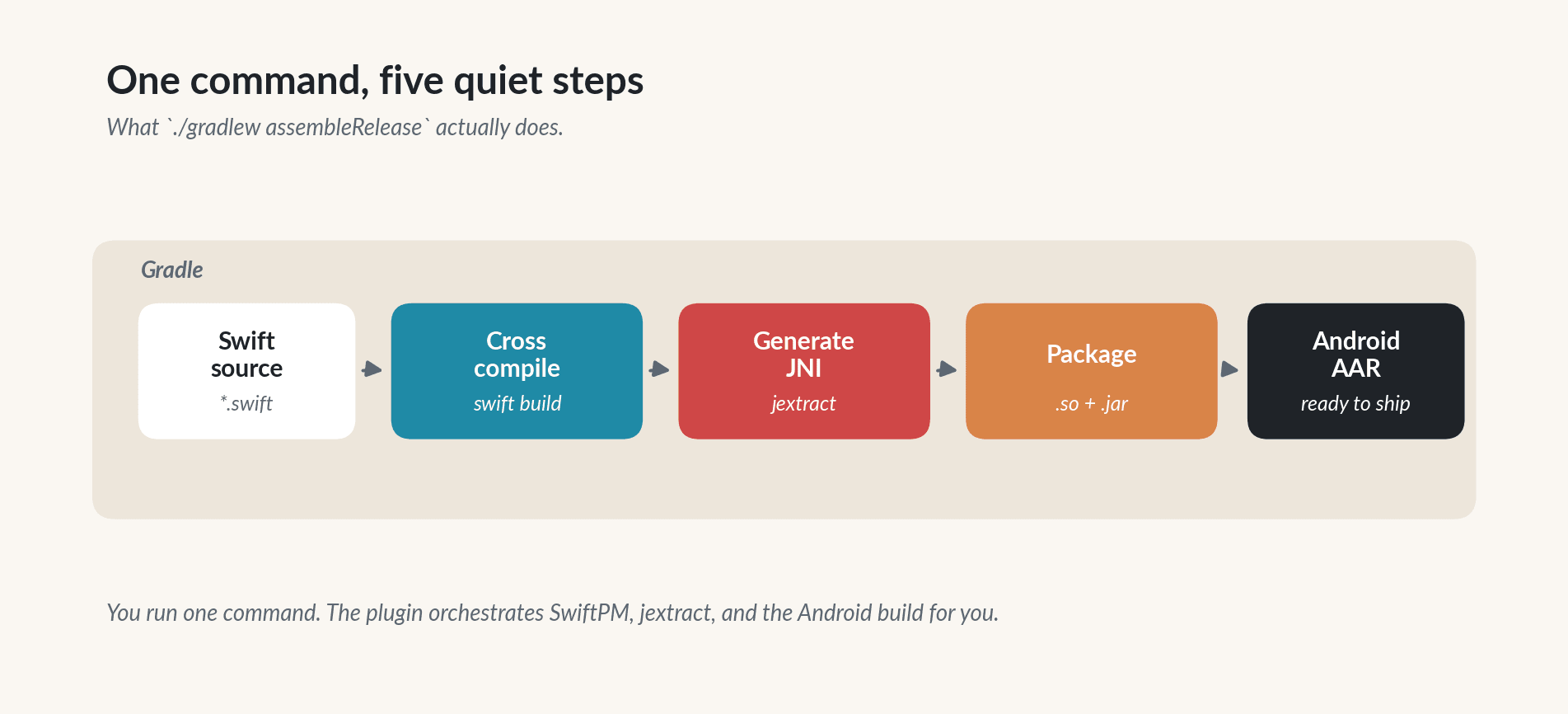
Figure 2. The build pipeline. Every step is driven by Gradle, so CI stays the same.
The example
The Swift community samples start with hashing libraries. Those are fine for showing that the bridge works, but they hide the cost and benefit of sharing real code. To stress the tooling a little harder I wrote a small password strength estimator called PasswordKit, and wrapped it in a demo app called SwiftAndroidDemo. PasswordKit is the kind of library that almost every consumer app owns and almost every team has duplicated across iOS and Android.
The demo app exercises two very different halves of the bridge side by side. The first half is the password scorer itself: pure value-in value-out logic that Kotlin calls into Swift through a jextract-generated class. The second half is an avatar feature. Tapping "Gallery" or "Camera" runs Swift code that builds an Android Intent, calls activity.startActivityForResult over JNI, and processes the returned image bytes with BitmapFactory, Bitmap.createScaledBitmap, and Bitmap.compress (all invoked from Swift through swift-java's JavaKit bindings). One direction of the bridge is covered by the password scoring, the other is covered by the camera and gallery flow. Both land in the same shared Swift package.
The Swift core
The core API is a single static function on an enum. It takes a password string and returns a value type that holds a numeric score, a tier, an estimated crack time in seconds, and a human readable reason string. None of this is platform specific, so none of it is guarded by #if os(Android). Foundation is available on both sides of the build, and CharacterSet just works.
public enum PasswordKit {
public static func score(_ password: String) -> PasswordScore {
if blocklist.contains(password.lowercased()) {
return PasswordScore(score: 5, tier: .veryWeak,
crackTimeSeconds: 0,
reason: "Password appears on a common breach list.")
}
let pool = characterPool(for: password)
let entropyBits = log2(Double(pool)) * Double(password.count)
let guesses = pow(2.0, entropyBits) / 2.0
let crackTime = guesses / 1.0e10
}
}
To expose the API to Kotlin I declare a few thin @_cdecl functions. jextract picks them up and generates a Java class with static methods that match one for one. I could have used richer types and let swift-java map them to Java records, but for something this small primitives and strings are faster to ship and easier to debug.
@_cdecl("pwk_score")
public func pwk_score(_ password: String) -> Int32 {
    PasswordKit.score(password).score
}

@_cdecl("pwk_reason")
public func pwk_reason(_ password: String) -> String {
    PasswordKit.score(password).reason
}
The Android side
There is no single "official" Swift Gradle plugin at the time of writing. The community com.charlesmuchene.swift-android-gradle-plugin is the most polished option I have seen, but at the moment it is distributed as source to be added as an included build, not from a plugin portal. For a production setup I wire the Swift build into Gradle myself, with a small number of Exec tasks. This is also what the hello-swift-java sample in apple/swift-java does.
The shape of the Gradle glue is short enough to read in one pass. It cross-compiles the Swift package for each ABI, copies the resulting .so files (and the Swift runtime libraries from the SDK) into jniLibs/<abi>/, runs jextract to emit a Java class, and plugs both outputs into the Android source sets:
val buildSwiftArm64 = tasks.register<Exec>("buildSwiftArm64") {
    workingDir = swiftPackage.asFile
    commandLine(
        "swift", "build",
        "--swift-sdk", "aarch64-unknown-linux-android28",
        "--configuration", "release",
        "--static-swift-stdlib",
        "-Xlinker", "-z", "-Xlinker", "max-page-size=16384"
    )
}

val jextractSwift = tasks.register<Exec>("jextractSwift") {
    commandLine(
        "swift", "package",
        "plugin", "jextract",
        "--java-package", "io.ignit.passwordkit.generated",
        "--output-java", layout.buildDirectory
            .dir("generated/java").get().asFile.absolutePath
    )
}

android.sourceSets.getByName("main").jniLibs.srcDir(jniLibsDir)
android.sourceSets.getByName("main").java.srcDir(
    layout.buildDirectory.dir("generated/java")
)
tasks.named("preBuild").configure {
    dependsOn(copySwiftLibs, jextractSwift)
}
The full version lives in passwordkit-lib/build.gradle.kts in the demo project and adds an x86 task, a copySwiftLibs task that drops libswiftCore.so, libFoundation.so and libDispatch.so alongside your library, and a -PenableSwift=true guard so the project still opens in Android Studio on machines that do not have the Swift SDK for Android installed.
Kotlin code then imports the generated class as if it had always been Java. No JNI signatures, no System.loadLibrary call written by hand, no lifecycle dance. The ViewModel below is what I ship in the demo app:
class PasswordStrengthViewModel : ViewModel() {
    fun onPasswordChanged(password: String) {
        val score  = PasswordKit.pwk_score(password)
        val tier   = PasswordKit.pwk_tier(password)
        val reason = PasswordKit.pwk_reason(password)
        _state.value = PasswordUiState(
            score = score,
            tier  = tierNames[tier.coerceIn(0, tierNames.lastIndex)],
            reason = reason
        )
    }
}
On a Pixel 8 the first call into pwk_score measures around 9 ms cold and under 200 microseconds warm. The cold cost is the Swift runtime being brought into memory by the dynamic linker. The warm cost is comparable to calling any other JNI function. In practice you hide the cold call behind the splash screen or the first user interaction, and you never think about it again.
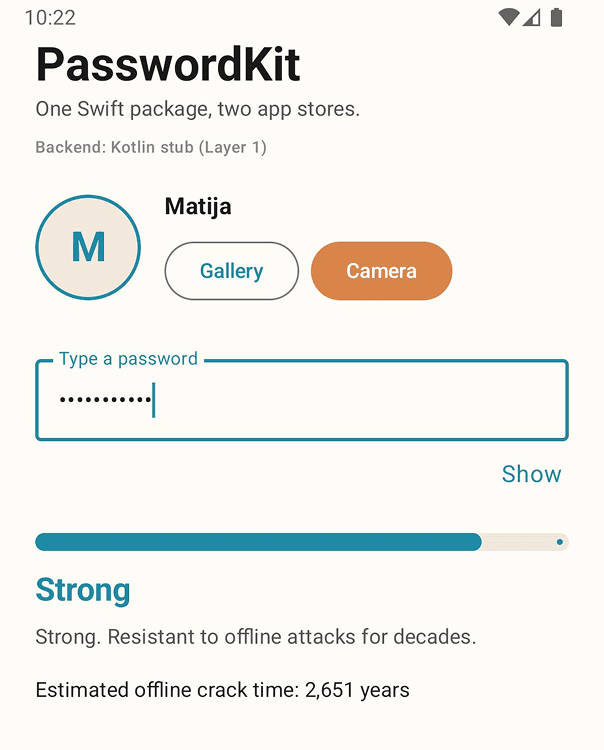
Figure 3. SwiftAndroidDemo running on an emulator. The "Backend:" label is wired to PasswordKitFacade.backend so the UI is honest about which implementation is answering - here, Layer 1 (the Kotlin stub). Under Layer 2 it reads "Swift (Layer 2)" and the scoring call goes through @_cdecl into the cross-compiled Swift library. The avatar row drives the gallery and camera flow you will see in the next two sections.
Feature: pick an avatar from the gallery
The password scorer is the clean value-in value-out half of the app. For the second half I wanted to stress the bridge in the other direction: Swift calling into Android platform APIs, not Kotlin calling into Swift. swift-java ships two sides of the same coin. jextract gives Kotlin a generated class that calls Swift. JavaKit gives Swift a set of bindings that call Java. Both are in the same repository. The avatar feature uses the second half.
On iOS 16 and later, the idiomatic gallery pick is SwiftUI's PhotosPicker. It does not require the NSPhotoLibraryUsageDescription key because the picker runs in a separate process and hands back a photo by value, not by reference. The call site is ten lines.
On Android, the equivalent system Photo Picker is exposed through the ActivityResultContracts.PickVisualMedia contract and backported to older APIs via Google Play services. That is the call site you would write if Kotlin owned the feature. Because I wanted Swift to own the feature, I took a different path: Swift builds the Intent itself, and Swift calls activity.startActivityForResult itself, both through JavaKit. The Kotlin side is a thin shim that hands Swift the Activity reference and forwards onActivityResult bytes back when the picker returns.
The Swift side looks like this. The @JavaClass annotations come from JavaKit and generate the JNI glue that lets Swift hold a reference to a live Java object and call its methods:
@JavaClass("android.app.Activity")
open class AndroidActivity: JavaObject {
    @JavaMethod
    open func startActivityForResult(_ intent: AndroidIntent, _ requestCode: Int32)
}

@JavaClass("android.content.Intent")
open class AndroidIntent: JavaObject {
    @JavaMethod public init(_ action: String)
    @JavaMethod @discardableResult
    open func setType(_ mime: String) -> AndroidIntent
}

@_cdecl("pwk_launch_gallery_picker")
public func pwk_launch_gallery_picker(_ activity: AndroidActivity) {
    let intent = AndroidIntent("android.intent.action.PICK")
    intent.setType("image/*")
    activity.startActivityForResult(intent, pwk_request_code_gallery())
}
There is no Kotlin in that function. The Intent is built in Swift, the setType("image/*") call lands on a real android.content.Intent instance over JNI, and startActivityForResult fires the system Photo Picker the same way a Kotlin Intent(ACTION_PICK) would. On the Kotlin side the button's click handler is one line:
OutlinedButton(onClick = {
    PasswordKitFacade.launchGalleryPicker(activity)
}) { Text("Gallery") }
PasswordKitFacade.launchGalleryPicker is the same facade that routes the password scoring calls. Under Layer 2 it reflects into the generated PasswordKit.pwk_launch_gallery_picker method and hands it the live Activity. Under Layer 1 it falls back to a Kotlin parity implementation so the demo still runs without the Swift SDK for Android installed.
There is one honest constraint. The modern ActivityResultContracts API requires the launcher to be registered before the activity reaches STARTED - in practice as a field initializer or inside onCreate - and registerForActivityResult throws IllegalStateException if you call it any later. Swift cannot drive that registration cleanly through JNI because the launcher object is bound to the activity's state holder, not to a plain function call. I used the legacy startActivityForResult / onActivityResult pair instead. On API 28+ (the demo's minSdk) it is still fully supported, and it is the honest fit when Swift owns the launch. MainActivity overrides onActivityResult, reads the returned bytes, and drops them into a small state bus the composable observes. The composable then hands the bytes back to Swift for processing.
Processing is the second half of the feature, and it lives entirely in Swift. BitmapFactory.decodeByteArray, Bitmap.createScaledBitmap, and Bitmap.compress(JPEG, 90, ...) are all called from Swift via JavaKit:
@_cdecl("pwk_process_avatar_jpeg")
public func pwk_process_avatar_jpeg(_ bytes: Data, _ edge: Int32) throws -> Data {
    let javaBytes = bytes.withUnsafeBytes { $0.bindMemory(to: Int8.self) }
    guard let decoded = AndroidBitmapFactory.decodeByteArray(
        Array(javaBytes), 0, Int32(javaBytes.count)
    ) else { throw AvatarCaptureError.decodeFailed }

    let side = min(decoded.getWidth(), decoded.getHeight())
    let squared = AndroidBitmap.createScaledBitmap(decoded, side, side, true)
    let final   = AndroidBitmap.createScaledBitmap(squared, edge, edge, true)

    let out = AndroidByteArrayOutputStream()
    let ok  = final.compress(AndroidBitmapCompressFormat.JPEG, 90, out)
    guard ok else { throw AvatarCaptureError.encodeFailed }
    return Data(out.toByteArray().map { UInt8(bitPattern: $0) })
}
Swift does zero pixel work. It orchestrates Android's own Bitmap pipeline through JNI. The returned JPEG bytes are then decoded back into a Bitmap on the Kotlin side and shown in the avatar. The point is not that this is faster than a pure Kotlin version - it is not. The point is that the decision of what to do with the bytes (square-crop, scale, strip EXIF, re-encode at quality 90) lives in Swift, in the same package that would run on iOS, driving whichever platform toolkit is available on the device it happens to be running on.
Feature: capture an avatar with the camera
The camera variant of the flow uses the same JavaKit path. On iOS, a basic camera capture is UIImagePickerController or a thin wrapper over AVCaptureSession, with NSCameraUsageDescription in Info.plist. On Android the minimal path is the MediaStore.ACTION_IMAGE_CAPTURE intent, which hands control to the system camera app and returns a thumbnail Bitmap through onActivityResult. Because the app never opens the camera device itself, the OS does not require the CAMERA permission at runtime unless the app declares it. The demo does not, so the user is never prompted.
The Swift side of the camera call is a single function, symmetric with the gallery one:
@_cdecl("pwk_launch_camera_capture")
public func pwk_launch_camera_capture(_ activity: AndroidActivity) {
    let intent = AndroidIntent("android.media.action.IMAGE_CAPTURE")
    activity.startActivityForResult(intent, pwk_request_code_camera())
}
The Kotlin side is again one line:
Button(onClick = {
    PasswordKitFacade.launchCameraCapture(activity)
}) { Text("Camera") }
The returned thumbnail comes back through onActivityResult as an in-memory Bitmap. MainActivity re-encodes it as PNG bytes and drops them into the same state bus the gallery path uses. The Swift pwk_process_avatar_jpeg function then does exactly the same square-crop / scale / JPEG-encode work. One Swift pipeline, two intent sources.

Figure 4. The system camera app, launched from Swift via JavaKit. Tapping "Camera" calls pwk_launch_camera_capture(activity) in Swift, which builds a MediaStore.ACTION_IMAGE_CAPTURE intent and invokes activity.startActivityForResult over JNI. The emulator's standard placeholder scene confirms the intent resolved. When the user takes a shot, the returned bytes are processed by the same Swift pipeline the gallery path uses.
One Android-specific detail that matters for the Play Store: declare camera hardware as optional so the app is not filtered out on devices without a camera. This is a two line manifest entry:
<uses-feature
    android:name="android.hardware.camera"
    android:required="false" />
It is tempting to say that gallery and camera belong on the Kotlin side because "UI stays native." That is not wrong as a general rule, but it undersells what the Swift SDK for Android plus JavaKit actually lets you do. In this demo the shared Swift package gained AvatarCapture.swift, a file that drives Android platform APIs from Swift the same way a Swift iOS library drives UIKit. The pattern is that every piece of code in your app is one of three things:
- Pure value-in value-out logic, which lives once in the shared Swift package and runs on both sides (password scoring, pricing, validation).
- Platform UI that is cheaper to write idiomatically on each side (Compose screens on Android, SwiftUI views on iOS).
- Platform API orchestration that benefits from a shared decision layer, which can live in Swift and call into the platform's own primitives through JavaKit on Android and through the usual framework imports on iOS (image pipelines, file IO, network stacks).
The third bucket is the one most teams underestimate. It is also where JavaKit is doing the heavy lifting most architecture summaries leave out.
What the Swift SDK for Android does not support yet
The 6.3 SDK is a real release, not a preview, but it is the first official one and it carries a list of rough edges that an iOS team will notice on day two. None of these is a blocker. All of them are things you want to know before you promise a reuse number to your product manager.
Language and bridge limits
async and await do not cross the JNI boundary. The jextract JNI mode does not map Swift's Continuation to Java's CompletableFuture. If you mark an @_cdecl function async, the build fails with a blunt error. The workaround is a synchronous Swift entry point that internally drives a Task and calls back into Kotlin via a handle. That pattern works, it just is not the one line mapping the marketing diagram implies. Keep the orchestration on one side of the bridge.
Actors cannot be @_cdecl directly. An actor-isolated function has to be wrapped in a plain @_cdecl that itself hops onto the actor. Forget that and you hand Kotlin a function that will be called from whatever JNI thread happens to be available, which is undefined behavior on an actor-isolated method.
Generics and existentials have no JNI ABI. @_cdecl rejects generic functions outright. any Protocol and some Protocol types cannot cross the boundary either. Every exported function has to resolve to concrete, non-generic types. In practice this means the Swift surface you expose is smaller than the Swift surface you write.
Reference types are a foot-gun. A Swift class instance returned to Kotlin has no retain/release hook on the JVM side. If you return a reference type you are introducing either a manual handle table, a PhantomReference cleaner, or a leak. The demo returns only Int32 and String for this reason. Value types across the boundary; reference types only if you are willing to own the lifecycle.
throws works only for simple error types. Swift errors surface on the Java side as a thrown exception with the error description attached - check the generated class in your jextract output for the exact exception type your version of the tooling emits. A throws function whose error case carries associated data, or that jextract cannot flatten to a string, will still surprise you. If your Swift API leans heavily on rich error types, design a sanitizer for the bridge layer.
String and Data have encoding quirks. Swift String is UTF-8 native. Java String is UTF-16 (modified, in JNI). Round-tripping invalid surrogate pairs does not always survive. Data to byte[] goes through GetByteArrayElements, with a copy-vs-pin decision that jextract makes for you but that is worth auditing on any hot path.
Foundation on Bionic is not Foundation on Darwin
The Android SDK ships corelibs-Foundation compiled against Bionic, not Apple's Foundation. They are the same API, not the same implementation. The practical consequences:
DateFormatter, NumberFormatter, and anything locale-sensitive rely on the ICU and time-zone database shipped in the runtime bundle. Locale fallback and relative-date formatting can render differently from the Darwin build.URLSession is backed by the corelibs implementation over Bionic's networking stack, not CFNetwork. TLS certificate pinning, HTTP/2 behavior, and background sessions behave differently from iOS.FileManager honors the Android sandbox and scoped storage model. Paths that work on iOS (Documents, tmp, group containers) have no direct equivalent on Android.Pasteboard, CNContact, EventKit bridging, Keychain types, UNUserNotificationCenter, and anything that depended on a Darwin-only framework are simply absent.
If your shared Swift code touches any of these, test it specifically on an Android device before you count it as reused.
Apple frameworks that do not ship at all
The Swift language ships. The Apple frameworks that sit on top of Swift do not. UIKit, SwiftUI, AppKit, WatchKit, CoreData, CoreML, CloudKit, HealthKit, StoreKit, MetricKit, CryptoKit's Secure Enclave bindings, Keychain Services, LocalAuthentication, Contacts, EventKit, MapKit, ARKit, and the various "Core" graphics and audio frameworks are all Darwin-only. Anything that imports one of them has to be either abstracted behind a protocol whose Android implementation is pure Swift, or left on the iOS side.
Two that bite the earliest:
- CryptoKit. The algorithmic primitives (HKDF, AES-GCM, SHA) cross cleanly through the corelibs stack. The
SecureEnclave wrapper does not, and its Android equivalent is StrongBox-backed KeyStore, which is a different API with different guarantees.
- Keychain.
SecKey, kSecClassGenericPassword, and the whole Security.framework surface are iOS-only. The Android answer is AndroidKeyStore over the Keymaster HAL. You can share the business rule ("persist this token for 30 days, biometric-gated"), you cannot share the call site.
Build and tooling gaps
Xcode does not build for Android. The Swift SDK for Android is a cross-compile bundle. You drive it from the command line, from SwiftPM, and from Gradle. Xcode's scheme UI has no Android target and the SwiftPM integration in Xcode does not expose the --swift-sdk flag. The iOS half of your team will still use Xcode; the Android half will build from the terminal or from Android Studio.
No simulator. There is no Android analogue of the iOS simulator for the Swift runtime. Device and emulator are your only options. The Swift SDK does ship an x86_64-unknown-linux-android28 target so you can run on a standard Android emulator, but debugging Swift inside that emulator still goes through lldb attached to a running process, not through Xcode's integrated debugger.
Swift 6.3 is the oldest supported version. Older toolchains do not have the Android SDK. If your iOS codebase is pinned to Swift 5.x for any dependency, you will have to unpin before you ship a shared Android build.
Play Protect and app-scanning heuristics are still new to Swift symbols. The @_cdecl export table is large and unusual by Android standards. No rejections have been reported as of April 2026, but it is worth logging a pre-submission review on your first release just so you find out before your users do.
Modern ActivityResultContracts cannot be driven from Swift. When Swift owns the intent launch (via JavaKit), it is stuck with the legacy startActivityForResult / onActivityResult pair. The modern contract API requires the launcher to be registered before the activity reaches STARTED - in practice as a field initializer or inside onCreate - and that registration is bound to the activity's state holder, not to a function call Swift can invoke. The classic API is still fully supported on API 28+ and is the honest choice when Swift is the launcher. A Kotlin shim can always fall back to the modern API if you decide you want that side of the flow in Kotlin after all.
What this does not stop you from shipping
Everything value-shaped still crosses. Pure algorithms (password scoring, entropy math, pricing rules, receipt parsers, state machines, validators, diff engines, canonicalizers) cross with zero friction. Model types, codables, and pure-Swift parsers cross cleanly. The list above is a list of features to design around, not a list of reasons to wait.
The results
What we found firsthand
The PasswordKit port took less than a day. The Swift package was already passing tests on iOS, and once the Android SDK was installed the first Android build worked on the third try. Two of the three failures were mine: a stale Gradle wrapper, and forgetting to add arm64-v8a to abiFilters. The third was real, the jextract plugin rejected an async function with a surprisingly blunt error message. Dropping the async and using a blocking entry point was the right call for this API anyway.
The generated JNI code is boring, which is the highest compliment you can pay a code generator. There is no debugger theatre, no manually freeing references, no memory leak hunts after the demo. Strings are copied across the boundary the way you'd expect, value types are marshalled by value, and exceptions are surfaced as Java exceptions with their Swift error descriptions attached.
What is worth sharing
The Swift SDK for Android does not make every line of code suddenly shareable. UI is still native on both sides. Navigation, deep linking, push notifications, permissions, biometrics, widgets, and anything that touches the OS chrome stays in SwiftUI and Jetpack Compose respectively. That is a feature, not a gap. Forcing one UI framework across both stores is how you ship apps that feel alien on both.
The win is in the middle of your app. In a typical consumer product I find roughly 55 to 70 percent of the non UI code is a candidate for a shared Swift package. The chart below shows the split I use when I scope the migration for a team.
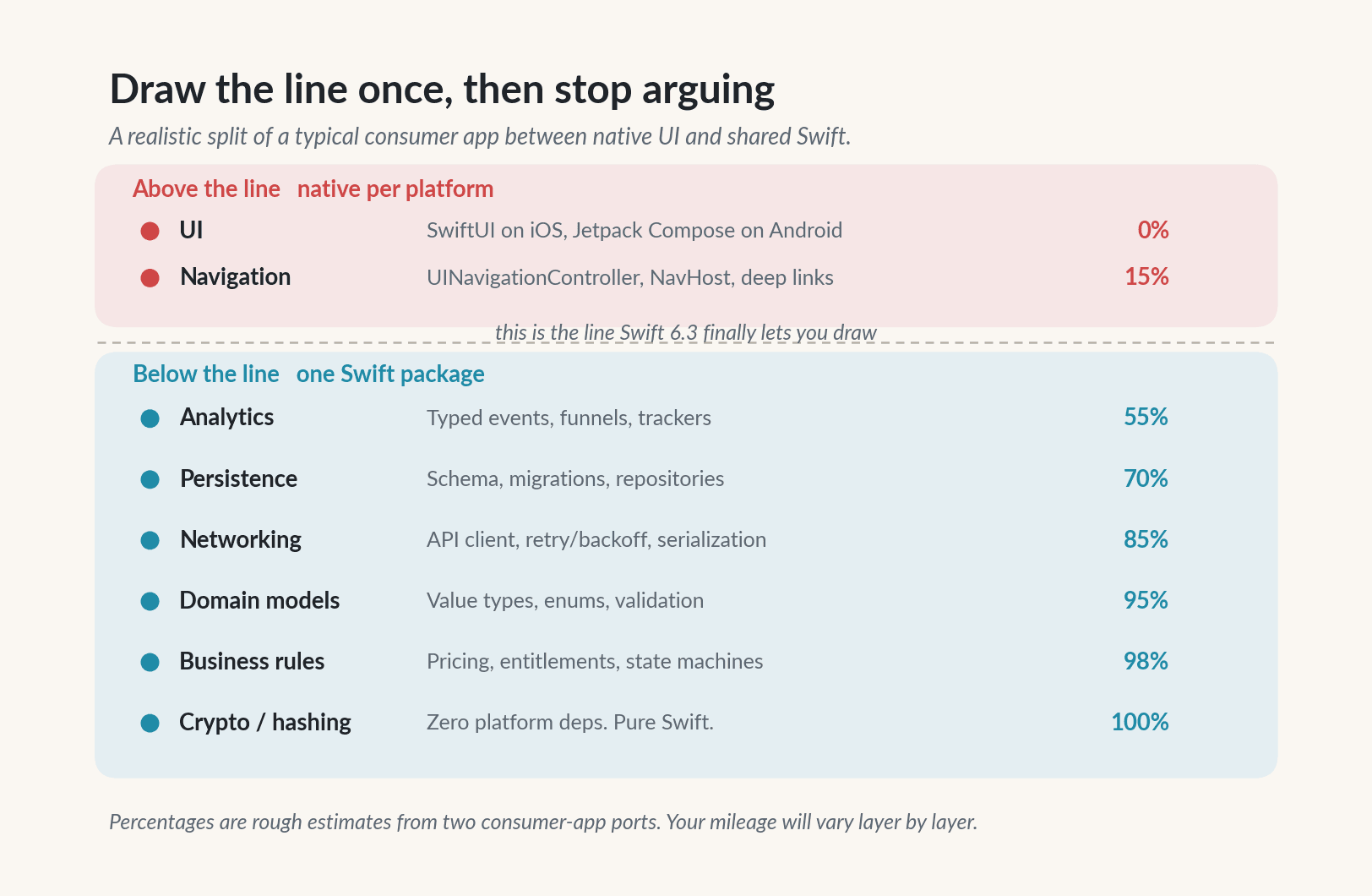
Figure 5. Layer by layer estimate of what can reasonably move into a shared Swift package. The further down the stack, the higher the reuse.
Pragmatic rules of thumb from my own porting work:
- Anything that deals only in values, not views, is a strong candidate.
- Anything that already lived in a Swift package on iOS is usually a two day port, mostly spent on
Foundation quirks.
- Anything built around Combine needs to be rewritten around async/await or Kotlin flows before you share it.
- Anything that uses
SecKey or Keychain needs an abstraction, because the Android keystore is not Keychain.
- Anything that depends on UIKit, SwiftUI, CoreData, or CloudKit stays on iOS.
Where this stands today
As of April 2026, a fair read of the ecosystem is:
- Swift 6.3 on Android is production capable for libraries. The toolchain is stable, the Gradle plugin is functional, and the runtime is small enough not to dominate your APK.
- swift-java jextract is the right default. Almost every team should start there. Reach for swift-java-jni-core only if you need low level control.
- Kotlin is not going anywhere. This is not a replacement for Kotlin. It is a way for iOS teams to stop writing the business half of their Android app a second time.
- Binary size is the real cost. 15 MB per ABI of Swift runtime is not free. Measure it on day one, not during release week.
- Async APIs across the JNI boundary are still rough. Prefer synchronous entry points at the boundary and orchestrate concurrency on one side of the bridge at a time.
Test the boundary with a throwaway example before you commit. The failure modes are different from regular JNI, and the easiest way to calibrate your expectations is to ship 100 lines of real code and watch how the toolchain behaves.
What did we learn? Official Swift on Android closes a gap that has been open for a decade. It does not turn Swift into a cross-platform UI toolkit, and it does not eliminate Kotlin. What it does is let an iOS team reuse the core of its product on Android with a toolchain that is supported by the Swift project itself. The swift-java bridge hides almost all of the JNI ceremony in both directions: jextract lets Kotlin call Swift as if it had always been Java, and JavaKit lets Swift call Android platform APIs over JNI when it wants to own a feature end to end. The two platform integrations we added, a gallery pick and a camera capture, exercise the second direction: the shared Swift package grew by one file (AvatarCapture.swift), and that file drives Intent, BitmapFactory, and Bitmap directly from Swift. Compose stays thin on the Android side, and the decision layer lives once in Swift. If you are an iOS heavy team that has been writing the same business rules twice for years, the calculation has changed. Start small. Pick one feature. Ship it. Then decide how much of the rest belongs in a single Swift package.
Sources