Multi-AZ protects a database within a single AWS Region. This test deploys Aurora PostgreSQL across the Ireland and Frankfurt Regions to see what changes when the recovery boundary extends beyond one Region.
The starting point was a practical question: if the AWS Region in Ireland became unavailable, how quickly could the same database become available from Frankfurt? Multi-AZ does not answer that question because it provides protection within a single Region.
The comparison came down to Aurora Global Database and a standard RDS cross-Region read replica. They look similar in a diagram, but they lead to very different recovery procedures.
The hands-on test used Aurora PostgreSQL Global Database across Ireland and Frankfurt. The Terraform apply completed successfully, and both regional clusters reached Available. Standard RDS for MySQL remains in the article as a simpler alternative for an existing RDS workload.
Why test Aurora Global Database
Before writing Terraform, the choice came down to one key difference. Aurora connects regional clusters into one managed global database, while standard RDS creates an asynchronous replica of the source instance in another Region.
Aurora was the better subject for this test because it includes a managed switchover and failover model. When the requirement is only a remote read copy for an existing MySQL database, the simpler RDS replica is the better starting point.
The problem to solve
The goal was not to replace Multi-AZ. It was to add another layer for a Region-wide outage, lower-latency reads in a second geography, and a secondary cluster that could become the writer if necessary.
Aurora Global Database provides that model: one writer cluster and one or more read-only clusters in other Regions, with cross-Region replication handled by Aurora's storage layer.
Limits and sizing decisions
Aurora Global Database is more opinionated than a standard Aurora cluster. It supports one primary cluster with one writer and up to 10 secondary clusters, each in a different AWS Region. Every secondary Region also reduces by one the maximum number of Aurora Replicas that can be added to the primary cluster. Engine, engine version, and Region support must be checked before building the topology, and cluster names must be unique across all Regions.
For provisioned compute, Aurora Global Database requires memory-optimized DB instance classes, with db.r5 or newer recommended by AWS. Aurora Serverless v2 is also supported, but its capacity range needs the same production sizing discipline. AWS recommends a minimum of 8 ACUs for the primary cluster when it participates in a global database. This is a recommendation rather than a creation-time requirement: the smaller 0.5–4 ACU range used in this test deployed successfully, but it should not be treated as a production baseline. One ACU represents roughly 2 GiB of memory together with corresponding CPU and networking capacity.
There are also feature-level limitations to check. For example, Aurora's managed integration with AWS Secrets Manager for the master password isn't supported when adding a Region to an Aurora Global Database. Application secrets can still be managed separately, but the database credential lifecycle needs to be designed with this limitation in mind.
The deployed setup
The test was deliberately small: one writer in Ireland and one reader in Frankfurt.
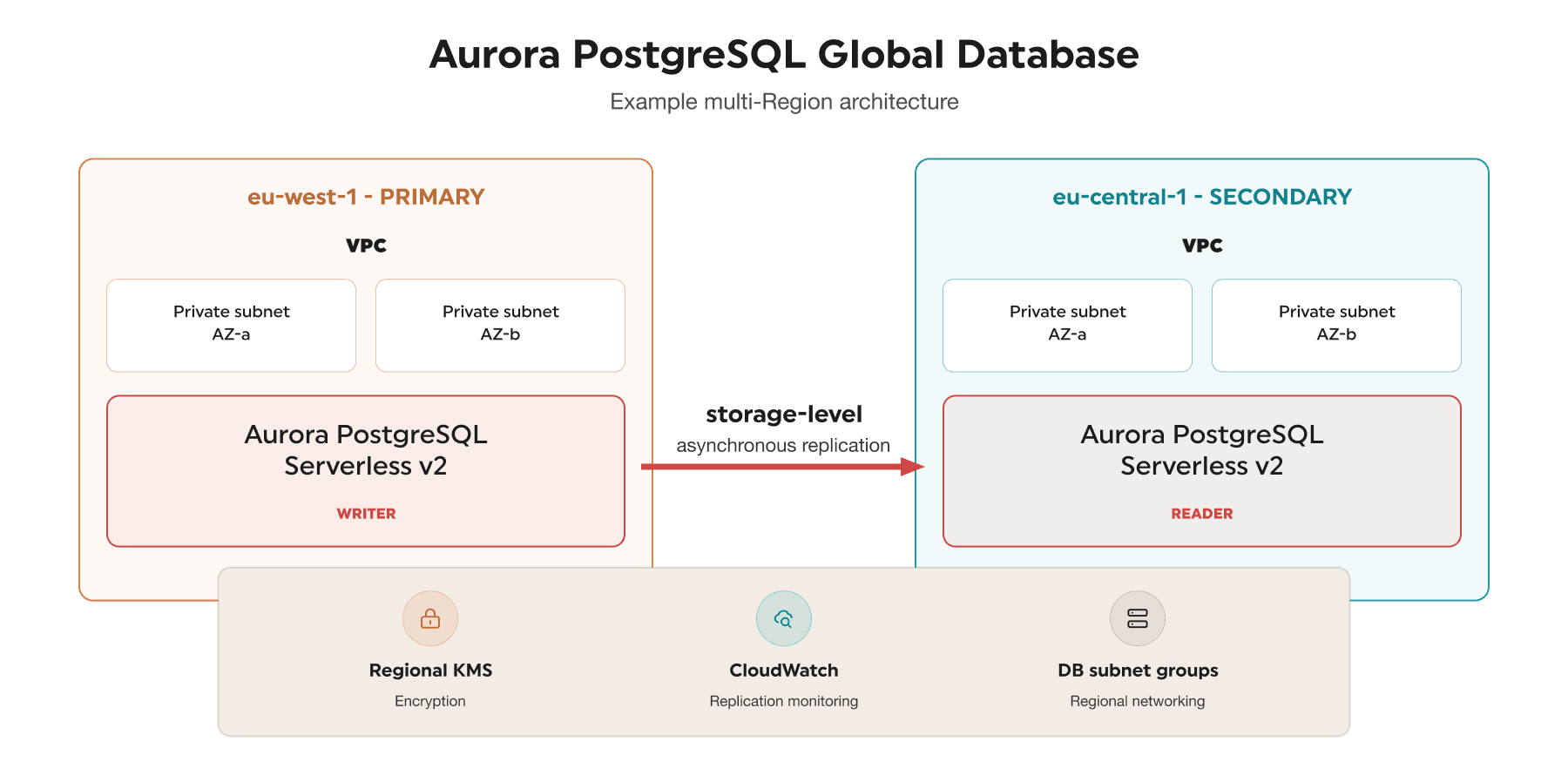
Aurora PostgreSQL Global Database across two AWS Regions.
The Ireland cluster accepted reads and writes. Frankfurt stayed read-only as long as it was the secondary member of the global database.
One useful detail is that replication itself does not need VPC peering. Aurora handles it outside the customer VPCs; cross-Region networking is only needed for applications or operators that must reach both endpoints.
The first Terraform detail that matters
Terraform needs to know which resources belong in which Region. The default provider represents Ireland, with an alias for Frankfurt:
provider "aws" {
  region = "eu-west-1"
}

provider "aws" {
  alias  = "secondary"
  region = "eu-central-1"
}
This small provider alias is what keeps the rest of the configuration readable: secondary resources simply use provider = aws.secondary.
What is still needed in each Region
Each cluster needs private subnets, a DB subnet group, and security-group rules in its own Region. Aurora handles Global Database replication outside the customer VPC, so VPC peering is not required for replication itself; application connectivity is a separate design decision.
Encryption is regional too. Use a KMS key in each Region, attach the local key to the local cluster, and keep credentials in a secrets service rather than in Terraform code.
Connecting the two Regions
Terraform provides the aws_rds_global_cluster resource for managing Aurora Global Database. For Aurora PostgreSQL:
resource "aws_rds_global_cluster" "global" {
  global_cluster_identifier = "example-global-database"

  engine            = "aurora-postgresql"
  engine_version    = "14.20"
  database_name     = "applicationdb"
  storage_encrypted = true

  deletion_protection = true
}
The global cluster acts as the container that connects the regional Aurora clusters. Before choosing an engine version, verify that both primary and secondary Regions support that Aurora version for Global Database. Using the same engine version across Regions is the safest approach and is required for many operations.
Creating the writer cluster
The primary regional cluster is attached to the global cluster using global_cluster_identifier. A simplified example is:
resource "aws_rds_cluster" "primary" {
  cluster_identifier        = "global-db-primary"
  engine                    = "aurora-postgresql"
  engine_version            = "14.20"
  global_cluster_identifier = aws_rds_global_cluster.global.id
  db_subnet_group_name      = aws_db_subnet_group.primary.name
  storage_encrypted         = true
  kms_key_id                = aws_kms_key.primary.arn
  master_username           = "appadmin"
  master_password           = var.master_password
  deletion_protection       = true

  serverlessv2_scaling_configuration {
    min_capacity = 0.5
    max_capacity = 4
  }
}
The password is intentionally represented as a sensitive variable here. In a real deployment, credentials and Terraform state should be protected according to the organization's secrets-management requirements.
The cluster itself is not enough. Aurora also needs at least one DB instance:
resource "aws_rds_cluster_instance" "primary" {
  cluster_identifier = aws_rds_cluster.primary.id
  instance_class     = "db.serverless"
  engine             = aws_rds_cluster.primary.engine
  engine_version     = aws_rds_cluster.primary.engine_version
}
Although engine_mode is set to provisioned, db.serverless combined with serverlessv2_scaling_configuration is how Aurora Serverless v2 is configured.
Creating the reader cluster
The secondary cluster is created through the provider for the second Region:
resource "aws_rds_cluster" "secondary" {
  provider                  = aws.secondary
  cluster_identifier        = "global-db-secondary"
  engine                    = "aurora-postgresql"
  engine_version            = "14.20"
  global_cluster_identifier = aws_rds_global_cluster.global.id
  source_region             = "eu-west-1"
  db_subnet_group_name      = aws_db_subnet_group.secondary.name
  storage_encrypted         = true
  kms_key_id                = aws_kms_key.secondary.arn

  serverlessv2_scaling_configuration {
    min_capacity = 0.5
    max_capacity = 4
  }

  depends_on = [aws_rds_cluster_instance.primary]
}
There is no separate master username or password in the secondary configuration because it is created as a secondary member of the Global Database. The source_region argument is relevant for an encrypted replica cluster, while the destination uses a KMS key from its own Region.
Finally, the secondary Region also needs a compute instance:
resource "aws_rds_cluster_instance" "secondary" {
  provider           = aws.secondary
  cluster_identifier = aws_rds_cluster.secondary.id
  instance_class     = "db.serverless"
  engine             = aws_rds_cluster.secondary.engine
  engine_version     = aws_rds_cluster.secondary.engine_version
}
At this point the Terraform dependency graph describes one global database containing two regional Aurora clusters.
A lower-cost headless standby
A secondary Aurora cluster does not have to run a DB instance continuously. Aurora separates compute from storage, so the secondary cluster can remain part of the global database without a reader instance while its storage volume continues to replicate from the primary. AWS calls this a headless secondary cluster.
In Terraform, the secondary aws_rds_cluster remains, but the corresponding secondary aws_rds_cluster_instance is omitted. That removes the secondary compute charge while retaining replicated storage, which can make sense when the Region exists only as a disaster-recovery standby and does not serve local reads.
The trade-off is recovery time. A headless cluster has no database endpoint that applications can use, and it cannot become the new primary until a DB instance is added and becomes available. That extra provisioning step increases RTO and makes this a manual recovery pattern rather than a ready-to-promote hot standby. For Aurora PostgreSQL, AWS also notes that a headless secondary must be created through the API or CLI rather than directly through the RDS console. The deployed test used an active reader in Frankfurt, so the headless variation was not exercised as part of this test.
During a primary-Region outage, the recovery runbook for a headless standby is:
- Create a sufficiently sized DB instance in the headless secondary cluster.
- Wait until the instance is Available and confirm the cluster is ready for promotion.
- Select that cluster as the target of an Aurora Global Database failover.
- Verify the new writer endpoint and resume application traffic in the recovery Region.
Subnet groups, security groups, KMS keys, parameter groups, and service quotas therefore still need to be prepared in advance. The compute instance can be created only when it is needed, but relying on emergency capacity introduces extra recovery risk. A warm secondary with a running reader costs more, while a headless secondary trades that cost for a longer and less predictable RTO.
What happened during terraform apply
Before apply, the configuration was formatted, initialized, validated, and reviewed:
terraform fmt
terraform init
terraform validate
terraform plan
The plan showed 18 resources to add, 0 to change, and 0 to destroy. That exact plan was applied in a non-production AWS account. The global database, both clusters, and both Aurora Serverless v2 instances reached Available.
Deletion protection was disabled for this temporary test so the stack could be removed afterwards. The production-oriented snippet keeps it enabled.
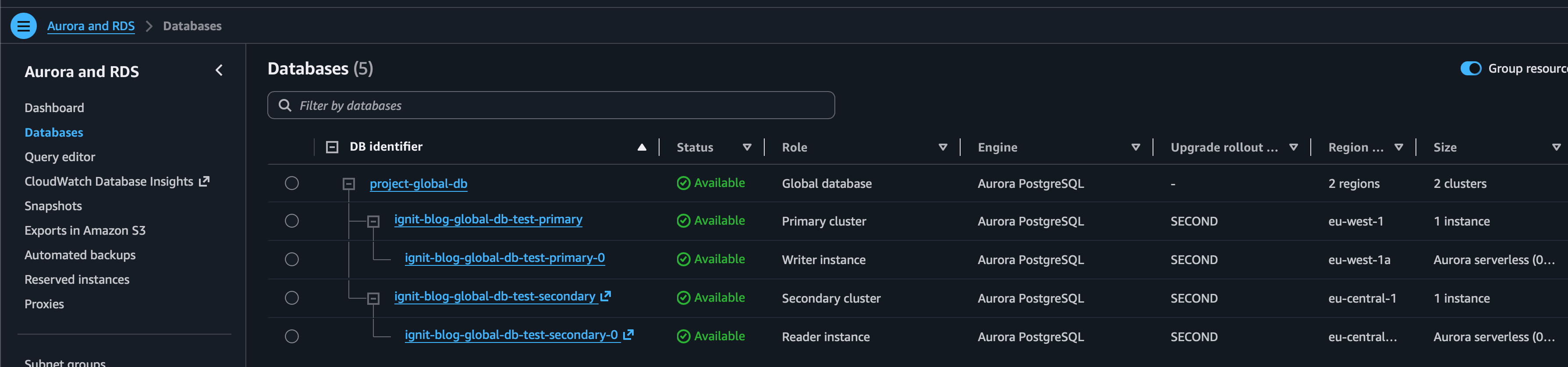
The deployed Global Database with an Available writer in eu-west-1 and an Available reader in eu-central-1.
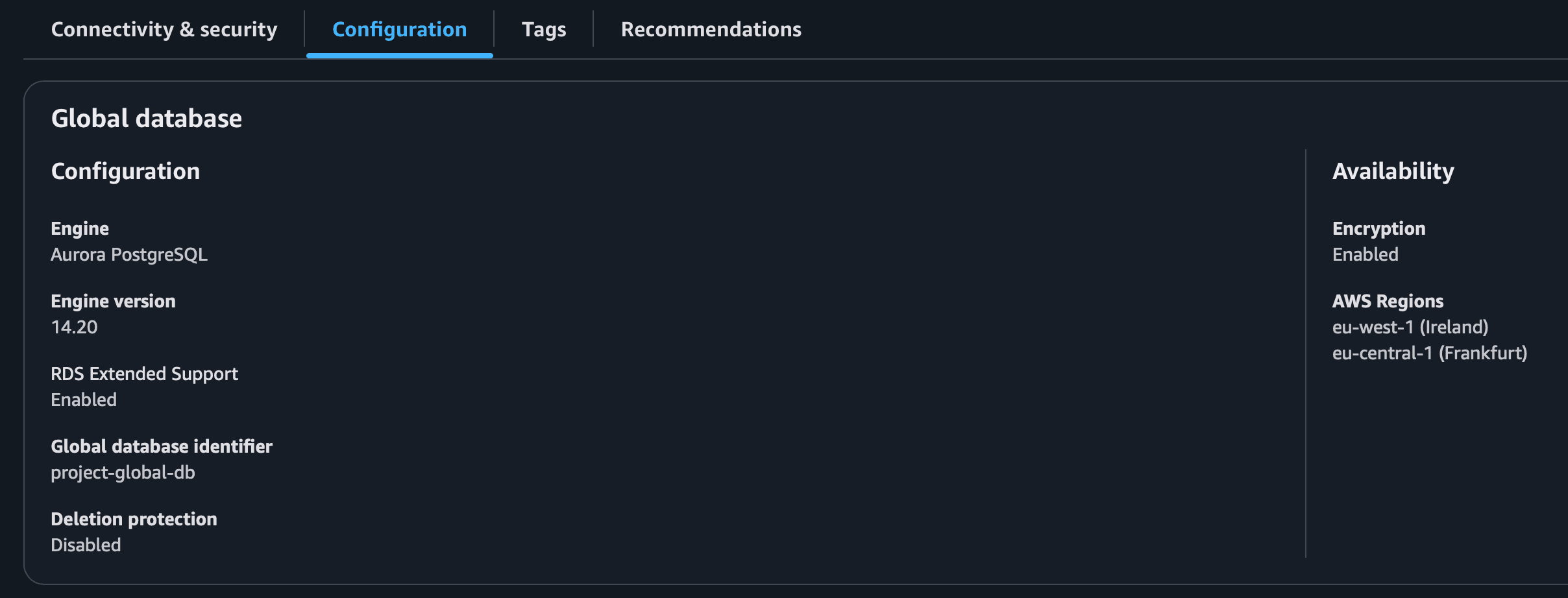
Aurora PostgreSQL 14.20 with encryption enabled across Ireland and Frankfurt.
The test confirmed that the Terraform can be applied and that AWS creates a healthy two-Region topology. SQL replication, application routing, switchover, and failover were not exercised.
What to test next
The next check is simple: write one row through the Ireland writer endpoint, then query it from Frankfurt:
CREATE TABLE replication_test (
  id         SERIAL PRIMARY KEY,
  message    VARCHAR(255),
  created_at TIMESTAMP DEFAULT CURRENT_TIMESTAMP
);

INSERT INTO replication_test (message)
VALUES ('Written in the primary AWS Region');
From the secondary cluster:
SELECT * FROM replication_test;
Once replication catches up, the row should appear in Frankfurt while that cluster remains read-only.
What to monitor in production
Cross-Region replication should always be monitored. Aurora exposes CloudWatch metrics for global database replication progress and replica lag. For recent Aurora PostgreSQL versions, relevant metrics include:
AuroraGlobalDBProgressLag
AuroraReplicaLag
AuroraGlobalDBProgressLag tracks progress between global database cluster volumes, while AuroraReplicaLag provides instance-level lag visibility. CloudWatch alarms can alert the operations team when replication falls behind an acceptable threshold.
Monitoring is especially important because Global Database replication is asynchronous. Under normal conditions AWS reports sub-second cross-Region replication, but network interruptions or unusually heavy write workloads can increase lag.
What the recovery options mean in practice
Opening the AWS recovery dialog makes the distinction clearer than the feature names do:
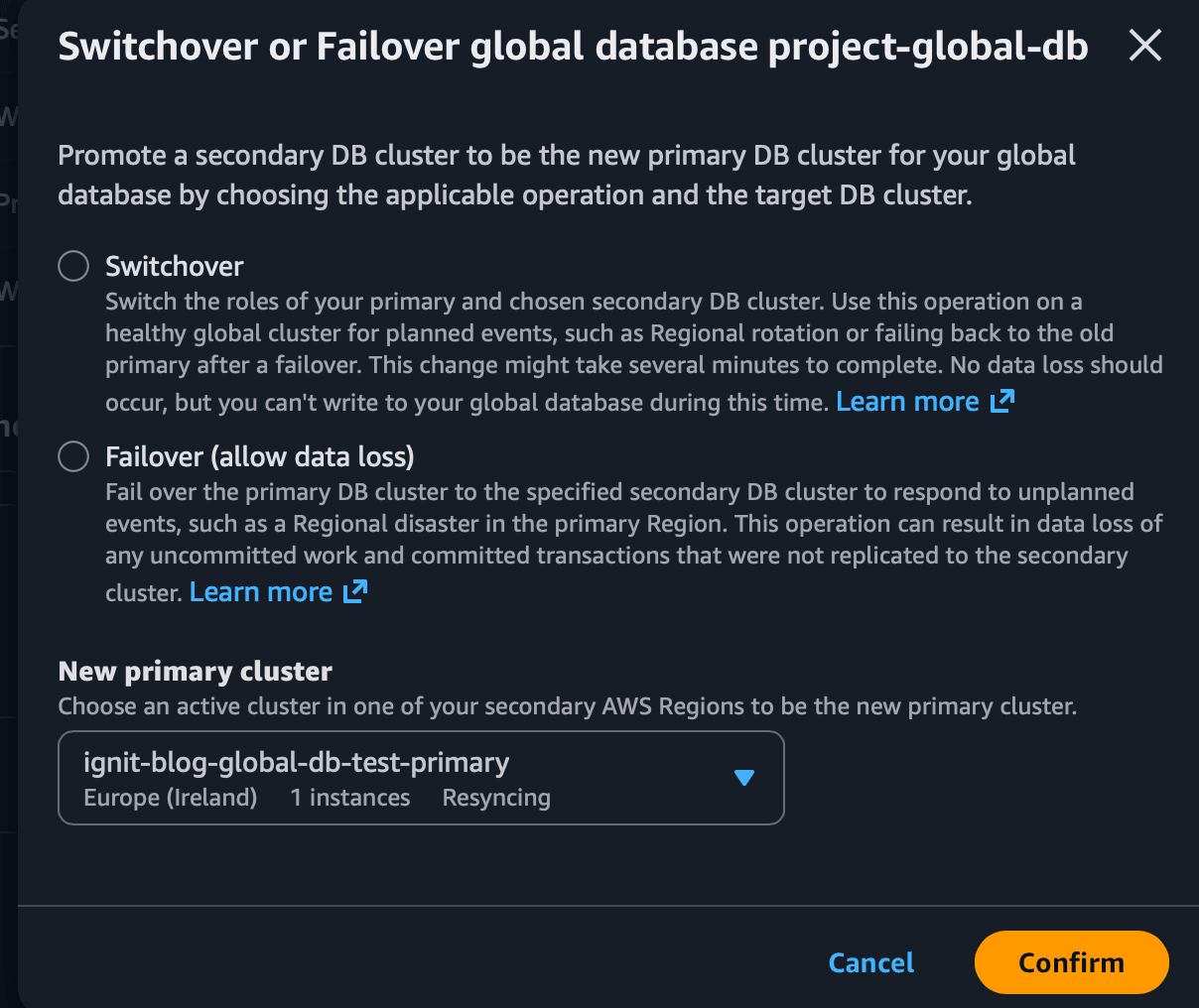
The AWS console presents switchover as the planned option and failover as the emergency option that can allow data loss.
A switchover is intended for planned operations. Aurora synchronizes the secondary before changing roles, allowing the new Region to become primary without intentionally losing committed data.
A failover is intended for an unexpected outage. If the primary Region becomes unavailable, a secondary Region can be promoted. Because replication is asynchronous, there can be a small amount of data loss corresponding to any replication lag that existed at the time of failure.
A disaster recovery strategy should define not only how the database is deployed, but also who initiates failover, which Region becomes primary, how applications discover the new writer, and how the original Region is reintroduced after recovery.
What would each console action be used for
The Actions menu groups several operations together, but they solve different problems. Adding a Region expands the topology, switchover and failover change the writer Region, and blue/green creates a synchronized staging copy for database maintenance.
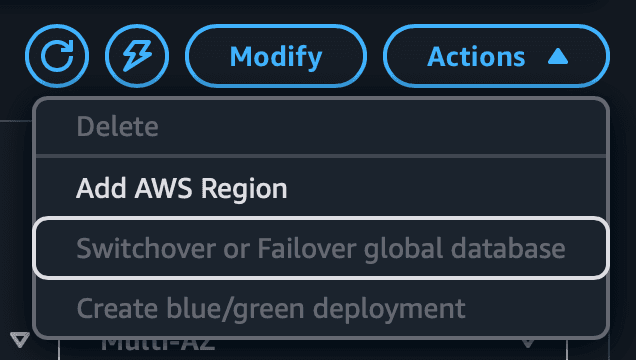
The available actions depend on the selected Global Database and its current state.
| Action | What it does | Best used for |
|---|
| Add AWS Region | Attaches another read-only secondary cluster to the existing Global Database. | Local reads in another geography or an additional disaster-recovery target. It does not move the current writer. |
| Switchover | Waits for synchronization, then exchanges the primary and a chosen secondary Region. | Planned maintenance, a regional rotation, migration, or a disaster-recovery drill. Target RPO is zero. |
| Failover | Promotes a secondary during an unplanned outage. Transactions not yet replicated can be lost. | A real regional incident when restoring writes matters more than preserving the last few seconds of data. |
| Blue/Green deployment | Copies the complete global topology into a synchronized green environment, then switches it into production. | Engine upgrades, parameter changes, and database maintenance that need realistic testing and short downtime. It is not a disaster-recovery replacement. |
Blue/green is the maintenance tool in this list. AWS mirrors the primary cluster and every secondary Region into the green environment, but topology changes or a global switchover while the deployment is active can invalidate it. Start it from the current writer Region and review its replication and parameter-group limitations before relying on the final switchover.
When standard RDS is a better fit
Aurora Global Database is not the only way to build a multi-Region relational database architecture. Amazon RDS for MySQL supports cross-Region read replicas. RDS asynchronously replicates changes from a primary MySQL DB instance to a read-only replica in another Region. Automated backups must be enabled on the source instance.
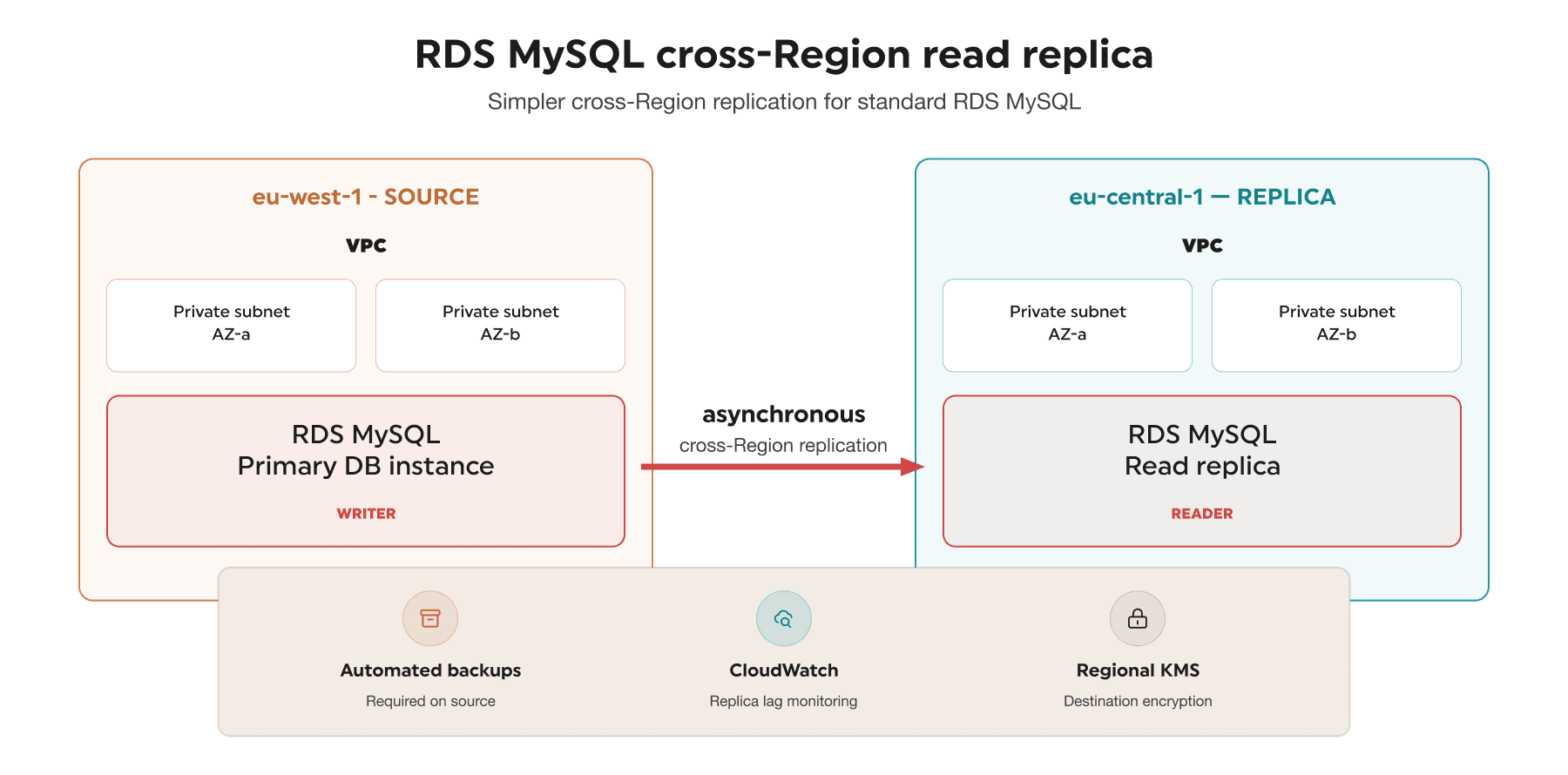
RDS MySQL cross-Region read replica architecture.
A simplified Terraform example looks like this:
resource "aws_db_instance" "replica" {
  provider            = aws.secondary
  identifier          = "mysql-replica"
  replicate_source_db = aws_db_instance.primary.arn
  instance_class      = "db.t3.small"

  storage_encrypted = true
  kms_key_id         = aws_kms_key.secondary.arn

  lifecycle {
    ignore_changes = [replicate_source_db]
  }
}
For cross-Region replication, the source DB instance ARN is supplied through replicate_source_db. If the source is encrypted, the destination replica requires a KMS key in the destination Region. RDS manages the AWS-side replication channel between Regions.
The lifecycle rule is intentional when promotion is owned by an external recovery workflow. Terraform still uses replicate_source_db when it creates the replica, but it does not try to restore that relationship after the RDS API removes it during promotion. Only this attribute is ignored; instance sizing, encryption, networking, tags, and the remaining database configuration stay under Terraform control.
Promoting an RDS read replica
An RDS cross-Region read replica does not provide Aurora's managed regional switchover workflow. Promotion is a deliberate operation performed from the RDS console, the AWS CLI, or the RDS API. It can be automated with Lambda or Step Functions, but the health decision, application rerouting, and recovery sequence still belong to the application team.
For a planned promotion, the safe sequence is:
- Stop writes to the source database.
- Watch the
ReplicaLag metric and wait until the replica has applied the remaining changes.
- Confirm that the replica is not in the
backing-up state and that its backup configuration is appropriate.
- Promote the replica.
- Wait for the reboot to complete and for the new standalone instance to become Available.
- Redirect application traffic to the promoted instance.
- Create a new cross-Region replica from the new primary to restore the DR topology.
The CLI operation itself is short:
aws rds promote-read-replica \
  --region eu-central-1 \
  --db-instance-identifier mysql-replica
The same API call can be wrapped in a small Lambda function. This example checks whether the instance is still a replica and whether it is available before requesting promotion:
import os

import boto3


REGION = os.environ["TARGET_REGION"]
REPLICA_ID = os.environ["READ_REPLICA_ID"]
rds = boto3.client("rds", region_name=REGION)


def handler(event, context):
    instance = rds.describe_db_instances(
        DBInstanceIdentifier=REPLICA_ID
    )["DBInstances"][0]

    if not instance.get("ReadReplicaSourceDBInstanceIdentifier"):
        return {"status": "already-promoted", "db_instance": REPLICA_ID}

    if instance["DBInstanceStatus"] != "available":
        raise RuntimeError(
            f"Replica is {instance['DBInstanceStatus']}, not available"
        )

    rds.promote_read_replica(
        DBInstanceIdentifier=REPLICA_ID,
        BackupRetentionPeriod=7,
    )

    return {"status": "promotion-requested", "db_instance": REPLICA_ID}
The Lambda execution role needs rds:DescribeDBInstances and a resource-scoped rds:PromoteReadReplica permission for the standby instance. The function should receive the destination Region and replica identifier through environment variables rather than hard-coded values.
This function only submits the promotion request. A complete automation normally uses Step Functions or another orchestrator to wait until the database becomes Available, update DNS or application configuration, run health checks, and later create a replacement cross-Region replica. Triggering promotion automatically from a single alarm is risky; production automation should require multiple health signals or a controlled human approval step.
The database operation is not instantaneous. RDS stops replication, reboots the replica, and then exposes it as an independent read/write DB instance. AWS notes that this can take several minutes or longer. The original source does not automatically become a replica of the promoted database, and any other replicas keep their existing relationship.
During an actual source-Region outage, stopping writes and waiting for zero lag might not be possible. Promotion can therefore lose transactions that had not reached the replica.
If the replica was created by Terraform, a console, CLI, or Lambda promotion changes an attribute that Terraform originally configured. The targeted ignore_changes = [replicate_source_db] rule prevents Terraform from trying to re-establish the old source relationship, but it does not model the recovered topology or create a new standby. After the incident, the Terraform configuration still needs to be updated deliberately to represent the new primary and its replacement replica.
A practical comparison
For a real workload, the choice can be summarized like this:
| Capability | Aurora Global Database | RDS MySQL cross-Region replica |
|---|
| Replication | Aurora storage layer | MySQL/RDS replication |
| Replication model | Asynchronous | Asynchronous |
| Typical cross-Region lag | Sub-second under normal conditions according to AWS | Workload and network dependent |
| Local reads in secondary Region | Yes | Yes |
| Cross-Region DR | Native Global Database workflow | Manual or API-driven promotion, application rerouting, and replica rebuild |
| Planned managed switchover | Yes | More operational orchestration |
| Terraform resource | aws_rds_global_cluster | aws_db_instance |
| Destination encryption | Regional KMS key | Regional KMS key |
| Best fit | Global applications and stricter DR requirements | Simpler MySQL replication and DR requirements |
Aurora Global Database is the stronger option when cross-Region disaster recovery, low-latency local reads, and managed regional recovery are primary requirements. RDS MySQL cross-Region replicas remain useful when an application already runs on standard RDS for MySQL and migrating to Aurora solely for Global Database is not justified.
What Terraform does not solve
Multi-Region architecture improves resilience, but it adds cost and operational responsibility. The secondary Region contains actual database compute and storage resources, so it incurs ongoing cost even when it exists primarily for disaster recovery.
- replication lag monitoring
- KMS key management in every Region
- network connectivity for applications in each Region
- DNS or connection management after failover
- promotion automation and rebuilding replication after recovery
- testing disaster recovery procedures
A secondary Region that cannot handle the primary workload is not a complete disaster recovery solution.
What I would choose
Aurora Global Database is the stronger choice when regional recovery time, local reads in another Region, and a managed recovery workflow justify the extra cost.
An RDS MySQL cross-Region replica is the better fit when the application already runs on standard RDS and mostly needs a remote read copy or a simpler recovery option. Promotion works, but more of the procedure remains with the application team.
The main takeaway is that Terraform makes the topology repeatable, not the recovery automatic. Monitoring, routing, secondary capacity, and regular drills still decide whether this design will work on the day it is needed.
Sources and further reading